

PenDraw - Maze
EMIRHAN SIMSEK Entertainment iPhoneiPadiPod touch
PenDraw - Maze is a free Entertainment app for iPhone and iPad by EMIRHAN SIMSEK. Requires iOS 18.5. Updated January 30, 2026.
- Price
- Free
- on the App Store
- Size
- 1 MB
- Age 4+
- Updated
- Jan 30
- 2026 · v1.1
Screenshots
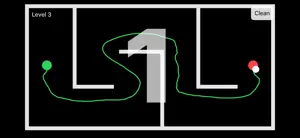

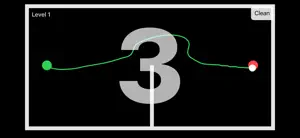

About PenDraw - Maze
PenDraw – Maze turns your phone into a pen controlled by motion. Move your device to guide the ball and draw a continuous line through the maze. Start at the beginning, follow the corridors carefully, and reach the end without losing control. There are no buttons or touch controls — your movement is the drawing tool. Precision and steady motion are the key to completing each maze. Features • Motion-controlled drawing • Maze-based challenges • Clean and minimal design • Smooth and responsive controls • No ads, no accounts, no distractions PenDraw – Maze offers a simple but unique experience that combines drawing and maze navigation in a calm, focused way.
What’s new
Version 1.1 · Updated January 30, 2026
• New progressive maze levels • Countdown timer when reaching the goal • Win screen and replay option • Smoother, more stable line drawing
App privacy
The developer, EMIRHAN SIMSEK, reported these privacy practices to Apple.
Data Not Collected
The developer does not collect any data from this app.
Alternatives to PenDraw - Maze
Looking for apps like PenDraw - Maze? Here are 6 similar apps on the App Store. The highest rated is Draw Art- Drawing Board (5.0/5), and all 6 are free to download.
-
 AeroDraw: AR Finger Paint
-
 Maze Printer
-
 Scribble Draw
-
 Draw Art- Drawing Board
5.0
Draw Art- Drawing Board
5.0
-
 PaintPad - Draw and have fun
-
 Classic mazes for drawing
| App | Rating | Price | Last updated | Compare |
|---|---|---|---|---|
| PenDraw - Maze | – | Free | January 30, 2026 | |
| AeroDraw: AR Finger Paint | – | Free | Jul 16, 2026 | Compare |
| Maze Printer | – | Free | Jun 11, 2026 | Compare |
| Scribble Draw | – | Free | Oct 27, 2025 | Compare |
| Draw Art- Drawing Board | 5.0 / 5 (1) | Free | Jan 8, 2026 | Compare |
| PaintPad - Draw and have fun | – | Free | Apr 25, 2026 | Compare |
| Classic mazes for drawing | – | Free | Apr 2, 2025 | Compare |
Compare PenDraw - Maze with the top alternatives: ratings, updates, ASO score and keyword gaps →