

Call Scheduler
Seiya.k Productivity iPhoneiPadiPod touch
Call Scheduler is a free Productivity app for iPhone and iPad by Seiya.k. Rated 5.0/5 from 1 ratings. Requires iOS 15.6. Updated October 15, 2026.
- Rating
- 5.0
- 1 ratings
- Price
- Free
- on the App Store
- Size
- 50 MB
- Age 4+
- Updated
- Oct 15
- 2026 · v1.0.18
Screenshots


About Call Scheduler
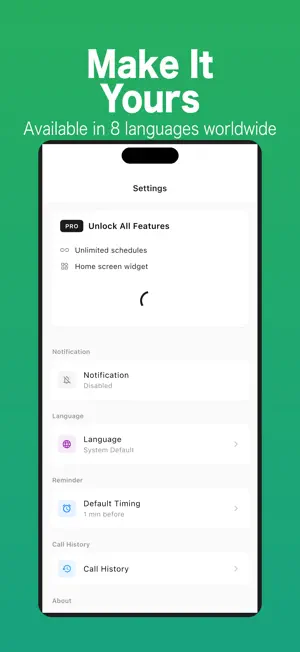
The restaurant only takes bookings by phone and the line opens at 10. By 10:15 you have forgotten. Call Scheduler reminds you at the right moment, and one tap on the reminder opens the number ready to dial. Set the date, time and number once. The app does the remembering. This app does not make calls automatically. All calls are started manually by the user. Key Features Call Reminders Schedule phone calls and receive a notification before the scheduled time so you never forget. Tap to Call Open the call preparation screen from the reminder and start dialing with a single tap. Contact Selection Choose phone numbers directly from your iOS contacts for quick scheduling. Edit and Manage Calls Update the date, time, number, or notes for any scheduled call. Simple Call Preparation Screen View the phone number, notes, and scheduled time before placing the call. Use Cases Perfect for situations where you must remember to call someone at a specific time: Business callbacks Appointment confirmations Freelancers managing client calls Daily reminders for important phone calls Elderly users who want help remembering to call Privacy Focused Your scheduled calls are stored locally on your device. Contact access is requested only when you choose to select a number from your contacts. Free Version Up to three active scheduled calls Call reminders Manual call helper Contact import Pro Version Unlimited scheduled calls Ad-free experience Call history Search by phone number or notes Home screen widget for the next scheduled call Reusable call templates Important Notes Call Scheduler does not perform automatic dialing. The app only reminds you and helps you start a call manually using the iPhone dialer. Pricing Free: schedule calls (with a limit), call history, and reusable templates. Call Scheduler Pro (monthly / yearly auto-renewable subscription): removes the scheduling limit and hides ads. Prices are shown in the app. Payment is charged to your Apple ID account and renews automatically unless auto-renew is turned off at least 24 hours before the end of the current period. You can manage or cancel your subscription anytime in your App Store account settings. Terms of Use (EULA): https://www.apple.com/legal/internet-services/itunes/dev/stdeula/ Privacy Policy: https://fillapps.com/privacy/
What’s new
Version 1.0.18 · Updated October 15, 2026
Minor improvements and stability fixes.
App privacy
The developer, Seiya.k, reported these privacy practices to Apple.
Data Used to Track You
The following data may be used to track you across apps and websites owned by other companies:
- Identifiers: Device ID
- Usage Data: Advertising Data
Data Linked to You
The following data, which may be collected and linked to your identity, may be used for the following purposes:
- Identifiers: Device ID
- Usage Data: Advertising Data
Used for: Third-Party Advertising
Data Not Linked to You
The following data, which may be collected but is not linked to your identity, may be used for the following purposes:
- Identifiers: Device ID
- Usage Data: Product Interaction
- Diagnostics: Crash Data
Used for: Analytics
Alternatives to Call Scheduler
Looking for apps like Call Scheduler? Here are 6 similar apps on the App Store. The highest rated is ImageCopy (5.0/5), and 3 of the 6 are free to download.
-
 Idevo - Personal AI Archive
-
 Callmi AI: Chat, Talk, Text
-
 ImageCopy
5.0
-
 Remindavo- Phone Call Reminder
5.0
-
 Mini Project - Task Progress
5.0
-
 Call Scheduler & Organizer
| App | Rating | Price | Last updated | Compare |
|---|---|---|---|---|
| Call Scheduler | 5.0 / 5 (1 rating) | Free | October 15, 2026 | |
| Idevo - Personal AI Archive | – | Free | May 21, 2026 | Compare |
| Callmi AI: Chat, Talk, Text | – | 3.99 USD | Nov 21, 2025 | Compare |
| ImageCopy | 5.0 / 5 (1) | 2.99 USD | Aug 2, 2024 | Compare |
| Remindavo- Phone Call Reminder | 5.0 / 5 (1) | Free | Oct 19, 2026 | Compare |
| Mini Project - Task Progress | 5.0 / 5 (1) | 0.69 USD | Feb 26, 2026 | Compare |
| Call Scheduler & Organizer | – | Free | May 25, 2026 | Compare |
Compare Call Scheduler with the top alternatives: ratings, updates, ASO score and keyword gaps →