

Ripple: Swipe Your Music
Theodore Faraut Schwieg Music iPhoneiPadiPod touch
Ripple: Swipe Your Music is a free Music app for iPhone and iPad by Theodore Faraut Schwieg. Requires iOS 15.0. Updated October 19, 2026.
- Price
- Free
- on the App Store
- Size
- 29 MB
- Age 4+
- Updated
- Oct 19
- 2026 · v1.89.2
Screenshots
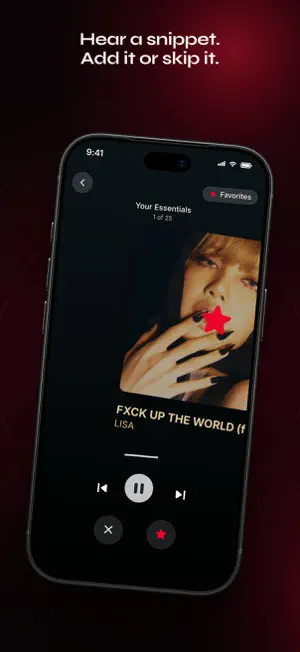


About Ripple: Swipe Your Music
A track plays. You listen. You swipe. Right, you keep it. Left, you pass. And everything lands straight in your Apple Music library (subscription required). THREE WAYS TO PLAY SORT: finally get through that giant playlist, or your whole library. Start at any track, not just the first. BUILD: type a playlist name. It's created on your first swipe, then fills up swipe after swipe. EXPLORE: swipe your Apple Music mixes and recommendations. Add the gems, skip the rest. HOW IT WORKS Every track auto-plays its Apple Music preview. You just decide. Swipe right to add it to your favorites, or to the playlist you picked. Swipe left to pass. In Favorites mode, a track already in your favorites is removed from them. A firm haptic tap on the right, a light one on the left. QUICK ANSWERS Does it delete anything? Ripple never deletes a track from your library or your playlists. Is it paid? Free to download, no ads, no account. Sort 25 tracks a day for free. Ripple Pro makes it unlimited with a single lifetime purchase. My huge playlist? Thousands of tracks, no problem. One sitting? No. Stop whenever you want, pick up exactly where you left off. Does it work with Spotify? No. Ripple is built for Apple Music, nothing else. THE DETAILS • Swipe your entire library, not just playlists • Sort by title, artist, album, date added, release date or playlist order • Shuffle in one tap, on any playlist or your whole library • Two modes, Favorites or Playlist, picked before you start: each playlist keeps its progress in its own mode • End-of-session stats: added, skipped, ratio, duration, speed • Dark mode included Requires an Apple Music subscription. iOS 15+. Listen. Decide. Swipe.
What’s new
Version 1.89.2 · Updated October 19, 2026
The free version now lets you sort 25 songs a day. Improvements and fixes.
App privacy
The developer, Theodore Faraut Schwieg, reported these privacy practices to Apple.
Data Not Linked to You
The following data, which may be collected but is not linked to your identity, may be used for the following purposes:
- Purchases: Purchase History
- Identifiers: Device ID
- Usage Data: Product Interaction
Used for: Analytics
Alternatives to Ripple: Swipe Your Music
Looking for apps like Ripple: Swipe Your Music? Here are 6 similar apps on the App Store. The highest rated is GALAD Music (5.0/5), and all 6 are free to download.


| App | Rating | Price | Last updated | Compare |
|---|---|---|---|---|
| Ripple: Swipe Your Music | – | Free | October 19, 2026 | |
| GALAD Music | 5.0 / 5 (1) | Free | Jun 9, 2026 | Compare |
| On Air: Your Playlist Host | – | Free | Oct 10, 2026 | Compare |
| Medallo Music | 5.0 / 5 (1) | Free | Jul 12, 2026 | Compare |
| Famus Music | – | Free | Jul 31, 2026 | Compare |
| WeekWave | – | Free | May 17, 2026 | Compare |
| RND Shuffle | – | Free | Jun 13, 2026 | Compare |