

Pro Mapper Projection Mapping
omur olgunay Graphics & Design iPhoneiPadiPod touchMac
Pro Mapper Projection Mapping is a free Graphics & Design app for iPhone and iPad by omur olgunay. Rated 4.7/5 from 81 ratings. Requires iOS 17.0.
- Rating
- 4.7
- 81 ratings
- Price
- Free
- on the App Store
- Size
- 65 MB
- Age 4+
- Updated
- Oct 28
- 2026 · v1.37
Screenshots

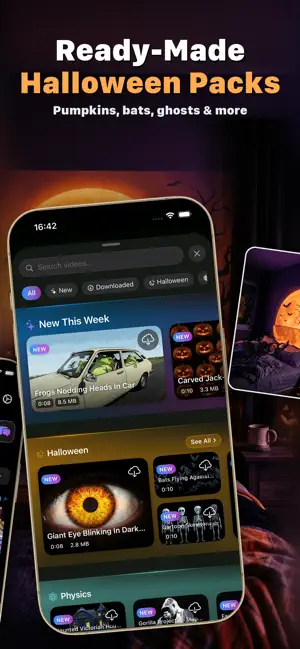
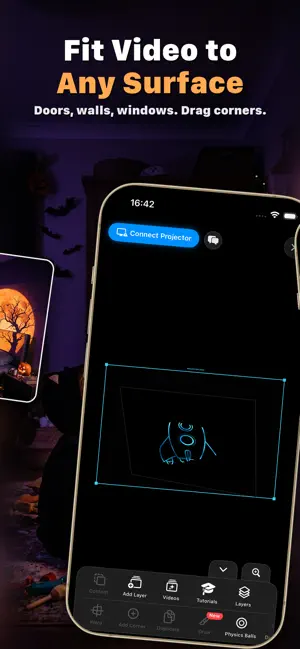
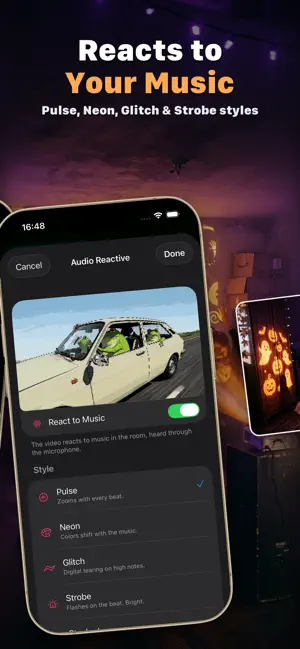
About Pro Mapper Projection Mapping
ProMapper brings professional projection mapping to your iPhone and iPad. Design, map, and project visuals onto any surface — no computer required. Create powerful video projection mapping setups using only your mobile device and a projector. ProMapper is built for artists, designers, performers, and creative professionals who need precision, speed, and flexibility. Projection Mapping Made Simple ProMapper lets you map videos, photos, and visuals directly onto walls, stages, objects, and custom surfaces. With a touch-based interface, you can align content perfectly in minutes and preview everything in real time. From small portable projectors to professional systems, ProMapper adapts to your setup and workflow. Key Features • Professional projection mapping tools • Map visuals onto any surface or object • Import and map videos and photos • Built-in grid patterns, solid colors, gradients, and visualizer content • Surface-based workflow for multi-surface projects • Real-time preview and adjustments • External display and projector output • Optimized real-time performance on iOS ProMapper is ideal for: • Projection mapping artists • Stage and event designers • Exhibitions and installations • Performers and visual designers • Creative experiments and visual testing Design immersive visuals anywhere, without complex desktop software or hardware. Professional Results. Mobile Freedom. ProMapper focuses on clean design, precise control, and real-time performance. Every change updates instantly, allowing you to stay focused on your visuals instead of technical setup. Create, map, and project anywhere using only your iPhone or iPad. Terms of Use (EULA): https://www.apple.com/legal/internet-services/itunes/dev/stdeula/ Privacy Policy: https://omurolgunay.com/pp.html
Ratings & reviews
4.7
81 ratings
What’s new
Version 1.37 · Updated October 28, 2026
New content type: Edge Light. Draw a glowing light that runs along the edges of your mapped surface. Choose Chase, Dash, Draw or Pulse mode, then tune the speed, segment length, color, line width and glow. Stability and performance improvements.
App privacy
The developer, omur olgunay, reported these privacy practices to Apple.
Data Not Linked to You
The following data, which may be collected but is not linked to your identity, may be used for the following purposes:
- Usage Data: Product Interaction
- Diagnostics: Crash Data, Performance Data
Used for: Analytics
Alternatives to Pro Mapper Projection Mapping
Looking for apps like Pro Mapper Projection Mapping? Here are 6 similar apps on the App Store. The highest rated is LayerMapper MApp (5.0/5), and all 6 are free to download.
-
 SurfaBeam - Projection Mapping
3.3
SurfaBeam - Projection Mapping
3.3
-
 ProjectX - Projection Mapping
4.6
ProjectX - Projection Mapping
4.6
-
 LayerMapper MApp
5.0
LayerMapper MApp
5.0
-
 Redrawing Reality: Projector
5.0
Redrawing Reality: Projector
5.0
-
 PicoMap: Projection Mapping
-
 EasyMapper Projection Mapping
1.0
EasyMapper Projection Mapping
1.0
| App | Rating | Price | Last updated | Compare |
|---|---|---|---|---|
| Pro Mapper Projection Mapping | 4.7 / 5 (81 ratings) | Free | October 28, 2026 | |
| SurfaBeam - Projection Mapping | 3.3 / 5 (19) | Free | Oct 24, 2026 | Compare |
| ProjectX - Projection Mapping | 4.6 / 5 (82) | Free | Oct 9, 2026 | Compare |
| LayerMapper MApp | 5.0 / 5 (1) | Free | Oct 4, 2026 | Compare |
| Redrawing Reality: Projector | 5.0 / 5 (1) | Free | Oct 23, 2026 | Compare |
| PicoMap: Projection Mapping | – | Free | Sep 19, 2026 | Compare |
| EasyMapper Projection Mapping | 1.0 / 5 (1) | Free | Oct 28, 2026 | Compare |