

Screenshot Hero AI
Chris Barnhart Productivity iPhoneiPadiPod touch
Screenshot Hero AI is a paid Productivity app for iPhone and iPad by Chris Barnhart. Rated 5.0/5 from 1 ratings. Requires iOS 26.0. Updated January 26, 2026.
- Rating
- 5.0
- 1 ratings
- Price
- 1.99 USD
- on the App Store
- Size
- 6 MB
- Age 4+
- Updated
- Jan 26
- 2026 · v2.5
Screenshots

About Screenshot Hero AI
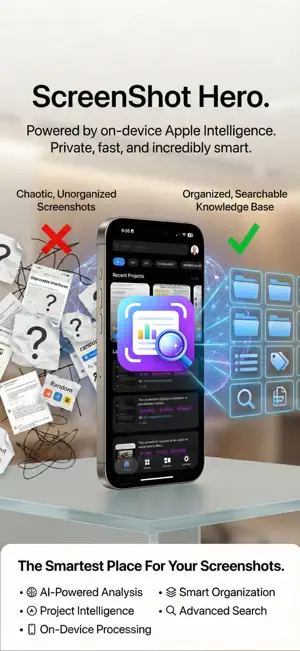
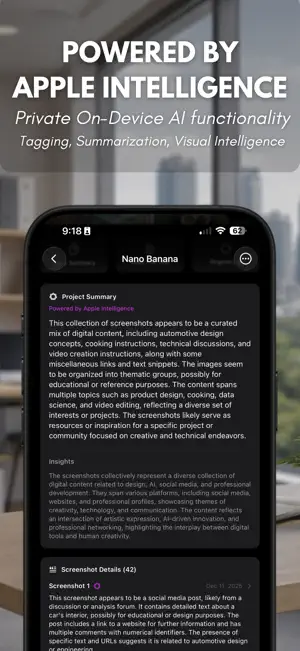
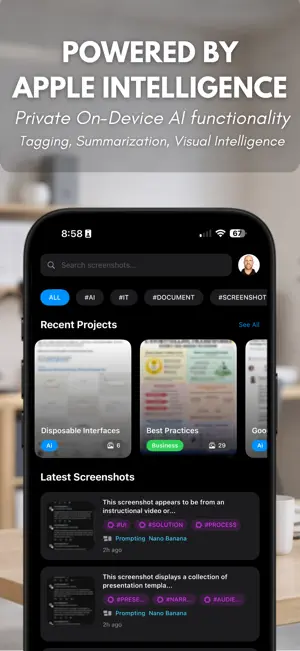
Your screenshots are full of important information. Receipts, messages, ideas, tasks, and documents. But once you save them, they disappear into chaos. ScreenShot Hero turns screenshots into something useful. Automatically. Privately. On device. It analyzes screenshots using on device Apple Intelligence and creates summaries, smart tags, and searchable text so you can find anything in seconds. No uploads. No tracking. No data collection. ## Instantly Understand Every Screenshot * Each screenshot gets a clear AI generated summary so you know exactly what it contains at a glance ## Smart Tags Created for You * Screenshots are automatically labeled with tags like * #Receipt #Document #Chat #Idea #AI * No manual sorting required ## Projects That Think * Group screenshots into projects with automatic summaries, key points, and action items * Perfect for work, research, and everyday life ## Powerful Instant Search * Search across screenshot text, AI summaries, tags, apps, and projects to find anything instantly ## App Aware Organization * Screenshots are automatically grouped by the app they came from, like Messages, Safari, or Notes ## Built for Speed * Smooth scrolling and instant results, even with thousands of screenshots ## Flexible Exports * Export projects as PDF, Markdown, Word, or plain text * Ready to share or archive ## Privacy by Design * All processing happens on your device * No tracking * No uploads * Your screenshots stay yours
What’s new
Version 2.5 · Updated January 26, 2026
Quick Project Creation Create projects instantly while searching! When you're adding screenshots to a project, just type a name and tap "Create" — even if no matching project exists. Your search becomes the project name, making organization faster than ever. Full Library Backup & Restore Your screenshot library is precious. Now you can: Export your entire library — all metadata, projects, categories, and tag configurations — to a single backup file Import backups with smart merge options that protect your existing data Three import strategies: Merge (smart update), Replace, or New Only
App privacy
The developer, Chris Barnhart, reported these privacy practices to Apple.
Data Not Collected
The developer does not collect any data from this app.
Alternatives to Screenshot Hero AI
Looking for apps like Screenshot Hero AI? Here are 6 similar apps on the App Store. The highest rated is Vagent.io (5.0/5), and all 6 are free to download.
-
 ScanSeek AI: Photo Search
-
 Screenshot Manager & Organizer
-
 Vagent.io
5.0
-
 TrustTunnel
4.2
-
 PDF Calendar - Print & Share
4.4
-
 Balsio: Work Chat
5.0
| App | Rating | Price | Last updated | Compare |
|---|---|---|---|---|
| Screenshot Hero AI | 5.0 / 5 (1 rating) | 1.99 USD | January 26, 2026 | |
| ScanSeek AI: Photo Search | – | Free | May 21, 2026 | Compare |
| Screenshot Manager & Organizer | – | Free | Sep 8, 2025 | Compare |
| Vagent.io | 5.0 / 5 (1) | Free | Sep 28, 2024 | Compare |
| TrustTunnel | 4.3 / 5 (12) | Free | Aug 31, 2026 | Compare |
| PDF Calendar - Print & Share | 4.4 / 5 (1,114) | Free | Sep 14, 2026 | Compare |
| Balsio: Work Chat | 5.0 / 5 (1) | Free | Oct 28, 2026 | Compare |
Compare Screenshot Hero AI with the top alternatives: ratings, updates, ASO score and keyword gaps →