

SmsGuard: Spam Text Blocker
Batin Erke Ozturk Productivity iPhoneiPadiPod touch
SmsGuard: Spam Text Blocker is a free Productivity app for iPhone and iPad by Batin Erke Ozturk. Requires iOS 16.6. Updated October 24, 2026.
- Price
- Free
- on the App Store
- Size
- 55 MB
- Age 4+
- Updated
- Oct 24
- 2026 · v1.6
Screenshots



About SmsGuard: Spam Text Blocker
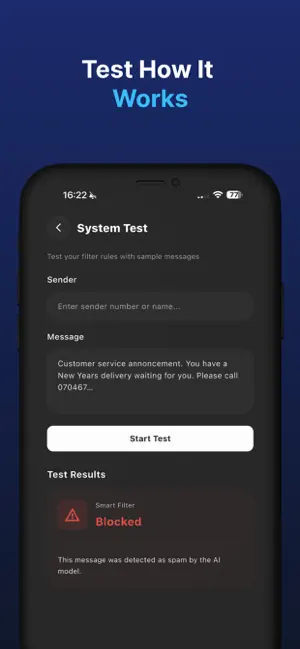
Stop scam and junk texts before they reach you. SmsGuard filters messages from unknown senders with an AI model that runs entirely on your iPhone. SMART FILTER (PREMIUM) An on-device machine learning model checks each incoming text and sends likely spam, scams and phishing attempts to your Junk folder. Your message content is analyzed on your device and is never uploaded for filtering. ALLOW AND BLOCK RULES (FREE) • Allow list: always deliver texts from your bank, courier or any sender you trust • Block list: send unwanted senders and keywords straight to Junk • Match by sender name, message text, or both • Quick rule suggestions to get started in seconds 11 LANGUAGES Spam looks different in every language. SmsGuard detects the language of each message and applies a model built for it: English, Turkish, German, Spanish, French, Portuguese, Russian, Arabic, Chinese, Japanese and Hindi. PRIVATE BY DESIGN • Filtering runs on your device and works without an internet connection • Your messages are never sent to our servers for analysis SET UP IN ONE MINUTE 1. Open SmsGuard and tap Set Up 2. Go to Settings > Messages > Unknown & Spam 3. Select SmsGuard under SMS Filtering 4. Open System Test in the app to confirm your filter is working GOOD TO KNOW Apple allows message filters to check texts from senders who are not in your contacts. Filtered messages appear in the Junk list in Messages. iMessage conversations are not filtered. Dark and light mode included. SUBSCRIPTION Premium unlocks Smart Filter. Subscriptions are billed to your Apple ID and renew automatically unless canceled at least 24 hours before the end of the current period. Manage or cancel anytime in Settings > Apple ID > Subscriptions. Privacy Policy: https://smsguard.workorm.com/privacy Terms of Use: https://smsguard.workorm.com/terms
What’s new
Version 1.6 · Updated October 24, 2026
• Added full support for the iPhone Fold Duo to ensure a seamless foldable experience. • Refreshed App Store screenshots and visuals. • General performance improvements and bug fixes.
App privacy
The developer, Batin Erke Ozturk, reported these privacy practices to Apple.
Data Used to Track You
The following data may be used to track you across apps and websites owned by other companies:
- Purchases: Purchase History
Data Linked to You
The following data, which may be collected and linked to your identity, may be used for the following purposes:
- Purchases: Purchase History
- Diagnostics: Crash Data
Used for: Analytics, App Functionality
Alternatives to SmsGuard: Spam Text Blocker
Looking for apps like SmsGuard: Spam Text Blocker? Here are 6 similar apps on the App Store. The highest rated is SpamShield: Spam Text Blocker (5.0/5), and all 6 are free to download.
-
 SpamShield: Spam Text Blocker
5.0
SpamShield: Spam Text Blocker
5.0
-
 QChat: AI Food & Calorie Diary
-
 Wrnty: Warranty & Receipts
5.0
Wrnty: Warranty & Receipts
5.0
-
 Vision: The Anti-Scam AI
5.0
Vision: The Anti-Scam AI
5.0
-
 VoiceClaw Realtime
3.7
VoiceClaw Realtime
3.7
-
 Swish: To Do Reminder Widget
5.0
Swish: To Do Reminder Widget
5.0
| App | Rating | Price | Last updated | Compare |
|---|---|---|---|---|
| SmsGuard: Spam Text Blocker | – | Free | October 24, 2026 | |
| SpamShield: Spam Text Blocker | 5.0 / 5 (1) | Free | Oct 9, 2026 | Compare |
| QChat: AI Food & Calorie Diary | – | Free | Sep 30, 2026 | Compare |
| Wrnty: Warranty & Receipts | 5.0 / 5 (1) | Free | Oct 4, 2026 | Compare |
| Vision: The Anti-Scam AI | 5.0 / 5 (4) | Free | Sep 5, 2026 | Compare |
| VoiceClaw Realtime | 3.7 / 5 (6) | Free | Sep 5, 2026 | Compare |
| Swish: To Do Reminder Widget | 5.0 / 5 (9) | Free | Oct 23, 2026 | Compare |