

Klerk: Speech to Text
Yarra Park Pty Ltd Productivity iPhoneiPadiPod touch
Klerk: Speech to Text is a free Productivity app for iPhone and iPad by Yarra Park Pty Ltd. Requires iOS 18.6. Updated January 12, 2026.
- Price
- Free
- on the App Store
- Size
- 7 MB
- Age 12+
- Updated
- Jan 12
- 2026 · v1.0.5
Screenshots


About Klerk: Speech to Text
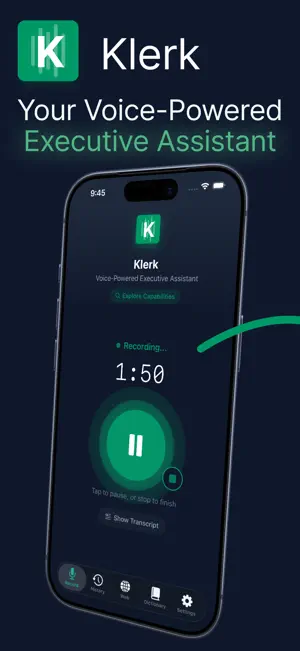
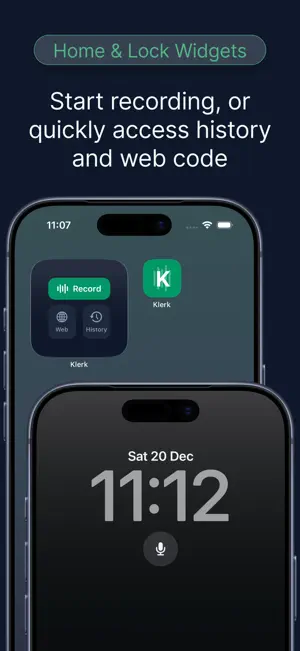
Speech to text with Klerk. You voice memos transcibed into polished drafts. Speak it. Klerk structures it. You send it. Klerk transforms your voice memos into polished emails, organised tasks, note taking, and calendar events. No typing. No formatting. Just speak naturally and let AI handle the structure. SPEECH TO TEXTT - DICTATE LIKE YOU TALK Ramble through your thoughts. Mention multiple emails, mix in tasks, add a meeting. Klerk understands context and separates everything into clean, structured content. "Email Sarah about rescheduling tomorrow, remind me to review the Q3 report, and schedule a call with James on Thursday" becomes three separate items — formatted and ready. MULTIPLE CONTENT TYPES Emails — Professional messages with greetings, body, and sign-off Tasks — Consolidated to-do lists from scattered mentions Note taking & voice memos — Meeting recaps, ideas, status updates Calendar — Events with date, time, and attendees extracted ACCESS FROM ANY BROWSER Generate a short code and open your content on any computer. Walk to your desk, enter the code at klerkai.app, and copy straight into Outlook, OneNote, or wherever you work. Codes expire in 5 minutes and are single-use. No sync accounts. No cloud storage. REFINE WITH ONE TAP Make it more formal. Shorter. Friendlier. More detailed. Adjust any content instantly without re-dictating. Even add custome refinements YOUR WRITING STYLE Set preferences once, apply everywhere. Tone, length, English spelling (American, British, or Australian), sign-off style, and your name for signatures. CUSTOM DICTIONARY Teach Klerk your vocabulary. Add colleague names, acronyms, and company terms. Set transcription corrections so speech recognition errors get fixed automatically. PRIVACY BY DESIGN No account required. No data stored on servers. Data stays on your device. Voice is processed in real-time and never retained. Nothing to breach, nothing to track. Built for professionals who process dozens of emails daily, think faster than they type, or want their commute to be productive. Download Klerk and turn your voice into your most productive tool. Terms of Use: https://www.apple.com/legal/internet-services/itunes/dev/stdeula/ Privacy Policy: https://klerkai.app/privacy
What’s new
Version 1.0.5 · Updated January 12, 2026
Klerk: Speech to Text now includes widgets and free trial of access to all features
App privacy
The developer, Yarra Park Pty Ltd, reported these privacy practices to Apple.
Data Not Collected
The developer does not collect any data from this app.
Alternatives to Klerk: Speech to Text
Looking for apps like Klerk: Speech to Text? Here are 6 similar apps on the App Store. The highest rated is Klerk (5.0/5), and 5 of the 6 are free to download.
-
 Klerk
5.0
Klerk
5.0
-
 AI Daily Planner : SLATE
-
 Mneme: Life Log, AI Notepad
-
 MindMark AI - Second Brain
5.0
MindMark AI - Second Brain
5.0
-
 AI Note Taker - Sumnevo
5.0
AI Note Taker - Sumnevo
5.0
-
 AI Prompt Library - PromptiFex
| App | Rating | Price | Last updated | Compare |
|---|---|---|---|---|
| Klerk: Speech to Text | – | Free | January 12, 2026 | |
| Klerk | 5.0 / 5 (1) | Free | Oct 9, 2026 | Compare |
| AI Daily Planner : SLATE | – | 1.99 USD | Aug 6, 2026 | Compare |
| Mneme: Life Log, AI Notepad | – | Free | Feb 18, 2026 | Compare |
| MindMark AI - Second Brain | 5.0 / 5 (1) | Free | Oct 15, 2026 | Compare |
| AI Note Taker - Sumnevo | 5.0 / 5 (4) | Free | Aug 11, 2026 | Compare |
| AI Prompt Library - PromptiFex | – | Free | Sep 30, 2026 | Compare |