

ItemMap: 3D Inventory Scanner
ItemMap, Inc. Productivity iPhoneiPadiPod touch
ItemMap: 3D Inventory Scanner is a free Productivity app for iPhone and iPad by ItemMap, Inc. Rated 5.0/5 from 1 ratings. Requires iOS 16.4.
- Rating
- 5.0
- 1 ratings
- Price
- Free
- on the App Store
- Size
- 114 MB
- Age 4+
- Updated
- Sep 22
- 2026 · v3.0.0
Screenshots


About ItemMap: 3D Inventory Scanner
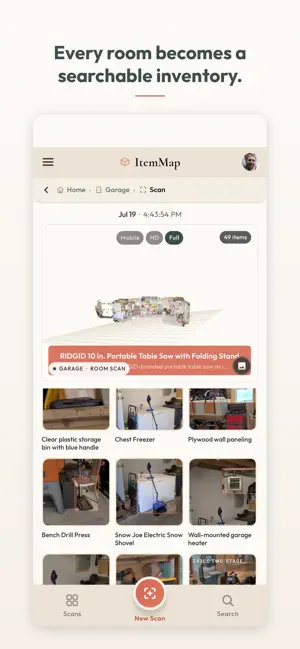
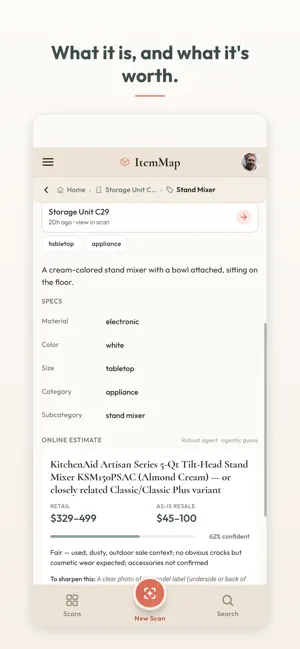
Your home has a search bar now. ItemMap lets you sweep your phone over the things you own, and makes a 3D inventory of what it sees. It matches each item against like items across the internet, puts what it sees into words, and hands you the list. HOW IT WORKS 1. Scan. Sweep your phone across the room. Items start appearing while you are still scanning. 2. Give it a minute. ItemMap works through what it saw, writes it up, and prices what it can identify. 3. Search. Find what it found, from your phone or from your computer at app.itemmap.app. WHAT YOU GET • A 3D map of the space, not just a list. See where each thing actually sits. • A written record of what the camera found: a name, a description, and the spot it was standing in. • Retail and resale numbers for the items it recognizes, drawn from current listings and recent completed sales. • Locations, zones, and containers, so the inventory is organized the way your space already is. • Fast search. Ask for "the good drill" or "grandma's china" and get it. • Export. A print-ready PDF catalog for insurance, a CSV spreadsheet, or the raw 3D scan as a .glb file. IT TELLS YOU WHEN IT IS NOT SURE ItemMap does not bluff. When all it can tell is that something is a black electronic device, that is what it writes down. Estimates carry a confidence figure and a short note on what would sharpen them, usually a clearer angle on a label or a brand badge. WRONG? TELL IT Pick anything it misread, tap "It's actually...", and say what it is in your own words. "It's a Roland FP-10, in pretty good condition" is plenty. ItemMap rebuilds the name, the description, the specs and the estimate around your answer, and keeps your sentence on the record. Your word beats its guess. GETTING A GOOD SCAN Point it at things the camera can see. A bookshelf, a table of gear, an open bin, one wall of the garage. Pan and turn rather than walking toward things, because sideways movement is what gives us depth. Go slow, give the room some light, and do not worry about length: several short scans of one room beat one long one. Deep piles and taped up boxes keep their contents to themselves, so what the camera cannot see stays a question mark with a photo and a place. PEOPLE USE IT FOR Moving and pack-outs. Storage units. Insurance documentation. Downsizing and estates. Small business stockrooms. Any time somebody has to write down what is in a room. PRIVACY No ads, ever. We do not sell your data. Your inventory is private to your account unless you choose to share it. The camera and microphone are live only during a scan you start. You can delete any scan, any item, or your whole account from inside the app. Full policy: https://itemmap.app/privacy.html WHAT YOU NEED An ARKit-capable iPhone and an internet connection. Scanning streams video to our servers, where the 3D reconstruction and item identification happen. Questions, or something scanned badly? [email protected]
What’s new
Version 3.0.0 · Updated September 22, 2026
Your inventory now includes Collections - groups ItemMap notices in your things. A shelf of Sherlock Holmes books. The 3rd grade reading level books. The fishing supplies. They take shape as you scan more, and you can always name your own. Opportunities is new. It watches for good moments for things you already own: a sunny Saturday and the sunglasses on your desk, the first day of fall and your cocktail books, a craft fair near home. Each one names the items, says why now, and links out. Save it, drop it in your calendar, push it to next weekend, or tell it no. Ask ItemMap anything. Type "where are my drills" and matches appear instantly, with an actual answer and shortcuts straight to the room or the collection. Ask a follow-up and it keeps going. Also in this version: • Item, collection and room links now open straight to the thing in the app • Opportunity notifications — off until you turn them on, a couple a week at most • Scans can tag where they happened, so home and away stay separate
App privacy
The developer, ItemMap, Inc., reported these privacy practices to Apple.
Data Linked to You
The following data, which may be collected and linked to your identity, may be used for the following purposes:
- Usage Data: Product Interaction
- Contact Info: Email Address, Name
- User Content: Photos or Videos, Audio Data, Customer Support, Other User Content
- Identifiers: User ID, Device ID
- Surroundings: Environment Scanning
Used for: Analytics, App Functionality
Alternatives to ItemMap: 3D Inventory Scanner
Looking for apps like ItemMap: 3D Inventory Scanner? Here are 6 similar apps on the App Store. The highest rated is Truckroll (5.0/5), and all 6 are free to download.
-
 Aido Receipts
-
 Truckroll
5.0
Truckroll
5.0
-
 Jokebook - Stand Up Comedy
4.7
Jokebook - Stand Up Comedy
4.7
-
 Memo AI - Voice Notes Taker
4.9
Memo AI - Voice Notes Taker
4.9
-
 Sutra Spaces
4.7
Sutra Spaces
4.7
-
 GoProspect
4.8
GoProspect
4.8
| App | Rating | Price | Last updated | Compare |
|---|---|---|---|---|
| ItemMap: 3D Inventory Scanner | 5.0 / 5 (1 rating) | Free | September 22, 2026 | |
| Aido Receipts | – | Free | Jul 21, 2026 | Compare |
| Truckroll | 5.0 / 5 (1) | Free | Oct 3, 2026 | Compare |
| Jokebook - Stand Up Comedy | 4.7 / 5 (15) | Free | Apr 5, 2024 | Compare |
| Memo AI - Voice Notes Taker | 4.9 / 5 (67) | Free | Aug 24, 2026 | Compare |
| Sutra Spaces | 4.7 / 5 (279) | Free | Sep 16, 2026 | Compare |
| GoProspect | 4.8 / 5 (1,363) | Free | Apr 2, 2026 | Compare |