

Vocci
GygesLabs Productivity iPhoneiPadiPod touch
Vocci is a free Productivity app for iPhone and iPad by GygesLabs. Rated 4.6/5 from 8 ratings. Requires iOS 18.0. Updated October 12, 2026.
- Rating
- 4.6
- 8 ratings
- Price
- Free
- on the App Store
- Size
- 118 MB
- Age 4+
- Updated
- Oct 12
- 2026 · v1.1.24
Screenshots


About Vocci
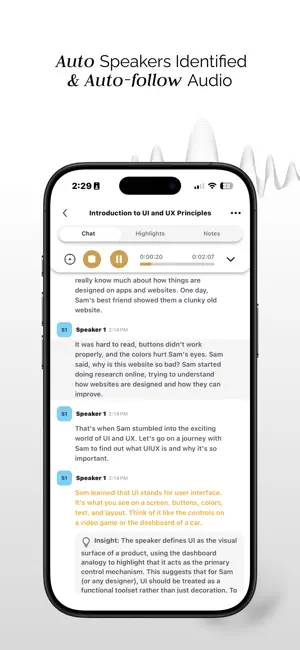
Vocci is an AI note-taking ring and companion app. Capture conversations, meetings, voice notes and ideas; get searchable transcripts, summaries, highlights and notes, and revisit the original audio. Ask Vocci AI about your sessions, notes and files, and create reports, drafts and slides. With your permission, use apps such as Gmail, Google Calendar, Slack and Notion. Search, sort and star files. Authorize supported AI apps to search and open your Vocci context without editing or deleting it. Upgrading from 1.0.x These major public improvements have been added across our updates since 1.0.11: Background Ring Sync After setup on supported phones, new Ring recordings can sync while your phone is locked or Vocci is in the background, when the system allows it. Reopening Vocci may be needed if the app is stopped or closed. Sessions, Files and exports • Export transcripts, summaries, notes and audio from several sessions together. • Share multiple files in one system share sheet, or delete selected items together. • Briefly undo deletions in Sessions, Files and Vocci AI chat history. • Read downloaded transcripts and notes offline; recent transcripts and notes download ahead while online. Audio is not automatically downloaded. • Enhance compatible local Ring recordings before upload, and stop supported Ring uploads in progress. • Export recordings already on your phone before cloud upload. • On iOS, preview compatible PDF, Word and Excel files inside Vocci. • Find your own uploaded files more easily in Files. To Do, Tags and widgets • Collect suggested to-dos in To Do, add your own, and manage session Follow-ups, due dates, reminders and priorities. Control automatic collection in To Do Settings. • Organize Sessions, Files and to-dos with tags and filters. • Use Sessions and To Do home-screen widgets on supported devices, each with an optional tag filter; open items and mark to-dos complete. Widget changes sync when Vocci next runs. To Do features follow your To Do setting. Vocci AI • Open a dedicated Vocci AI tab and search chats in its side panel. • Give thumbs-up or thumbs-down feedback on AI replies. • Keep unsent message drafts, retry messages after reconnecting and pin important conversations. • Choose when Vocci AI asks before acting; review and edit supported action details before approval, with clearer confirmations and results. • Start common requests from suggestions. Get nearby help when location permission and sharing are enabled. Connected apps and AI apps • Browse connected apps by category and manage multiple accounts separately, with clearer status, rename, reconnect and disconnect controls. • Get new Gemini and Grok setup guides, alongside improved setup handoffs for supported AI apps such as ChatGPT and Claude. Account and everyday reliability Choose Light, Dark, or Match system in Settings > Appearance. Edit your name and avatar in My Account, use simpler Settings, and get clearer offline and reconnecting status. Recent fixes improve background sync, widget readability, AI chat scrolling and queue sync, notifications, pairing, accessibility and stability. Privacy at the core Vocci is built with privacy at its core and is compliant with GDPR, SOC 2, and ISO standards. Your data is encrypted and remains securely under your control. Subscriptions Vocci Plus and Vocci Pro are available as auto-renewable subscriptions, with monthly and annual options. Payment is charged to your Apple Account at confirmation of purchase. A subscription renews automatically unless auto-renew is turned off at least 24 hours before the end of the current period. You can manage or cancel your subscription in your Apple Account settings. Feature availability may depend on your device, permissions, plan, region, and connected services. Ring features require a compatible Vocci Ring. Terms of Use (EULA): https://www.apple.com/legal/internet-services/itunes/dev/stdeula/
Ratings & reviews
4.6
8 ratings
What’s new
Version 1.1.24 · Updated October 12, 2026
Vocci 1.1.24 brings together the major public improvements since 1.0.11: - Background Ring Sync: after setup on supported phones, new recordings can sync while your phone is locked or Vocci is in the background, when your phone allows it. Reopening Vocci may be needed if the app is stopped or closed. - Export transcripts, summaries, notes and audio from several sessions together, and share multiple files. - A brief Undo option lets you undo deletions in Sessions, Files and Vocci AI chat history. - Read downloaded transcripts and notes offline. - Collect suggested to-dos in To Do, add your own, and manage session Follow-ups, due dates, reminders and priorities. Control automatic collection in To Do Settings. - Organize Sessions, Files and to-dos with tags and filters. - Use Sessions and To Do home-screen widgets on supported devices, each with an optional tag filter. Open items or mark to-dos complete; changes sync when Vocci next runs. To Do features follow your To Do setting. - Open Vocci AI in its own tab, search chats in the side panel, and give thumbs-up or thumbs-down feedback on replies. - Keep unsent Vocci AI drafts, retry messages after reconnecting, and pin important conversations. - Choose when Vocci AI asks before acting; review and edit supported action details before approval, with clearer confirmations and results. - Browse connected apps by category and manage multiple accounts separately, with clearer connection status. - Use new setup guides for Gemini and Grok, with smoother setup handoffs to supported AI apps. - Enhance compatible local Ring recordings before upload, and stop a supported Ring upload while it is in progress. - Export recordings stored on your phone before cloud upload. On iOS, preview compatible PDF, Word and Excel files inside Vocci. - Get help with nearby places when location permission and sharing are enabled, and start common requests from AI suggestions. - Choose Light, Dark, or Match system in Settings > Appearance. - Find your files more easily, update your name and avatar in My Account, and enjoy simpler Settings. - Get more accurate offline and reconnecting status, clearer connected-app search, notification permission handling, and improved background sync, widget readability, AI chat scrolling and queue sync, notification navigation, pairing, accessibility and stability. Terms of Use (EULA): https://www.apple.com/legal/internet-services/itunes/dev/stdeula/
App privacy
The developer, GygesLabs, reported these privacy practices to Apple.
Data Linked to You
The following data, which may be collected and linked to your identity, may be used for the following purposes:
- Contact Info: Email Address, Name
- Identifiers: User ID
- Usage Data: Product Interaction
- Purchases: Purchase History
- User Content: Audio Data
- Diagnostics: Crash Data, Performance Data, Other Diagnostic Data
Used for: Analytics, App Functionality
Data Not Linked to You
The following data, which may be collected but is not linked to your identity, may be used for the following purposes:
- Identifiers: Device ID
Used for: Analytics, App Functionality
Alternatives to Vocci
Looking for apps like Vocci? Here are 6 similar apps on the App Store. The highest rated is SpeakON: AI Voice Keyboard (4.9/5), and all 6 are free to download.
-
 SpeakON: AI Voice Keyboard
4.9
-
 Memoket
4.9
-
 Flowtica: AI Note Taker
4.5
-
 Mira Glasses
4.2
-
 MEMO Whiteboard Scanner
4.0
-
 Loona Deskmate
1.8
| App | Rating | Price | Last updated | Compare |
|---|---|---|---|---|
| Vocci | 4.6 / 5 (8 ratings) | Free | October 12, 2026 | |
| SpeakON: AI Voice Keyboard | 4.9 / 5 (82) | Free | Oct 13, 2026 | Compare |
| Memoket | 4.9 / 5 (78) | Free | Oct 20, 2026 | Compare |
| Flowtica: AI Note Taker | 4.5 / 5 (8) | Free | Oct 6, 2026 | Compare |
| Mira Glasses | 4.2 / 5 (33) | Free | Oct 16, 2026 | Compare |
| MEMO Whiteboard Scanner | 4.0 / 5 (4) | Free | Sep 28, 2026 | Compare |
| Loona Deskmate | 1.8 / 5 (11) | Free | Sep 14, 2026 | Compare |
Compare Vocci with the top alternatives: ratings, updates, ASO score and keyword gaps →