

Bluetooth Headphone Finder
Vladimir Ivakhnenko Productivity iPhoneiPadiPod touch
Bluetooth Headphone Finder is a free Productivity app for iPhone and iPad by Vladimir Ivakhnenko. Rated 5.0/5 from 1 ratings. Requires iOS 18.6.
- Rating
- 5.0
- 1 ratings
- Price
- Free
- on the App Store
- Size
- 25 MB
- Age 4+
- Updated
- Oct 21
- 2026 · v1.5.0
Screenshots

About Bluetooth Headphone Finder
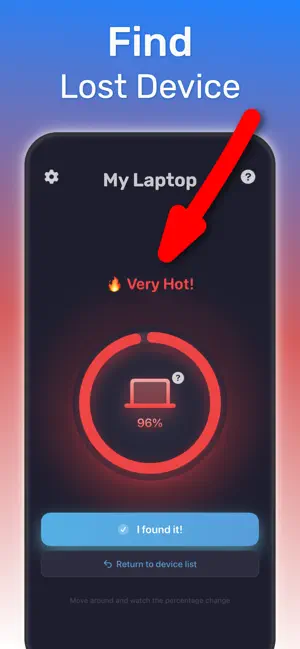
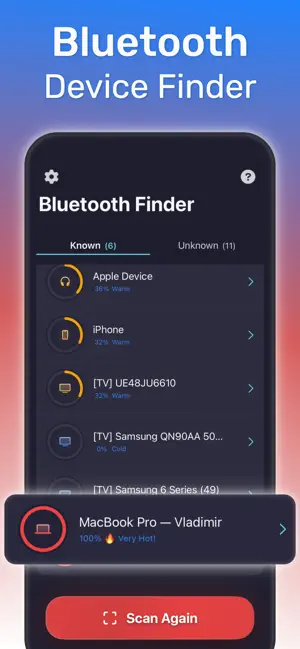
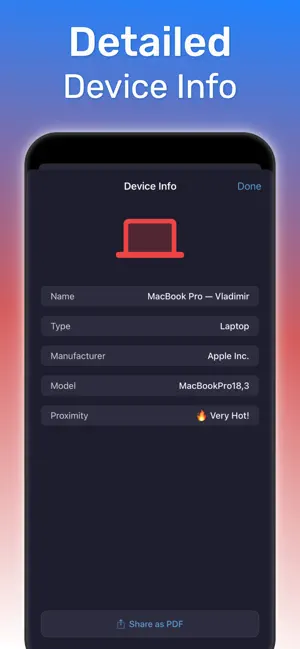
Bluetooth Headphone Finder is an iOS app for finding a nearby lost Bluetooth device. Use this app on your iPhone when wireless headphones, earbuds, or another powered-on accessory is still in range and you need to walk toward it. Most lost Bluetooth gear is close by: under a sofa cushion, in a jacket pocket, between car seats, or at the bottom of a bag. Bluetooth Headphone Finder scans nearby signals and shows whether you are getting warmer or colder, so you walk toward the device instead of searching blindly. What you can find - Wireless earbuds and Bluetooth headphones, including AirPods - Smartwatches and fitness trackers - Bluetooth speakers, keyboards, mice, and game controllers - Other Bluetooth Low Energy accessories and small gadgets that are powered on Key features - Scan for nearby Bluetooth devices and see them in one list - Read a signal strength meter for each device in real time - Follow hot–cold guidance that gets hotter as you move closer - Watch a proximity percentage until you are next to the device - View the name, manufacturer, and model when the device provides them - Play a loud sound on connected headphones to find them by ear - Use the finder at home, in an office, car, gym, hotel, train, or classroom How to find a lost Bluetooth device 1. Open Bluetooth Headphone Finder and start a scan. 2. Choose the headphones, earbuds, or other device from the list. 3. Walk slowly and watch the proximity percentage. 4. A hotter signal and a higher percentage mean you are getting closer. 5. Check bags, pockets, and furniture when the meter peaks. Find headphones by sound Some earbuds never show a signal in the scan, but they can still play sound while connected to your iPhone. When your headphones are connected, the app shows a Play sound button. Take them out of your ears or the case, tap Play sound, and follow the beeping to the sofa, the bag, or the jacket pocket. The sound stops on its own if the headphones disconnect, so it never plays from your iPhone speaker. Questions Can it find lost earbuds or headphones, including AirPods? Yes, when the accessory is powered on and within Bluetooth range. For AirPods, that means they are out of the case or the case lid is open and they still have battery. The app then leads you by signal strength. Can it find a device that is turned off or has a dead battery? No. A Bluetooth finder can detect only devices that are transmitting. It is meant for a nearby search, not for locating a device across town. Do I need to pair the device first? No. Bluetooth Headphone Finder lists nearby devices without pairing. Does it work with headphones that are not made by Apple? Yes. It works with many Bluetooth and BLE accessories, including earbuds, headphones, fitness bands, and speakers. Some budget earbuds use only Classic Bluetooth and appear only in iPhone Bluetooth settings. If they are connected to your iPhone, use Play sound to find them. Who it is for People who misplace wireless earbuds or headphones, parents looking for a child's headphones, and commuters who want a simple Bluetooth device locator on an iPhone. Privacy and pricing Scanning stays on your iPhone and uses Bluetooth signal strength. The app does not need your contacts. Full Access is an optional auto-renewable subscription. Payment is charged to your Apple ID at confirmation of purchase. Subscriptions renew automatically unless cancelled at least 24 hours before the end of the current period. Manage or cancel anytime in your App Store account settings. Requires iPhone with iOS 18.6 or later. Download Bluetooth Headphone Finder and follow the signal until you find the device. Terms of Use: https://bluetoothfinderapp.com/terms.html Privacy Policy: https://bluetoothfinderapp.com/privacy.html
What’s new
Version 1.5.0 · Updated October 21, 2026
This version of Bluetooth Headphone Finder includes new feature - find headphones by sound and bugs fixes and other improvements
App privacy
The developer, Vladimir Ivakhnenko, reported these privacy practices to Apple.
Data Not Linked to You
The following data, which may be collected but is not linked to your identity, may be used for the following purposes:
- Purchases: Purchase History
- Identifiers: User ID, Device ID
- Diagnostics: Crash Data, Other Diagnostic Data
Used for: Analytics, App Functionality, Other Purposes
Alternatives to Bluetooth Headphone Finder
Looking for apps like Bluetooth Headphone Finder? Here are 6 similar apps on the App Store. The highest rated is Decibel Meter - Sound Recorder (5.0/5), and all 6 are free to download.
-
 Find Device: Item Tracker
3.0
Find Device: Item Tracker
3.0
-
 Bluetooth Radar Pro
3.7
Bluetooth Radar Pro
3.7
-
 Device Track & Finder
3.7
Device Track & Finder
3.7
-
 Decibel Meter - Sound Recorder
5.0
Decibel Meter - Sound Recorder
5.0
-
 Device Finder: Find my Pods
3.5
Device Finder: Find my Pods
3.5
-
 BLE Scan Pro
4.5
BLE Scan Pro
4.5
| App | Rating | Price | Last updated | Compare |
|---|---|---|---|---|
| Bluetooth Headphone Finder | 5.0 / 5 (1 rating) | Free | October 21, 2026 | |
| Find Device: Item Tracker | 3.0 / 5 (2) | Free | Aug 8, 2026 | Compare |
| Bluetooth Radar Pro | 3.7 / 5 (3) | Free | Oct 6, 2026 | Compare |
| Device Track & Finder | 3.7 / 5 (3) | Free | Jun 9, 2025 | Compare |
| Decibel Meter - Sound Recorder | 5.0 / 5 (2) | Free | Feb 25, 2026 | Compare |
| Device Finder: Find my Pods | 3.6 / 5 (20) | Free | Jun 12, 2026 | Compare |
| BLE Scan Pro | 4.5 / 5 (8) | Free | Jan 30, 2024 | Compare |