

HOUKOUKU CAM
MASAHIRO SAITO Photo & Video iPhoneiPadiPod touch
HOUKOUKU CAM is a free Photo & Video app for iPhone and iPad by MASAHIRO SAITO. Requires iOS 26.0. Updated October 19, 2026.
- Price
- Free
- on the App Store
- Size
- 17 MB
- Age 4+
- Updated
- Oct 19
- 2026 · v5.2
Screenshots
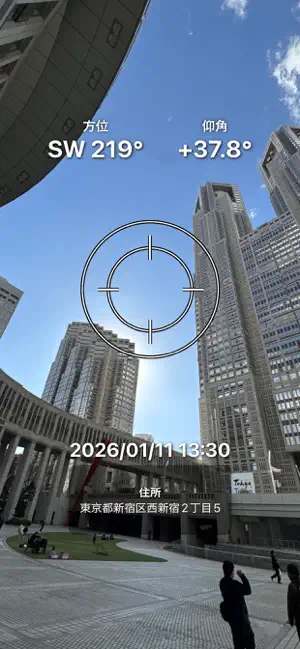


About HOUKOUKU CAM
Condense all essential information into a single photo! HOUKOUKU CAM is an advanced camera and photo editor that automatically records compass heading, device elevation (tilt angle), GPS address, latitude/longitude, and exact date/time directly onto your photos in real time. You can also overlay custom image stamps (such as logos, inspection marks, or cutouts) and customizable text simultaneously. Perfect for professional site inspections, real estate surveys, and daily field reporting without needing any post-editing tools! Key Features: - Real-Time Metadata Overlay: Heading (degrees), elevation angle, street address, GPS coordinates, and timestamp. - Custom Image & Text Overlays: Add up to 2 image stamps with adjustable transparency, size, and rotation. Add customizable text with borders and fonts. - AI Cutout & Stamp Maker: Automatically extract subjects from your album photos to create transparent stickers with a single tap. - Presets & Startup Auto-Load: Save your preferred layout templates and long-press to load them automatically upon launching the app. - EXIF Geotag Preservation: Saved photos retain their original GPS coordinates and capture timestamps in your iOS Photos library. - Quick Share: Share saved photos directly to messaging apps, email, or cloud drives with a single tap. - Photo Editor Mode: Import existing photos from your library, detect their original EXIF location, and apply decorations or auto-effects (Sparkle, Love, Sweat, Tears).
What’s new
Version 5.2 · Updated October 19, 2026
[What's New in Version 5.2] - Built-in default stamps, approval seals, and emojis are now ready to use right after installation. - Improved shared file naming format to clean, recognizable names (HOUKOUKU_CAM_YYYYMMDD-001). - Streamlined camera capture screen, focusing decoration mode on the dedicated photo editor. - Added a Camera Flash toggle button (Auto / On / Off) on the capture screen. - Added "Share Now" quick sharing right after saving a photo, plus a toolbar Share button. - Enhanced Auto Effects (Sparkle, Love, Sweat, Tears) in Photo Editor mode: tap repeatedly to evolve the effect, or select "Clear Effects" to restore the original photo anytime. - Preserved EXIF GPS location (geotag) and capture date metadata when saving photos to your library. - Fixed English localization and address lookup issues, and fully optimized for the latest iOS.
App privacy
The developer, MASAHIRO SAITO, reported these privacy practices to Apple.
Data Used to Track You
The following data may be used to track you across apps and websites owned by other companies:
- Identifiers: Device ID
Data Linked to You
The following data, which may be collected and linked to your identity, may be used for the following purposes:
- Location: Coarse Location
- Identifiers: Device ID
- Usage Data: Product Interaction, Advertising Data
- Diagnostics: Performance Data, Crash Data
Used for: Third-Party Advertising, Analytics, App Functionality
Alternatives to HOUKOUKU CAM
Looking for apps like HOUKOUKU CAM? Here are 6 similar apps on the App Store. The highest rated is Gcamera (3.0/5), and 5 of the 6 are free to download.
-
 PictBatch
-
 StampFrame - 日付入り写真・動画
-
 KIOKUN - Stamp & Photo Editor
-
 思い出カメラ -タイムスタンプカメラ
-
 Gcamera
3.0
Gcamera
3.0
-
 MatchFrames:Overlay Photos
| App | Rating | Price | Last updated | Compare |
|---|---|---|---|---|
| HOUKOUKU CAM | – | Free | October 19, 2026 | |
| PictBatch | – | Free | Sep 18, 2026 | Compare |
| StampFrame - 日付入り写真・動画 | – | Free | Jun 8, 2026 | Compare |
| KIOKUN - Stamp & Photo Editor | – | Free | Oct 23, 2026 | Compare |
| 思い出カメラ -タイムスタンプカメラ | – | Free | Aug 1, 2026 | Compare |
| Gcamera | 3.0 / 5 (1) | 0.99 USD | Dec 17, 2025 | Compare |
| MatchFrames:Overlay Photos | – | Free | Oct 23, 2026 | Compare |
Compare HOUKOUKU CAM with the top alternatives: ratings, updates, ASO score and keyword gaps →