

Convert Video to Audio - Pro
Anas Taqi Utilities iPhoneiPadiPod touch
Convert Video to Audio - Pro is a free Utilities app for iPhone and iPad by Anas Taqi. Rated 5.0/5 from 3 ratings. Requires iOS 18.0.
- Rating
- 5.0
- 3 ratings
- Price
- Free
- on the App Store
- Size
- 11 MB
- Age 4+
- Updated
- Sep 11
- 2026 · v2.0
Screenshots



About Convert Video to Audio - Pro
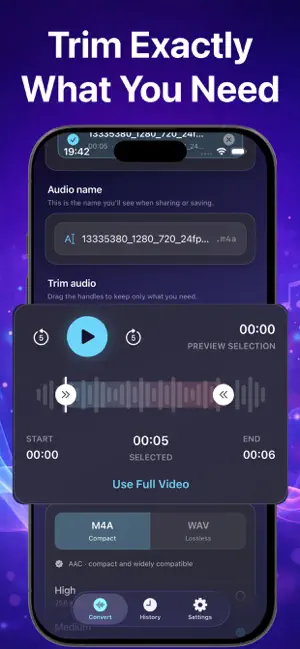
Convert Video to Audio – Pro makes it easy to extract audio from your videos, quickly, privately, and right on your device. Whether you’re saving a lecture for listening later, extracting a soundtrack, or turning a voice recording into an audio file, you get a focused workflow without uploading your media. Key Features : - Import from Photos or Files Choose videos from your Photo Library or the Files app. - Export as M4A or WAV Create compact M4A files with AAC encoding or lossless WAV files. - Choose Your Audio Quality Select 128 kbps, 192 kbps, or up to 256 kbps for M4A exports. - Trim Before You Convert Select the exact start and end points and preview the section you want to keep. - Convert in Batches Add multiple videos and process them together. - Fast On-Device Conversion Core media processing happens locally on your device. No internet connection is required for the conversion itself, and your videos and extracted audio are never uploaded to us. - Conversion History Keep your audio organized with file names, format, duration, file size, and conversion date. - Built-in Audio Player Play converted files with playback controls. - Privacy First No account required. Your selected videos, extracted audio, file names, and conversion history stay on your device. The app does not upload your media or use cross-app tracking. Simple. Fast. Private. Convert Video to Audio – Pro is built for anyone who wants a reliable way to turn videos into audio files while keeping the workflow local and under their control. Pro Features Pro unlocks unlimited conversions, batch conversion, precision trimming, 256 kbps high-quality M4A export, lossless WAV export, and an ad-free experience. Choose a monthly Pro subscription or a one-time Lifetime purchase. Basic conversion is available free with ads and daily limits. Pro features require a monthly subscription or one-time Lifetime purchase. Monthly subscriptions automatically renew unless canceled through your Apple Account settings. A one-time Lifetime purchase is also available. Terms of Use: https://sites.google.com/view/convert-video-to-audio-pro/terms Privacy Policy: https://sites.google.com/view/convert-video-to-audio-pro/privacy-policy
What’s new
Version 2.0 · Updated September 11, 2026
Convert Video to Audio 2.0 is here! - Batch conversion for multiple videos - Precision trimming with audio preview - Lossless WAV export and up to 256 kbps M4A export - Unlimited conversions for Pro users - Improved conversion history with search, rename, playback, and sharing
App privacy
The developer, Anas Taqi, reported these privacy practices to Apple.
Data Not Linked to You
The following data, which may be collected but is not linked to your identity, may be used for the following purposes:
- Usage Data: Product Interaction, Advertising Data
- Purchases: Purchase History
Used for: Third-Party Advertising, Developer’s Advertising or Marketing, Analytics, App Functionality
Alternatives to Convert Video to Audio - Pro
Looking for apps like Convert Video to Audio - Pro? Here are 6 similar apps on the App Store. The highest rated is Veyo: AI Voice Note (5.0/5), and all 6 are free to download.
-
 Blur It - Face Privacy Editor
-
 Veyo: AI Voice Note
5.0
Veyo: AI Voice Note
5.0
-
 Video & Image Converter
5.0
Video & Image Converter
5.0
-
 Long Audio
5.0
Long Audio
5.0
-
 Calculator+ Pro & Math Solver
-
 OnePlace App
5.0
OnePlace App
5.0
| App | Rating | Price | Last updated | Compare |
|---|---|---|---|---|
| Convert Video to Audio - Pro | 5.0 / 5 (3 ratings) | Free | September 11, 2026 | |
| Blur It - Face Privacy Editor | – | Free | May 23, 2026 | Compare |
| Veyo: AI Voice Note | 5.0 / 5 (1) | Free | Feb 23, 2026 | Compare |
| Video & Image Converter | 5.0 / 5 (2) | Free | Oct 21, 2026 | Compare |
| Long Audio | 5.0 / 5 (1) | Free | Apr 14, 2026 | Compare |
| Calculator+ Pro & Math Solver | – | Free | Jul 17, 2026 | Compare |
| OnePlace App | 5.0 / 5 (1) | Free | Jun 13, 2026 | Compare |