

Archivist Browser
Robert Lothian Utilities iPhoneiPadiPod touch
Archivist Browser is a free Utilities app for iPhone and iPad by Robert Lothian. Rated 4.9/5 from 63 ratings. Requires iOS 15.6. Updated September 17, 2026.
- Rating
- 4.9
- 63 ratings
- Price
- Free
- on the App Store
- Size
- 79 MB
- Age 17+
- Updated
- Sep 17
- 2026 · v1.4.0
Screenshots


About Archivist Browser
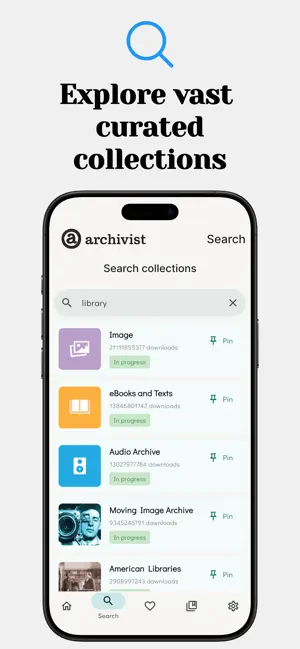
Archivist Browser: Your Portal to Digital History Archivist Browser is the ultimate media player, transforming your device into a comprehensive portal for streaming content directly from the Internet Archive's vast collections. Built specifically for researchers and enthusiasts of historical media, our app provides the fastest, most reliable way to stream millions of films, audiobooks, music and digital texts. Stop struggling with browser playback. Download Archivist Browser and experience the past, optimised for seamless, modern streaming. What the Critics Say "A really cool piece of software... I've never seen anything like this before... Highly recommend." — WILL SMITH, BRAD AND WILL MADE A TECH POD "A great idea for a very niche utility – my favourite kind these days." — FEDERICO VITICCI, MACSTORIES As featured in Cory Doctorow's Pluralistic blog. Enhanced Media Playback & Visuals Experience history in high definition with a UI designed for modern enthusiasts. Custom Themes: Personalise your experience with the new Alt Indigo Theme, a variation specifically for Dark Mode enthusiasts. Universal TV Casting: Watch films and video on your big screen! Archivist Browser supports AirPlay (on iOS) for instant, seamless video streaming to any compatible TV or streaming device. High-Res Image Viewer: Enjoy smoother navigation and better rendering when viewing high-resolution assets. Improved Subtitles: Expanded support for subtitles across more titles and languages. Optimised Audio: Enjoy full background audio support and media controls right from your lock screen, perfect for listening to historical audiobooks or music collections. Polished UI: Refined thumbnail badges offer better clarity and a more professional look. Discovery & Integration Navigate the Archive’s millions of items with ease. Topic Chips: Quickly filter and find what you want with Topic Chips now appearing on Collections. Uploader Profiles: Explore more from your favourite contributors by clicking an uploader’s name to see their full gallery. Internet Archive (IA) Integration: Seamlessly import your lists directly from your IA account for a seamless transition. Fast Content Discovery: Easily find media by title, keyword or creator, or access curated "Popular Queries" to jump straight into trending collections. File & Folder Management Organise and share your research effortlessly. Folder Sharing: Share your favourite folders with other users via URL or QR code. Smart Store Linking: If a recipient doesn’t have the app installed, shared links will automatically direct them to the store page. On-the-Fly Renaming: Keep your library organised by renaming your folders instantly. Text File Clean Up: Use a dedicated button to instantly tidy up messy OCR text files. Rapid Text Access: Cached text fetching retrieves PDFs and documents rapidly (note: cache is purged on app closure). Privacy & Reliability We prioritise your privacy: No user accounts, no mandatory login and absolutely no personal details are stored. Experience the Archive with total peace of mind.
Ratings & reviews
4.9
63 ratings
What’s new
Version 1.4.0 · Updated September 17, 2026
New Comic support — CBZ and CBR files open in-app Built-in EPUB reader Advanced search with filters, sorting and media-type refinement History tab replaces Collections AirPlay and DLNA casting for audio, alongside Chromecast Drag-and-drop track reordering, saved per album In-app user guide in Settings OCR cleanup for EPUB and text files Full screen-reader support (VoiceOver, TalkBack, Voice Control) Improved Favouriting: tap the heart to pick a folder, no long-press needed "Jump back in" can be dismissed, with undo Landscape reading — facing-page PDF spreads, side navigation, comfortable line length Fullscreen toggle in the PDF and comic readers Higher-resolution album artwork Faster collection loading with clearer loading states Smoother home screen during audio playback Rebuilt content filter — fewer false blocks, more reliable blocking Startup no longer blocks when the Archive is slow to respond Fixed Resumed items opening in the wrong viewer Albums offering both MP3 and WAV playing every track twice Truncated file names on the Favourites screen Tutorial cards cut off on some screens Colour artifacts during video playback on Nvidia Shield Remote focus and D-pad issues across Android TV and Fire TV On-screen keyboard appearing while moving between search fields with a remote
App privacy
The developer, Robert Lothian, reported these privacy practices to Apple.
Data Not Collected
The developer does not collect any data from this app.
Alternatives to Archivist Browser
Looking for apps like Archivist Browser? Here are 6 similar apps on the App Store. The highest rated is Cleaner AI - Clean Up Storage (4.6/5), and 5 of the 6 are free to download.
-
 LudyActions
4.2
-
 Darkify for Safari
3.5
-
 Cleaner AI - Clean Up Storage
4.6
-
 Stash: File Transfer & Share
3.7
-
 Remote Wake Up Mobile
3.5
-
 domoment ‐ Voice AI to Action
4.0
| App | Rating | Price | Last updated | Compare |
|---|---|---|---|---|
| Archivist Browser | 4.9 / 5 (63 ratings) | Free | September 17, 2026 | |
| LudyActions | 4.2 / 5 (5) | Free | Feb 26, 2026 | Compare |
| Darkify for Safari | 3.5 / 5 (11) | Free | Sep 3, 2026 | Compare |
| Cleaner AI - Clean Up Storage | 4.6 / 5 (31) | Free | Jan 16, 2026 | Compare |
| Stash: File Transfer & Share | 3.7 / 5 (3) | Free | Jun 13, 2026 | Compare |
| Remote Wake Up Mobile | 3.5 / 5 (2) | 9.99 USD | Oct 12, 2026 | Compare |
| domoment ‐ Voice AI to Action | 4.0 / 5 (1) | Free | Mar 26, 2026 | Compare |
Compare Archivist Browser with the top alternatives: ratings, updates, ASO score and keyword gaps →