

PenDraw
EMIRHAN SIMSEK Graphics & Design iPhoneiPadiPod touch
PenDraw is a free Graphics & Design app for iPhone and iPad by EMIRHAN SIMSEK. Requires iOS 18.5. Updated October 26, 2026.
- Price
- Free
- on the App Store
- Size
- 1 MB
- Age 4+
- Updated
- Oct 26
- 2026 · v1.2
Screenshots
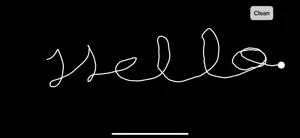

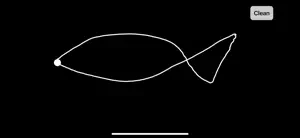
About PenDraw
PenDraw lets you turn your phone into a motion-controlled pen. By using the device’s motion sensors, you can draw lines and shapes on the screen simply by moving your phone. PenDraw creates a minimal, distraction-free canvas designed for experimentation, play, and creative exploration. Features: • Motion-controlled drawing using your phone • Smooth real-time line rendering • Clean button to reset the canvas instantly • Simple, minimal interface • No account required • No data collected PenDraw is designed for creative experimentation and visual play. Just move your phone and start drawing.
What’s new
Version 1.2 · Updated October 26, 2026
Fixed drawing alignment so the full sketch stays visible and captured images match the canvas. Shared drawings now include a PenDraw download invitation and App Store link.
App privacy
The developer, EMIRHAN SIMSEK, reported these privacy practices to Apple.
Data Not Collected
The developer does not collect any data from this app.
Alternatives to PenDraw
Looking for apps like PenDraw? Here are 6 similar apps on the App Store. The highest rated is Pen15! (5.0/5), and 5 of the 6 are free to download.
-
 Crafter Draw: Sketch & Markup
-
 Doodle Jam: Drawing Together
-
 Pen15!
5.0
-
 Bitrot: Glitch Photo Editor
4.6
-
 VOSC Visual Particle Synth
4.5
-
 Themora: Icon Themes & Widgets
2.0
| App | Rating | Price | Last updated | Compare |
|---|---|---|---|---|
| PenDraw | – | Free | October 26, 2026 | |
| Crafter Draw: Sketch & Markup | – | Free | Jul 10, 2026 | Compare |
| Doodle Jam: Drawing Together | – | Free | Oct 13, 2026 | Compare |
| Pen15! | 5.0 / 5 (2) | Free | Jun 11, 2026 | Compare |
| Bitrot: Glitch Photo Editor | 4.6 / 5 (5) | Free | Nov 1, 2026 | Compare |
| VOSC Visual Particle Synth | 4.5 / 5 (26) | 4.99 USD | Feb 16, 2025 | Compare |
| Themora: Icon Themes & Widgets | 2.0 / 5 (3) | Free | Oct 26, 2026 | Compare |
Compare PenDraw with the top alternatives: ratings, updates, ASO score and keyword gaps →