

KeepOnFirst: Pomodoro Timer
yu te Lin Productivity iPhoneiPadiPod touch
KeepOnFirst: Pomodoro Timer is a free Productivity app for iPhone and iPad by yu te Lin. Requires iOS 17.0. Updated November 19, 2026.
- Price
- Free
- on the App Store
- Size
- 19 MB
- Age 4+
- Updated
- Nov 19
- 2026 · v1.0.15
Screenshots
Save to Pinterest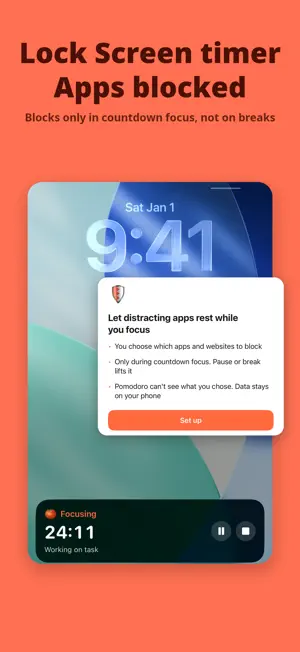


About KeepOnFirst: Pomodoro Timer
One tap to focus, and your countdown stays live on the Lock Screen and in the Dynamic Island (on supported iPhones). TIMER • Classic 25-minute Pomodoro. Set your own focus, short break, and long break lengths. A break starts automatically after focus by default. • Count-up mode too: the timer counts up from zero. Tap Done to log the real time; sessions under 1 minute do not count. It shows on the Lock Screen and in the Dynamic Island as well. • Landscape layout. • White noise while you focus. Four sounds: Lake Breeze, Soft Rain, Spring Forest, Pine Wind. FOCUS BLOCKING • You choose which apps and websites to block. They are blocked only during a focus countdown. Pause or take a break, and they open again. Count-up mode does not block. • Needs Screen Time permission. Pomodoro can't see what you chose. Data stays on your phone. TASKS AND TAGS • Make a to-do list, pick the task to focus on, and see how many Pomodoros each task takes. • Pick a tag before you start (defaults: Coding, Study, Writing, Reading, Meeting, or add your own). Stats show where your time goes. GOALS AND REMINDERS • Set a daily goal. The stats page shows today's count and your streak. • A daily reminder. If you have a streak and have not focused by 8 PM, you get a nudge to keep it going. Turn reminders off in Settings. STATS • See focus time for today, this week, and this month, plus a day-by-day view of this week. WIDGETS • Home Screen and Lock Screen widgets show your timer status. TOMATO COLLECTION • Finish Pomodoros, build streaks, and play through the seasons to collect different tomatoes. 12 in all; 4 can be collected without Pro (including the Golden Tomato you earn with a 7-day streak), and the other 8 need Pro. PRO (OPTIONAL) • Unlock all 12 tomatoes on the collection wall. • Long-term stats: monthly hours for the last 12 months, this year's total, your top focus hours, and your longest streak. • No ads, 4 extra themes, and CSV export of your stats. • Choose a monthly or yearly subscription, or a one-time lifetime purchase. Prices follow your App Store region. The subscriptions have no trial period. • Subscriptions renew automatically unless you cancel at least 24 hours before the period ends. Payment is charged to your Apple ID when you confirm the purchase, and the renewal is charged within 24 hours before the period ends. Cancel anytime in Settings → your name → Subscriptions. The lifetime purchase never renews. • Open Pro from the top of Settings. Restore Purchases is on the Pro screen. • Without Pro, you can still use the timer, tasks, tags, white noise, and widgets. Ads show until you get Pro. Terms of Use: https://www.apple.com/legal/internet-services/itunes/dev/stdeula/ Privacy Policy: https://keeponfirst.com/pomodoro_privacy
What’s new
Version 1.0.15 · Updated November 19, 2026
• Fixed: after the system closed the app, the countdown on the Lock Screen stayed at 00:00 when time ran out. Now it shows “Tap to start”. It disappears when you return to the app. • On first launch, you can tap a blank area to hide the keyboard after you type a task name. This reveals the “Start Your First Pomodoro” button.
App privacy
The developer, yu te Lin, reported these privacy practices to Apple.
Data Used to Track You
The following data may be used to track you across apps and websites owned by other companies:
- Identifiers: Device ID
- Usage Data: Product Interaction, Advertising Data
Data Linked to You
The following data, which may be collected and linked to your identity, may be used for the following purposes:
- Location: Coarse Location
- Identifiers: Device ID
- Usage Data: Product Interaction, Advertising Data
- Diagnostics: Performance Data
Used for: Third-Party Advertising, Analytics, App Functionality
Data Not Linked to You
The following data, which may be collected but is not linked to your identity, may be used for the following purposes:
- Diagnostics: Other Diagnostic Data, Crash Data
- Purchases: Purchase History
Used for: Third-Party Advertising, Analytics, App Functionality
Alternatives to KeepOnFirst: Pomodoro Timer
Looking for apps like KeepOnFirst: Pomodoro Timer? Here are 6 similar apps on the App Store. The highest rated is Due Pal: ADHD Visual Timer (5.0/5), and all 6 are free to download.
-
 FocusNow: Deep Work Timer
-
 Budly: Habit Tracker & Focus
-
 Today - A Daily To do List
-
 Work & Break Timer
-
 时区转换器
-
 Due Pal: ADHD Visual Timer
5.0
| App | Rating | Price | Last updated | Compare |
|---|---|---|---|---|
| KeepOnFirst: Pomodoro Timer | – | Free | November 19, 2026 | |
| FocusNow: Deep Work Timer | – | Free | Jun 30, 2025 | Compare |
| Budly: Habit Tracker & Focus | – | Free | Jul 13, 2026 | Compare |
| Today - A Daily To do List | – | Free | Apr 12, 2026 | Compare |
| Work & Break Timer | – | Free | Dec 23, 2025 | Compare |
| 时区转换器 | – | Free | Feb 21, 2025 | Compare |
| Due Pal: ADHD Visual Timer | 5.0 / 5 (2) | Free | Nov 18, 2026 | Compare |