

OpenIntelligence
Gunnar Hostetler Productivity iPhoneiPadiPod touchMac
OpenIntelligence is a free Productivity app for iPhone and iPad by Gunnar Hostetler. Rated 4.8/5 from 4 ratings. Requires iOS 26.0. Updated October 23, 2026.
- Rating
- 4.8
- 4 ratings
- Price
- Free
- on the App Store
- Size
- 170 MB
- Age 17+
- Updated
- Oct 23
- 2026 · v5.7
Screenshots

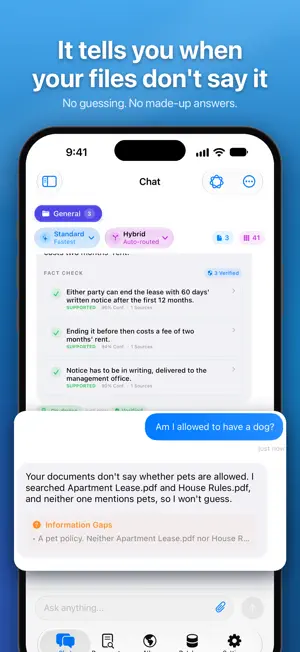


About OpenIntelligence
Ask a question about your own PDFs, contracts, lecture recordings or code, and get an answer with the exact passage it came from. Nothing you import leaves your device unless you allow it. Free to start, no account, no API key. OpenIntelligence reads what you import and answers in plain language, with citations you can tap to see where each claim came from. When your files don't contain the answer, it says so instead of guessing. ANSWERS START IN YOUR FILES Not in a chatbot's imagination. OpenIntelligence searches your library first, pulls the exact passages that matter, and only then writes, using Apple's on-device Apple Intelligence models. Requires an Apple Intelligence-capable device: iPhone 15 Pro or later, or an M1-or-later iPad or Mac, on iOS/iPadOS/macOS 26. Your device already had the intelligence. This gives it your knowledge, and rules of evidence. WHAT YOU CAN DO - Summarize long documents, recordings, or entire libraries. - Compare claims and details across multiple sources. - Find exact facts, dates, specifications, measurements, and table values. - Ask follow-up questions without losing the sources or the thread. - Choose Standard for quick factual work, Deep Think for multi-step questions, or Maximum for broader evidence synthesis. BRING YOUR OWN MATERIAL Import PDFs, Office documents, text and Markdown files, CSVs, code, images and scans, audio, or video. Pages, Numbers and Keynote files need to be exported to PDF first. OpenIntelligence extracts text, uses Vision OCR where needed, transcribes speech, and builds a searchable index for each library. HOW ANSWERS ARE BUILT Exact keyword matching and semantic search work together to retrieve the passages that matter. Apple Foundation Models turn those passages into a natural-language response. Then the app checks its own answer against the passages it actually used, so you can inspect what it's standing on instead of taking its word. If the sources do not establish an answer, the app flags weak support or abstains. No confident filler. WHERE YOUR FILES GO (AND DON'T) Reading your files, searching them, and choosing what to cite all happen on your device, start to finish, before anything is written. On-device answers need no connection at all. On a plane, in a dead zone, in a locked-down office, your library still works. For longer, evidence-heavy questions on iOS, iPadOS or macOS 27, you can optionally allow Apple Private Cloud Compute to do the writing. The app shows you how much would be sent and why, and asks you first. Apple says its servers keep nothing afterwards. Your material is never sent to a third-party AI provider. ANSWERS YOU CAN INSPECT Inline citations connect answers to their supporting pages and passages, one tap from claim to source. If you want more, response details go deeper: source snippets, retrieval quality, verification warnings, timing, and the route that actually produced the answer. The optional telemetry interface goes deeper when you want it and stays out of the way when you don't. LIBRARIES THAT FIT YOUR WORK Keep different subjects, projects, or clients in separate libraries. Choose Local Only or iCloud Drive (paid plans) for each library, and organize ongoing research in saved conversation threads. Siri and Shortcuts actions are available for common document and library workflows. PLANS Every plan runs the same model: Apple Intelligence on your device, Deep Think, and Private Cloud Compute after you approve what is sent. Free: 5 documents, one library, Maximum mode three times a day. Pro lifts that cap and grows to 1,000 documents and 10 libraries, monthly or yearly. Lifetime: one payment, unlimited documents, 20 libraries, Maximum every day, no renewal. OpenIntelligence is built and maintained by one developer. Pro and Lifetime support directly fund continued development. To everyone already supporting the app: thank you. It has been a wild journey. Privacy Policy: https://gunzino.me/openintelligence/privacy
What’s new
Version 5.7 · Updated October 23, 2026
This one's about getting things in and out of the app. JSON and JSONL files import as records, Siri and Shortcuts can ask, search and add to your libraries, Spotlight and Visual Intelligence find your documents, and an answer you share takes its sources with it. YOUR DOCUMENTS • JSON and JSONL files import as records, with their field names and numbers kept as they are. • Big imports keep going. Very large text and JSONL files import a piece at a time, a PDF of any size imports (over 500 MB used to be turned away), and an interrupted import picks up where it was, even after an app update, without redoing the pages and embeddings it had. The queue has a Pause button, and if iOS stops an import in the background the banner says Paused. • Share a web page or text to OpenIntelligence from any app, send it files with "Open in", drop in a whole folder, or tap Paste on the Documents screen for a copied file, address or text. • Scan into Library on the Lock Screen or the Action button takes a page without unlocking. • Numbers in tables are kept, pages in Greek, Chinese, Arabic and other scripts keep their text, and non-UTF-8 text files come in readable. • Addresses, phone numbers, dates and amounts are found anywhere in a document, not only in its tables. • An import stops and says so if the search model comes back empty, and a document missing from search is rebuilt. LARGE LIBRARIES • A very large library doesn't hold the app up: it's read once at launch, not twice, the app answers taps right after you open it, and starting an import doesn't freeze it. SIRI, SHORTCUTS AND SPOTLIGHT • Actions hand back what they found, so the next step of a shortcut can use the answer and its sources. "Ask My Documents" and "Ask a Library" have a Mode menu. • New actions: Find Passages, Check a Claim, Add to Library, Create Library, Set Answer Mode, Open Library and Open Document. • If a question from Siri needs Private Cloud Compute and you haven't decided yet, the app comes up and asks first. • Spotlight keeps your documents until you delete them, and tapping one opens it. Visual Intelligence lists the documents that mention what the camera sees. • Touch and hold the app icon for Ask, Add Document and Scan Document, add the widgets to the Home Screen or the Lock Screen, and long answers show progress there, with a Stop button. SHARING • A shared answer takes its sources with it, Image makes a card of it, and Export Conversation saves a conversation as Markdown, JSON Lines or PDF. • Copy Link on a document or a library opens it in the app on your other devices. ANSWERS • Every label in an answer, like [S5], opens the passage it came from, and tapping a point in an answer opens the PDF on that page with the passage highlighted. • If a question didn't get its answer because the app was closed, there's an Ask again button. Searches no longer pick up stray letters. • The chat is plainer to look at. Technical Details, under ⋯ or in Settings, brings back the stats and every step. • Ask out loud: the chat field has a microphone, and dictation runs on your device. • Sentences from your documents aren't cut in half, numbers are checked as numbers, and a code like E1 counts as a keyword. • Deep Think and Maximum answers get the same checks a Standard answer does, and Deep Think keeps its full answer instead of one short line that can be wrong. ALSO • Every screen has the same look now: spacing, corners and colors match. • Handoff, and conversations in an iCloud library sync with it. • A notification when an import or a long answer is done, if you turn it on, and on iOS 27 and macOS 27 an offer to email me a crash report, sent only if you say so. • Easier to read: darker gray text, clearer colored labels and a deeper blue in light mode. VoiceOver names every switch and slider. Everything still runs on your device, unless you okay Apple's Private Cloud Compute.
App privacy
The developer, Gunnar Hostetler, reported these privacy practices to Apple.
Data Not Collected
The developer does not collect any data from this app.
Alternatives to OpenIntelligence
Looking for apps like OpenIntelligence? Here are 6 similar apps on the App Store. The highest rated is ReplyKit - Quick Reply (5.0/5), and all 6 are free to download.
-
 LocalRAG! - AI Document Chat
1.0
LocalRAG! - AI Document Chat
1.0
-
 Mimi AI
-
 Habit Tracker - HabitGate
4.6
Habit Tracker - HabitGate
4.6
-
 ReplyKit - Quick Reply
5.0
ReplyKit - Quick Reply
5.0
-
 Mindute AI
4.5
Mindute AI
4.5
-
 EasyMD - MD reader & editor
| App | Rating | Price | Last updated | Compare |
|---|---|---|---|---|
| OpenIntelligence | 4.8 / 5 (4 ratings) | Free | October 23, 2026 | |
| LocalRAG! - AI Document Chat | 1.0 / 5 (1) | Free | Oct 15, 2026 | Compare |
| Mimi AI | – | Free | Apr 13, 2026 | Compare |
| Habit Tracker - HabitGate | 4.6 / 5 (5) | Free | Oct 20, 2026 | Compare |
| ReplyKit - Quick Reply | 5.0 / 5 (18) | Free | Oct 3, 2026 | Compare |
| Mindute AI | 4.5 / 5 (4) | Free | Jun 14, 2026 | Compare |
| EasyMD - MD reader & editor | – | Free | May 11, 2026 | Compare |
Compare OpenIntelligence with the top alternatives: ratings, updates, ASO score and keyword gaps →