

Findnook: Home Inventory
hot-n-GUI, LLC Utilities iPhoneiPadiPod touch
Findnook: Home Inventory is a free Utilities app for iPhone and iPad by hot-n-GUI, LLC. Rated 5.0/5 from 1 ratings. Requires iOS 27.1.
- Rating
- 5.0
- 1 ratings
- Price
- Free
- on the App Store
- Size
- 29 MB
- Age 4+
- Updated
- Oct 15
- 2026 · v2.2
Screenshots


About Findnook: Home Inventory
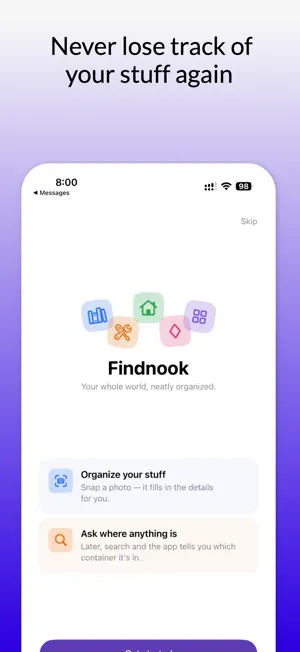
Where's that thing? That screwdriver. The hardback you swore you bought. Grandma's emerald ring. You know it's somewhere — you just can't remember which drawer, which shelf, which box in the garage. Findnook remembers for you. Snap a photo, give the thing a home, and the next time you go looking, the app actually has an answer. It's the calm, beautiful home inventory you'll wish you'd started years ago. ORGANIZE THE WAY YOUR HOME ACTUALLY WORKS Real storage nests — a garage holds a toolbox, a toolbox holds drawers, a drawer holds drill bits. Findnook works the same way. Build containers inside containers so the app mirrors your actual shelves, cases, and bins. BUILT FOR EVERYTHING YOU OWN Findnook speaks the right language for each kind of stuff, with fields that fit: • Books — author, ISBN, publisher, page count • Tools — brand, model, serial number, power source • Jewelry — gemstone, metal, value • Household — the everyday essentials • General — anything else under your roof LET THE APP DO THE TYPING • Scan a book's barcode to auto-fill its title, author, and details • "Analyze with AI" reads a photo and fills in the fields for you • "Recognize Text" lets you tap any word in a photo — a serial number, a model code — and drop it straight into the right field All powered by on-device intelligence. No typing slog required. FIND ANYTHING IN SECONDS • Fast, forgiving search that understands plurals — search "hammers" and your hammer shows up • AI Search lets you ask in plain English: "books published after 2018 I haven't rated yet" or "the silver rings in the jewelry case" • Filter by type, date, value, and more YOUR DATA, EVERYWHERE — AND PRIVATE • iCloud keeps your inventory in sync across iPhone and iPad automatically • AI features run on-device with Apple Intelligence — your photos and belongings stay yours • No account to create, no ads, no tracking THOUGHTFUL TO THE LAST DETAIL Snap photos with a built-in square viewfinder or import and crop from your library. Gentle tips guide you as you go. Full dark mode and Dynamic Type support. A clean, native design that feels right at home on iOS. Catalog your collection. Track what you've lent out. Know what you own for insurance. Stop buying the second one because you couldn't find the first. Give your stuff a home. Find it in seconds. Download Findnook and never ask "where's that thing?" again. Terms of User: https://www.hotngui.com/apps/Terms/TermsOfUse.html Privacy Policy: https://www.hotngui.com/apps/Privacy/privacypolicy.html Customer Support: [email protected]
What’s new
Version 2.2 · Updated October 15, 2026
• Search now forgives typos: when nothing matches exactly, search and AI Search show close matches, so "binoculars" still finds an item saved as "Binaculars".
App privacy
The developer, hot-n-GUI, LLC, reported these privacy practices to Apple.
Data Not Collected
The developer does not collect any data from this app.
Alternatives to Findnook: Home Inventory
Looking for apps like Findnook: Home Inventory? Here are 6 similar apps on the App Store. The highest rated is Roam: A Better Remote for Roku (4.7/5), and 5 of the 6 are free to download.
-
 Home Stuff Inventory Tracker
-
 MyPool: For ScreenLogic Pools
4.1
MyPool: For ScreenLogic Pools
4.1
-
 TigerTag RFID Connect
1.6
TigerTag RFID Connect
1.6
-
 Next Car Dashboard
4.1
Next Car Dashboard
4.1
-
 Roam: A Better Remote for Roku
4.7
Roam: A Better Remote for Roku
4.7
-
 Color Notes
4.1
Color Notes
4.1
| App | Rating | Price | Last updated | Compare |
|---|---|---|---|---|
| Findnook: Home Inventory | 5.0 / 5 (1 rating) | Free | October 15, 2026 | |
| Home Stuff Inventory Tracker | – | 1.99 USD | Jul 21, 2026 | Compare |
| MyPool: For ScreenLogic Pools | 4.1 / 5 (7) | Free | Oct 19, 2026 | Compare |
| TigerTag RFID Connect | 1.6 / 5 (7) | Free | Nov 17, 2025 | Compare |
| Next Car Dashboard | 4.1 / 5 (37) | Free | Sep 20, 2026 | Compare |
| Roam: A Better Remote for Roku | 4.7 / 5 (304) | Free | Oct 18, 2026 | Compare |
| Color Notes | 4.1 / 5 (640) | Free | Jan 2, 2026 | Compare |