

Pixel Contrast Checker
YONEMASU, K.K Developer Tools iPhoneiPadiPod touch
Pixel Contrast Checker is a free Developer Tools app for iPhone and iPad by YONEMASU, K.K. Requires iOS 18.3. Updated January 23, 2026.
- Price
- Free
- on the App Store
- Size
- 12 MB
- Age 17+
- Updated
- Jan 23
- 2026 · v1.4
Screenshots


About Pixel Contrast Checker
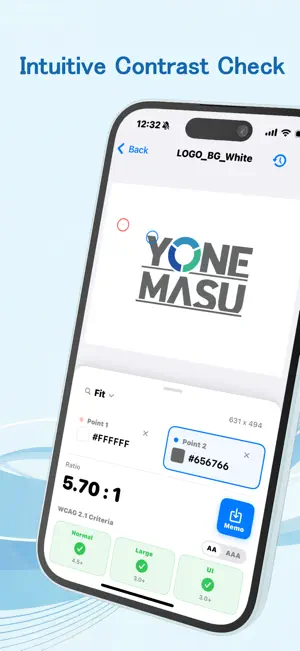
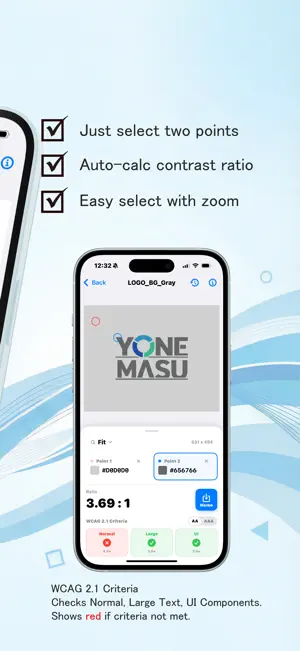
Ensure your designs are accessible and legible for everyone. You can analyze images and URLs.Evaluate the color contrast of your web designs, app UIs, and presentation slides based on the WCAG 2.1 international standards. This app provides instant accessibility checks for Standard Text, Large Text, and UI components. You can analyze images and URLs. ■ Key Features Simple Tap-to-Check Just upload an image and tap two points—the background and the text—to instantly calculate the contrast ratio. You can save up to 5 images within the app for quick reference without re-uploading. You can now display a web page by entering a URL and compare by tapping on the page. 300% Zoom Function Magnify your designs up to 300%. Even on a smartphone screen, you can examine fine details and ensure your work is perfect. Precision Magnifying Glass (Loupe) The built-in magnifying glass appears when you tap, allowing you to target and select specific pixels with pinpoint accuracy—ideal for complex designs or gradients. You can set the magnification of the loupe from 2x to 5x. History Management Save your results with a single tap. View your history of contrast ratios and HEX color codes at a glance. (Note: History is maintained during the current session and resets when the app is closed or a new image is selected.) Full WCAG 2.1 Compliance The app automatically determines if your colors meet the 4.5:1 ratio required for accessibility, making it easy to see if your content is truly readable. ■ Who It’s For Web, UI, and UX Designers App Developers & Front-end Engineers Business professionals creating presentations or flyers Any creator focused on inclusive, accessible design ■ Supported Formats JPEG, PNG, and HEIC High-resolution images up to 4000px Import directly from your Photo Library or Files app ■ Privacy First Your privacy is our priority. All image analysis is performed locally on your device. No data is ever uploaded to external servers.
What’s new
Version 1.4 · Updated January 23, 2026
Change the initial selection on the check screen. Compatible with iPad (full screen only).
App privacy
The developer, YONEMASU, K.K, reported these privacy practices to Apple.
Data Used to Track You
The following data may be used to track you across apps and websites owned by other companies:
- Identifiers: Device ID
- Usage Data: Product Interaction, Advertising Data
- Diagnostics: Crash Data, Performance Data
Data Linked to You
The following data, which may be collected and linked to your identity, may be used for the following purposes:
- Identifiers: Device ID
- Usage Data: Product Interaction, Advertising Data
- Diagnostics: Crash Data, Performance Data
Used for: Third-Party Advertising, Analytics
Alternatives to Pixel Contrast Checker
Looking for apps like Pixel Contrast Checker? Here are 6 similar apps on the App Store. The highest rated is HAP Studio (5.0/5), and all 6 are free to download.
-
 Contrast Checker WCAG AA AAA
-
 HAP Studio
5.0
HAP Studio
5.0
-
 ViRE – Regex You Can Read
4.1
ViRE – Regex You Can Read
4.1
-
 Accessibility Techniques
5.0
Accessibility Techniques
5.0
-
 Mobile IDE: AI App Builder
4.3
Mobile IDE: AI App Builder
4.3
-
 Aspect Cropper
4.5
Aspect Cropper
4.5
| App | Rating | Price | Last updated | Compare |
|---|---|---|---|---|
| Pixel Contrast Checker | – | Free | January 23, 2026 | |
| Contrast Checker WCAG AA AAA | – | Free | Sep 14, 2026 | Compare |
| HAP Studio | 5.0 / 5 (1) | Free | Sep 14, 2026 | Compare |
| ViRE – Regex You Can Read | 4.1 / 5 (15) | Free | Oct 2, 2024 | Compare |
| Accessibility Techniques | 5.0 / 5 (15) | Free | Sep 24, 2026 | Compare |
| Mobile IDE: AI App Builder | 4.3 / 5 (35) | Free | Oct 14, 2026 | Compare |
| Aspect Cropper | 4.5 / 5 (24) | Free | Jan 14, 2026 | Compare |