

Unmuss: Voice to Text AI
Jun Liu Productivity iPhoneiPadiPod touchApple Watch
Unmuss: Voice to Text AI is a free Productivity app for iPhone and iPad by Jun Liu. Requires iOS 18.5. Updated October 9, 2026.
- Price
- Free
- on the App Store
- Size
- 17 MB
- Age 4+
- Updated
- Oct 9
- 2026 · v2.2.0
Screenshots


About Unmuss: Voice to Text AI
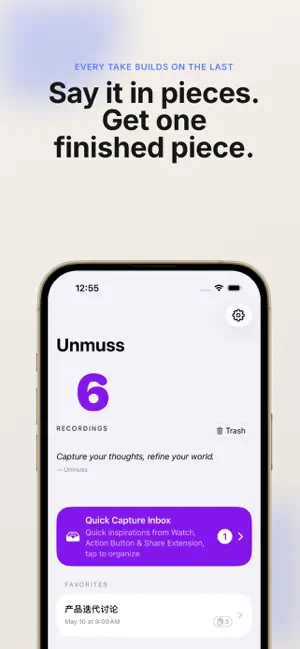
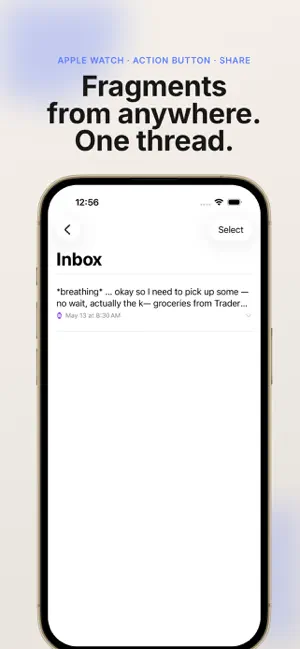
Say it in pieces. Get back one piece of writing. Voice to text that keeps working on your idea. Most apps take one recording and hand back one transcript. Unmuss keeps the thread: say a piece now, add another on the walk home, and every take is woven into the ones before it — until scattered fragments become one piece of writing that actually holds together. You don't think in finished paragraphs. So don't write that way either. HOW AN IDEA GROWS 1. Say one piece. Talk for ten seconds or a minute. You get a clean, structured take — not a word-for-word transcript. (Each take is up to 60 seconds: one thought at a time, by design.) 2. Add another piece whenever it shows up. Record again in the same Idea Session. Your new take is fused with everything you said before, so the draft gets fuller instead of starting over from scratch. 3. Let the fragments pile up. A thought from your Watch, one sentence on the Action Button, a memo caught while driving — they land as Pending Materials, waiting to be woven into your next take. Nothing gets lost, and nothing has to be organized yet. 4. Pull it all together. Master Recap turns the entire thread — every take, every fragment — into one finished draft. No new recording required. WATCH YOUR IDEA CHANGE Every pass is saved as a version. Put any two side by side and see exactly what changed — what got reworded, what got re-ordered, what you added later. V1 was a hunch. V3 is something you'd actually send. • Version history for every Idea Session • Side-by-side diff with changes highlighted • Nothing is overwritten — and if you change your mind, step back to any earlier version. Even then, nothing gets deleted AI THAT RESTRUCTURES, NOT TRANSCRIBES This isn't a verbatim transcript. Unmuss reads what you meant, rebuilds the logic, and turns spoken language into written language — keeping your voice and your intent intact. CAPTURE FROM ANYWHERE, INTO THE SAME THREAD • Apple Watch — record on your wrist; it transfers to iPhone and joins the thread • Action Button — one press, one thought saved. No unlocking, no hunting for the app • While you drive — say "Hey Siri, capture driving note in Unmuss." Recording starts in the background and stops itself two seconds after you finish speaking • Share Extension — bring in an audio file from Voice Memos or any other app CONTEXT YOU DIDN'T HAVE TO TYPE Each take can carry where you were and what the weather was like, so a voice journal reads like a memory instead of a note. EIGHT LANGUAGES English, German, French, Spanish, Portuguese, Japanese, Chinese and Cantonese. Speak in yours; the AI writes in it. BUILT FOR YOUR APPLE KIT Live Activities and Dynamic Island show progress. Widgets put record one tap away. iCloud keeps everything in sync. Live transcription runs on your device as you speak. AI rewriting is processed on our servers, where third-party AI service providers transcribe and rewrite the audio and text on our behalf — and you are asked for your permission before your first recording is uploaded. No account, no sign-up — open it and talk. WHO IT'S FOR • People who think out loud and figure it out as they go • Writers, founders and researchers growing one idea over days • Commuters whose best thinking happens behind the wheel • Anyone whose first draft is a ramble and knows it PRICING Free to download, with credits to start. You always see what a pass bought you: every one is saved as a version, with every change highlighted — and the earlier version is never overwritten. Extra credits and Unmuss Pro are available as in-app purchases. See the app for current pricing. Say it in pieces. Get back one piece of writing. Terms of Use (EULA): https://www.apple.com/legal/internet-services/itunes/dev/stdeula/
What’s new
Version 2.2.0 · Updated October 9, 2026
Your idea can now grow out loud. • Record another take any time — it fuses with everything you said before, so your draft gets fuller instead of starting over • Master Recap turns a whole Idea Session into one finished draft — no new recording needed • Put any two versions side by side and see exactly what changed • Changed your mind? Step back to any earlier version — nothing gets deleted • Capture hands-free while you drive: say "Hey Siri, capture driving note in Unmuss" and it records in the background, stopping on its own • A clearer first run, a rebuilt version list, and a noticeably smoother, faster app all round Say it in pieces. Get back one piece of writing.
App privacy
The developer, Jun Liu, reported these privacy practices to Apple.
Data Not Collected
The developer does not collect any data from this app.
Alternatives to Unmuss: Voice to Text AI
Looking for apps like Unmuss: Voice to Text AI? Here are 6 similar apps on the App Store. The highest rated is Whalescribe: AI Voice Notes (5.0/5), and 5 of the 6 are free to download.
-
 Whalescribe: AI Voice Notes
5.0
-
 Talk Memo: Watch Voice Notes
-
 Voice Notes AI - Vocascribe
-
 AICHE Notes - AI Voice to Text
5.0
-
 Password & ID Wallet
-
 Sotto: AI Chat on Your Wrist
| App | Rating | Price | Last updated | Compare |
|---|---|---|---|---|
| Unmuss: Voice to Text AI | – | Free | October 9, 2026 | |
| Whalescribe: AI Voice Notes | 5.0 / 5 (2) | Free | Oct 7, 2026 | Compare |
| Talk Memo: Watch Voice Notes | – | 3.99 USD | Oct 13, 2026 | Compare |
| Voice Notes AI - Vocascribe | – | Free | Jun 14, 2026 | Compare |
| AICHE Notes - AI Voice to Text | 5.0 / 5 (2) | Free | Jun 29, 2026 | Compare |
| Password & ID Wallet | – | Free | Oct 10, 2026 | Compare |
| Sotto: AI Chat on Your Wrist | – | Free | Oct 5, 2026 | Compare |