

TechDad Player
少义 余 Entertainment iPhoneiPadiPod touchMac
TechDad Player is a free Entertainment app for iPhone and iPad by 少义 余. Rated 5.0/5 from 1 ratings. Requires iOS 17.0. Updated July 16, 2026.
- Rating
- 5.0
- 1 ratings
- Price
- Free
- on the App Store
- Size
- 9 MB
- Age 4+
- Updated
- Jul 16
- 2026 · v2.0.0
Screenshots

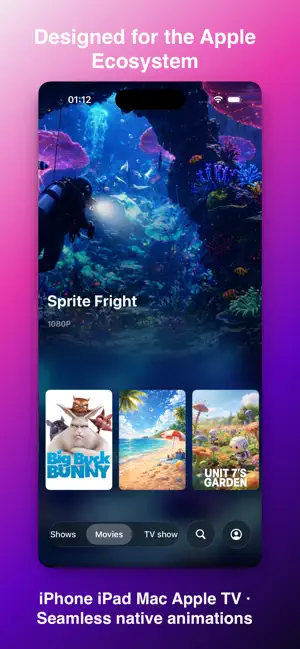

About TechDad Player
TechDad Player - The Ultimate Native Player "Minimal above all. Back to native. This may be the most beautiful and lightweight player you've ever seen." TechDad Player is more than just a media player — it is a piece of art crafted specifically for the Apple ecosystem. We reject the size compromises of traditional players, using an ultra-compact footprint of around just 10MB to unlock every ounce of power from Apple silicon. From the agility of iPhone to the immersive experience on Mac and Apple TV, TechDad Player delivers unprecedented visual fidelity and silky-smooth performance. 【Immersive Aesthetics: Unified Visual Experience Across All Platforms】 - Large-screen immersive UI: Poster wall designed for Apple TV, Mac, and iPad – your library becomes an elegant private theater - Unified experience: From iPhone to Apple TV, consistent native transition animations throughout - Native fluidity: 100% SwiftUI, every gesture follows physically accurate damping and bounce 【Ultimate Lightweight & Instant Launch】 - The 10MB miracle: Minimalist code, instant download, immediate launch - Native efficiency: Minimal memory footprint, significantly extended battery life 【Deep Native: Subtitle Aesthetics, Your Way】 - Supports System-Level Subtitle Customization: Deeply integrated with Apple's system-level subtitle settings. Personalize your subtitle font, size, color, background, border, and opacity — all to your liking. Whether you prefer the timeless "Classic" look or the clean simplicity of "Outline Text," your perfect viewing experience is entirely in your hands. 【Picture-in-Picture (PiP) Without Limits】 - Cross-platform PiP subtitles: Breaking system limitations – subtitles remain visible in floating mode - Seamless transition: From fullscreen to PiP with system-native smooth animations 【Smart Hardware Decoding, Smooth Playback】 - Native hardware decoding: Full utilization of Apple chip acceleration - All major formats: H.264, HEVC, AV1 and more, MKV/MP4 containers play seamlessly - Perfect HDR: Intelligent HDR color reproduction with Apple hardware acceleration - Embedded tracks: Perfect parsing of multi-audio and multilingual subtitles 【Apple Ecosystem Integration】 - Handoff continuity: Didn't finish on iPhone? One tap to continue on Mac - Universal Purchase: Buy once, use on iPhone, iPad, Mac, and Apple TV 【Purity & Privacy】 - Zero tracking, zero collection: All data stays locally on your device - No ads: A pure tool, built only for watching 【Flexible Subscription Options】 - Monthly: Continuous updates with the latest features - Yearly: More affordable long-term option - Lifetime: Pay once, use forever on all platforms Subscription Note: Subscriptions auto-renew. Cancel anytime in Apple ID settings. Lifetime purchase requires no subscription – pay once, enjoy all platforms forever. Streaming Protocols: Emby, Jellyfin Supported Formats: MKV, MP4, MOV and more Subtitles: Embedded and external Local File Playback: MP4, MOV and more Terms of Service: https://techdad-player-legal.pages.dev/terms-of-service.html Privacy Policy: https://techdad-player-legal.pages.dev/privacy-policy.html
What’s new
Version 2.0.0 · Updated July 16, 2026
TechDad Player 2.0 is a comprehensive upgrade to your playback experience. • Full adoption of Apple native playback controls across iPhone, iPad, Mac, and Apple TV • Brand-new Liquid Glass interface, unifying visuals and interactions across all platforms • Significantly enhanced playback experience for MKV, MP4, HEVC, and Dolby Vision • Expanded audio compatibility including DTS, DTS-HD MA, TrueHD, FLAC, and multi-channel Opus • Embedded and external subtitles are now unified under the system's native subtitle menu • Improved Picture-in-Picture, AirPlay, Handoff playback, and system media controls • Optimized resume playback, fast-forward/rewind, and long-distance scrubbing response • Improved playback stability for special subtitles, low-resolution videos, and Mac window resizing • Optimized iPhone bottom navigation and button touch experience across all platforms 2.0 is more than just an interface update—it is a complete reconstruction of the player's core capabilities and the Apple platform experience.
App privacy
The developer, 少义 余, reported these privacy practices to Apple.
Data Not Collected
The developer does not collect any data from this app.
Alternatives to TechDad Player
Looking for apps like TechDad Player? Here are 6 similar apps on the App Store. The highest rated is Tomo TV, a Jellyfin Client (5.0/5), and all 6 are free to download.
-
 LiquidFin
3.8
-
 OopsPlayer - Media Player
2.8
-
 Tomo TV, a Jellyfin Client
5.0
-
 JellyTV
4.3
-
 CinePlayer
1.0
-
 Zuno: Media Player
4.3
| App | Rating | Price | Last updated | Compare |
|---|---|---|---|---|
| TechDad Player | 5.0 / 5 (1 rating) | Free | July 16, 2026 | |
| LiquidFin | 3.8 / 5 (5) | Free | Oct 14, 2026 | Compare |
| OopsPlayer - Media Player | 2.8 / 5 (4) | Free | Oct 14, 2026 | Compare |
| Tomo TV, a Jellyfin Client | 5.0 / 5 (3) | Free | Oct 13, 2026 | Compare |
| JellyTV | 4.3 / 5 (38) | Free | Oct 15, 2026 | Compare |
| CinePlayer | 1.0 / 5 (1) | Free | Apr 17, 2026 | Compare |
| Zuno: Media Player | 4.3 / 5 (28) | Free | Oct 13, 2026 | Compare |
Compare TechDad Player with the top alternatives: ratings, updates, ASO score and keyword gaps →