

FileJump
Inspire Vision Tech LLC Utilities iPhoneiPadiPod touch
FileJump is a free Utilities app for iPhone and iPad by Inspire Vision Tech LLC. Rated 1.0/5 from 1 ratings. Requires iOS 15.0. Updated September 24, 2026.
- Rating
- 1.0
- 1 ratings
- Price
- Free
- on the App Store
- Size
- 66 MB
- Age 4+
- Updated
- Sep 24
- 2026 · v1.1.8
Screenshots


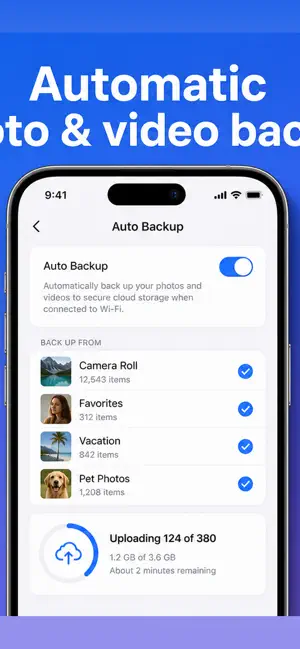
About FileJump
ileJump is your personal cloud storage, built to keep your photos, videos, and documents safe, organized, and available on every device. Upload anything, find it instantly, and free up space on your iPhone — without giving up control of your files. KEEP EVERYTHING BACKED UP • Automatic photo & video backup from your camera roll • Background uploads that keep running after you leave the app • Choose exactly which albums to back up • Wi-Fi-only option to protect your data plan • Upload large files — up to 1 GB each ALL YOUR FILES, BEAUTIFULLY ORGANIZED • Browse files and folders with list or grid views • Star important files for quick access • Powerful search to find anything fast • Smart albums that organize your media automatically • Built-in viewers for photos, videos, PDFs, and documents • Play your music and audio right inside the app A PRIVATE VAULT FOR WHAT MATTERS • Lock sensitive files in an encrypted vault • Protect the app with Face ID • Your private files stay private IMPORT FROM THE CLOUD • Bring files in directly from Google Drive • Move your content into FileJump in a few taps WORKS THE WAY iOS DOES • Access your FileJump files from the iOS Files app • Share files into FileJump from any app • Siri Shortcuts for upload, search, and quick actions • Home Screen widgets for one-tap access • Scan documents straight into your storage WORKSPACES FOR WORK & LIFE • Organize files into separate workspaces • Keep personal and shared content cleanly separated FREE UP SPACE • Back up your camera roll, then safely clear local copies • Carry your whole library without filling your phone Whether you're backing up a lifetime of photos, carrying important documents, or keeping private files secure, FileJump gives you a fast, reliable, and private home for everything. Download FileJump and take your storage with you. ———— Some features may require a FileJump account and/or a storage subscription. Continued use of background location-enabled features (such as reading photo location metadata) may decrease battery life. Support: https://filejump.com Privacy Policy: https://filejump.com/privacy-policy Terms of Use: https://filejump.com/terms
What’s new
Version 1.1.8 · Updated September 24, 2026
Improved Auto Uploads, Fixed a Bug related to iOS device(s) storage getting used up, Fixed "Share to FileJump" intent
App privacy
The developer, Inspire Vision Tech LLC, reported these privacy practices to Apple.
Data Linked to You
The following data, which may be collected and linked to your identity, may be used for the following purposes:
- Contact Info: Email Address, Name
Used for: App Functionality
Data Not Linked to You
The following data, which may be collected but is not linked to your identity, may be used for the following purposes:
- User Content: Photos or Videos
Used for: App Functionality
Alternatives to FileJump
Looking for apps like FileJump? Here are 6 similar apps on the App Store. The highest rated is Fwrd: Auto SMS Forwarder (5.0/5), and all 6 are free to download.
-
 ClipboardNoti
-
 Fwrd: Auto SMS Forwarder
5.0
-
 QR Craft - QR Code Generator
5.0
-
 Clipboard Manager - Cliptop
5.0
-
 CCopy
5.0
-
 Shuffle Texts
| App | Rating | Price | Last updated | Compare |
|---|---|---|---|---|
| FileJump | 1.0 / 5 (1 rating) | Free | September 24, 2026 | |
| ClipboardNoti | – | Free | Jul 30, 2026 | Compare |
| Fwrd: Auto SMS Forwarder | 5.0 / 5 (1) | Free | Oct 28, 2026 | Compare |
| QR Craft - QR Code Generator | 5.0 / 5 (1) | Free | Sep 26, 2026 | Compare |
| Clipboard Manager - Cliptop | 5.0 / 5 (1) | Free | Oct 26, 2026 | Compare |
| CCopy | 5.0 / 5 (1) | Free | Dec 20, 2024 | Compare |
| Shuffle Texts | – | Free | Oct 27, 2026 | Compare |
Compare FileJump with the top alternatives: ratings, updates, ASO score and keyword gaps →