

Video Speed • Slow Mo Editor
Muhammad Mujahid Khan Photo & Video iPhoneiPadiPod touch
Video Speed • Slow Mo Editor is a free Photo & Video app for iPhone and iPad by Muhammad Mujahid Khan. Requires iOS 17. Updated August 26, 2026.
- Price
- Free
- on the App Store
- Size
- 10 MB
- Age 4+
- Updated
- Aug 26
- 2026 · v1.5
Screenshots


About Video Speed • Slow Mo Editor
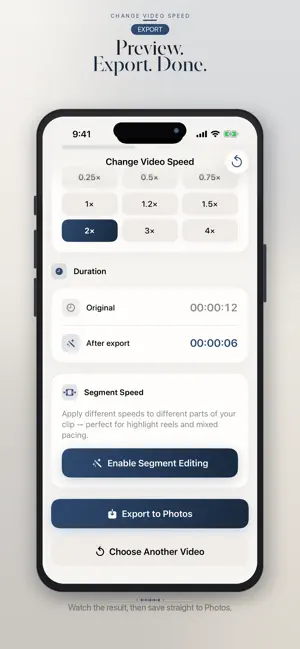
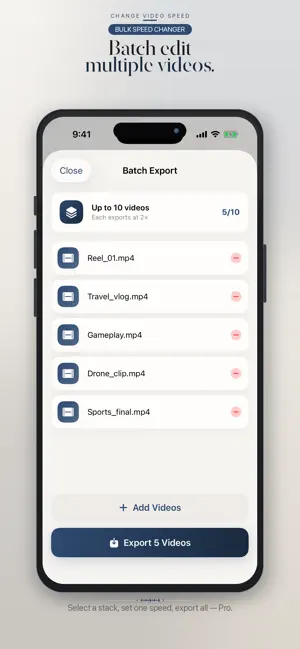
Speed up or slow down any clip from 0.25× to 4×. Free: speeds from 0.25× to 1.25×, one 720p export a day. Pro: 1080p, batch-export up to 10, segment speed. Preview, then save to Photos. SIMPLE VIDEO SPEED EDITOR Adjust playback from 0.25× to 4×, mute or keep audio, and export in a tap. Built for iPhone and iPad. BATCH EXPORT (PRO) Change the speed of up to 10 videos in one tap. Ideal for reels, sports series, and drone footage. SLOW MOTION & FAST FORWARD • Slow down to 0.25× for sports, action, and detail • Speed up to 4× for vlogs, reels, and time-lapse style pacing • Segment speed — apply different speeds to different parts of a clip (Pro) REAL-TIME PREVIEW See the new duration before you export. Keep original audio or mute it. IMPORT FROM PHOTOS OR FILES Choose videos from Photos or the Files app (Downloads, iCloud Drive, and other locations available in Files). Save finished videos to Photos. HOW IT WORKS 1. Choose a video from Photos or Files — or open Batch Export 2. Set speed with presets or the slider 3. Preview 4. Export one clip, or export the whole batch to Photos FREE • Speeds from 0.25× to 1.25×, one export per day, 720p PRO Weekly, Monthly, and Yearly subscriptions unlock the same Pro features: • Batch export up to 10 videos at the same speed • Every speed unlocked (including above 1.25×) • 1080p export and no ads • Segment speed in one clip • Unlimited exports Payment is charged to your Apple ID. Subscriptions auto-renew unless canceled at least 24 hours before the end of the current period. Manage or cancel in Settings > Apple ID > Subscriptions. Terms apply. Support: [email protected] Privacy Policy: https://justclack.blogspot.com/p/privacy-policy.html Terms of Use: https://www.apple.com/legal/internet-services/itunes/dev/stdeula/
What’s new
Version 1.5 · Updated August 26, 2026
• Batch export up to 10 videos at once (Pro) • Import from Files as well as Photos • Segment speeds in one clip (Pro) • Clearer free vs Pro limits and subscription wording • Smoother rendering performance and bug fixes
App privacy
The developer, Muhammad Mujahid Khan, reported these privacy practices to Apple.
Data Used to Track You
The following data may be used to track you across apps and websites owned by other companies:
- Usage Data: Advertising Data
Data Not Linked to You
The following data, which may be collected but is not linked to your identity, may be used for the following purposes:
- Usage Data: Advertising Data
Used for: Third-Party Advertising
Alternatives to Video Speed • Slow Mo Editor
Looking for apps like Video Speed • Slow Mo Editor? Here are 6 similar apps on the App Store. The highest rated is VideoSpeed: Video Speed Editor (5.0/5), and all 6 are free to download.
-
 Video to Audio: Video to MP3
-
 Geo Shot Camera
-
 VideoSpeed: Video Speed Editor
5.0
VideoSpeed: Video Speed Editor
5.0
-
 VideoCompressor - Fast Shrink
-
 Video Speed & Slow Motion
-
 ExifSmith: Batch Exif Editor
| App | Rating | Price | Last updated | Compare |
|---|---|---|---|---|
| Video Speed • Slow Mo Editor | – | Free | August 26, 2026 | |
| Video to Audio: Video to MP3 | – | Free | Dec 15, 2025 | Compare |
| Geo Shot Camera | – | Free | Dec 15, 2025 | Compare |
| VideoSpeed: Video Speed Editor | 5.0 / 5 (4) | Free | Apr 1, 2026 | Compare |
| VideoCompressor - Fast Shrink | – | Free | Dec 15, 2025 | Compare |
| Video Speed & Slow Motion | – | Free | Apr 19, 2026 | Compare |
| ExifSmith: Batch Exif Editor | – | Free | Jul 11, 2026 | Compare |