

Xtro
Reply200 Inc. Developer Tools iPhoneiPadiPod touch
Xtro is a free Developer Tools app for iPhone and iPad by Reply200 Inc. Requires iOS 17.0. Updated March 17, 2026.
- Price
- Free
- on the App Store
- Size
- 9 MB
- Age 4+
- Updated
- Mar 17
- 2026 · v1.2.0
Screenshots

About Xtro
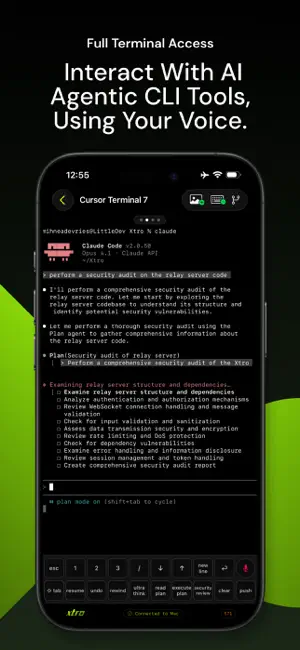
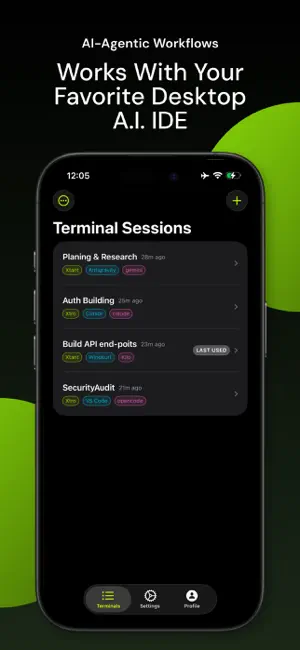
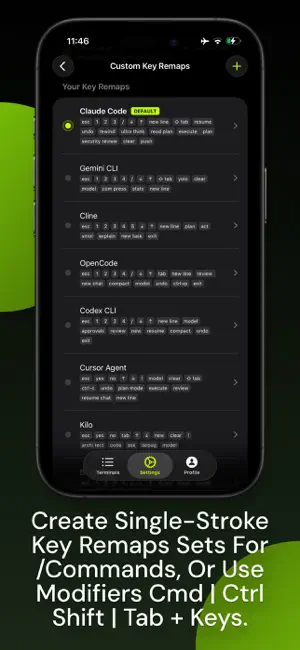
Xtro. The Mobile IDE for AI Developers Xtro is a mobile IDE and terminal app for developers who use AI coding tools like Claude Code, Gemini CLI, and OpenCode. It turns your iPhone into a real extension of your Mac development environment, letting you continue terminal sessions, AI conversations, and Git workflows from anywhere. This is not another SSH client. Xtro is a true IDE front-end for AI-assisted development. _____ Built for AI-First Developers If you run AI coding agents on your Mac, Xtro keeps you connected when you step away. Start an AI task on Mac. Get notified on iPhone. Approve, respond, and continue instantly. Perfect for indie developers, solo founders, and startup teams shipping fast. _____ Core Features Real Terminal Sessions Access your actual Mac terminal sessions, not remote copies. See live output from builds, tests, deployments, and AI agents in real time. AI CLI Support Designed for Claude Code, Gemini CLI, OpenCode, and other AI developer tools. Your AI context and terminal state stay perfectly in sync. Multi-Session Management Run multiple terminal sessions at once. Swipe between sessions to debug, commit, deploy, or monitor logs. Integrated Git Client Review diffs with syntax highlighting, stage files, commit, push, pull, and manage branches directly from your iPhone. Custom Key Remaps 18 programmable keys with presets for AI coding tools. Run complex commands with a single tap. Export and share layouts. Voice Commands Dictate terminal commands and AI prompts using speech recognition, ideal for mobile workflows. Screenshot to Terminal Send screenshots directly into your AI CLI session to explain UI bugs or share visual context. Mobile-Optimized Gestures Swipe to switch sessions, double-tap to summon the keyboard, rotate to refresh output. Built for speed on mobile. ______ Developer-First Experience • QR code pairing with your Mac • Face ID protection • Automatic reconnection • Fast resume • Full ANSI color support • xterm-256color compatibility ______ Real AI Developer Use Cases • Continue debugging while away from your desk • Respond to AI agent prompts instantly • Monitor deployment logs in real time • Run tests and scripts remotely • Manage Docker containers • Review and merge changes on the go ______ Secure by Design • AES-256 encryption • Secure token pairing • No terminal data stored on servers • Direct device-to-device connection ______ Your IDE, Everywhere Xtro is not remote access. It is your development workspace, mobilized. Built for developers who rely on AI tools and refuse to stop shipping. Terms of Use: https://www.apple.com/legal/internet-services/itunes/dev/stdeula/
What’s new
Version 1.2.0 · Updated March 17, 2026
What's New in 1.2.0 - Terminals renamed to Conversations for a clearer experience - Improved terminal rendering with better emoji display and font metrics - Fixed voice transcription spacing between consecutive recordings - Polished login screen with consistent field styles - Fixed app icon appearance in all modes
App privacy
The developer, Reply200 Inc., reported these privacy practices to Apple.
Data Linked to You
The following data, which may be collected and linked to your identity, may be used for the following purposes:
- Contact Info: Email Address, Name
- Identifiers: User ID, Device ID
Used for: App Functionality
Alternatives to Xtro
Looking for apps like Xtro? Here are 6 similar apps on the App Store.


| App | Rating | Price | Last updated | Compare |
|---|---|---|---|---|
| Xtro | – | Free | March 17, 2026 | |
| One Ship Army | – | Free | May 26, 2026 | Compare |
| VibeOrbit | – | Free | Jul 1, 2026 | Compare |
| DevSolve | – | Free | Apr 6, 2026 | Compare |
| Veelops | – | Free | Jun 10, 2026 | Compare |
| PocketEng | – | Free | Apr 22, 2026 | Compare |
| DeltaPad - Dev Tools | – | Free | Mar 19, 2026 | Compare |
Compare Xtro with the top alternatives: ratings, updates, ASO score and keyword gaps →