

PC View Mode for Safari
Seiya.k Utilities iPhoneiPadiPod touch
PC View Mode for Safari is a paid Utilities app for iPhone and iPad by Seiya.k. Requires iOS 16.0. Updated October 23, 2026.
- Price
- 1.99 USD
- on the App Store
- Size
- 7 MB
- Age 4+
- Updated
- Oct 23
- 2026 · v1.3.9
Screenshots


About PC View Mode for Safari
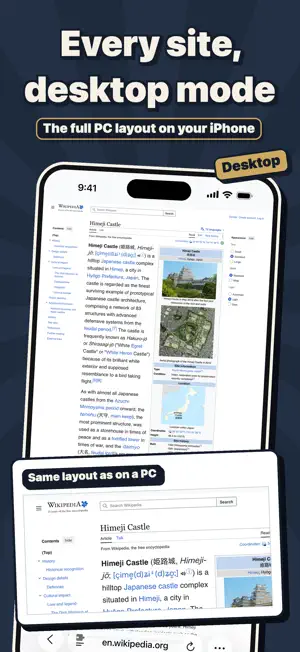
You tapped "Request Desktop Website" in Safari, and the page stayed in its mobile layout. Or a site told you "Please use a PC to access this page" and stopped you there. PC View Mode is a Safari extension that opens those sites on iPhone and iPad as the real desktop version. ▼ What it does · Tap the button once and the site switches to its desktop layout · The site is remembered, so it opens in desktop view automatically from then on · Tap the same button again to go back to the mobile layout ▼ Why it works where Safari's built-in option doesn't Safari's built-in option only changes how your browser identifies itself (the User-Agent). Your screen width stays the same, so sites that pick a layout by width stay in mobile mode. PC View Mode changes both: how the browser identifies itself and the page width it reports. That is why sites that ignored the built-in option switch to their desktop layout here. ▼ Made for · Working in company systems and admin panels (WordPress, AWS, internal tools) while away from your desk · Booking and member sites that show "desktop only" or block phones · YouTube, Amazon, eBay and Wikipedia with the full desktop UI, filters and comparison tables · Using an iPad as a laptop replacement, with sites looking exactly as they do on a PC ▼ Key features · One-tap switch between desktop and mobile view · Per-site rules remembered automatically (manage or delete them from the settings list) · Three page widths to choose from (1024px / 1280px / 1440px) · Floating button on the page: pick any of the four corners, or hide it · UI in 33 languages, with a manual language override ▼ No surprises · One-time purchase. No subscription, no in-app purchases · No ads · No data collection. All settings stay on your device Requirements: Safari on iOS 16 or later (iPhone / iPad). iOS 16.4 or later recommended. On first use, turn on PC View Mode under Settings → Safari → Extensions. A step-by-step guide is included in the app.
What’s new
Version 1.3.9 · Updated October 23, 2026
• Screen width and zoom are now remembered per site. • New zoom options (100% / 125% / 150%) make text easier to read while keeping the desktop layout. • Minor improvements and stability fixes.
App privacy
The developer, Seiya.k, reported these privacy practices to Apple.
Data Not Collected
The developer does not collect any data from this app.
Alternatives to PC View Mode for Safari
Looking for apps like PC View Mode for Safari? Here are 6 similar apps on the App Store. The highest rated is OpenWRT Manager (5.0/5), and 3 of the 6 are free to download.
-
 OpenWRT Manager
5.0
-
 Nucleo LLM by Marte AI
-
 Dash for Tesla
4.7
-
 VHF & UHF Radio Field Planner+
1.0
-
 AI Voice Recorder Pro: Notes
3.0
-
 Countix – Simple Counter
| App | Rating | Price | Last updated | Compare |
|---|---|---|---|---|
| PC View Mode for Safari | – | 1.99 USD | October 23, 2026 | |
| OpenWRT Manager | 5.0 / 5 (1) | 0.99 USD | Oct 19, 2026 | Compare |
| Nucleo LLM by Marte AI | – | Free | Apr 6, 2026 | Compare |
| Dash for Tesla | 4.7 / 5 (3) | 0.99 USD | Oct 2, 2026 | Compare |
| VHF & UHF Radio Field Planner+ | 1.0 / 5 (1) | Free | Oct 24, 2026 | Compare |
| AI Voice Recorder Pro: Notes | 3.0 / 5 (2) | Free | Sep 30, 2026 | Compare |
| Countix – Simple Counter | – | 0.99 USD | Apr 24, 2026 | Compare |