

KIPTV — IPTV Player
Attilio Kulli Entertainment iPhoneiPadiPod touch
KIPTV — IPTV Player is a free Entertainment app for iPhone and iPad by Attilio Kulli. Rated 4.5/5 from 4 ratings. Requires iOS 18.0.
- Rating
- 4.5
- 4 ratings
- Price
- Free
- on the App Store
- Size
- 316 MB
- Age 4+
- Updated
- Nov 2
- 2026 · v3.9
Screenshots


About KIPTV — IPTV Player
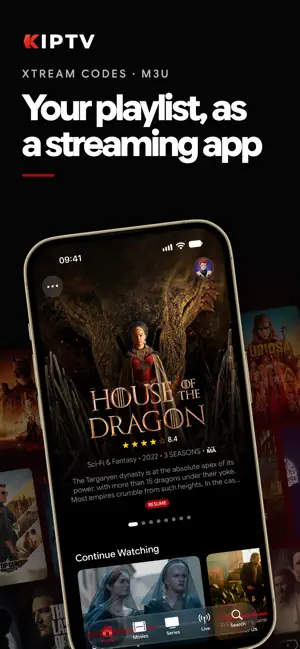
KIPTV turns your IPTV playlists into a cinematic experience. Connect your Xtream Codes or M3U providers and unlock a world of movies, TV shows, and live channels through an interface designed to make you forget you're using an IPTV player. DESIGNED WITH CARE KIPTV doesn't look like an IPTV player. It looks like the app you've always wanted. Every screen is crafted down to the smallest detail: artwork loads beautifully, animations feel smooth and natural, everything flows effortlessly from one view to the next. The interface adapts seamlessly to iPhone, iPad, and Apple TV, and it's already ready for the new Liquid Glass look in iOS 26. Open it once and you'll feel the difference. BROWSE IN STYLE Every title is automatically enriched with HD posters, synopses, cast, trailers, and age ratings thanks to integration with the world's largest movie database. Browse by genre, discover the week's trending titles in the hero carousel, or search across all your content — movies, shows, channels, actors, and TV programs — from a single search bar. THREE VIDEO ENGINES, ZERO HASSLE KIPTV packs three playback engines with automatic switching when something doesn't play. If a format won't work with one engine, the app switches to the next — no action needed on your part. Supports HLS, MP4, MKV, AVI, RTSP, and virtually every format out there. LIVE TV WITH PROGRAM GUIDE Watch live TV with a built-in EPG: see what's on now, what's coming next, and browse the full program guide in grid or timeline view. Smart grouping of similar channels and up to 7 days of replay for channels with archives. Set reminders so you never miss a show. PICK UP WHERE YOU LEFT OFF Your watch progress syncs automatically to the cloud across all your devices. Start a movie on iPhone and pick it up on Apple TV, or the other way around. The next episode plays automatically — binge without interruptions. DOWNLOAD & WATCH OFFLINE Download movies and individual episodes to watch without a connection. On a plane, on the subway, off the grid. The app detects when you're offline and automatically switches to offline mode with all your downloaded content. YOUR SPACE, YOUR RULES Organize your favorites with custom tags. Hide categories you don't care about. Reorder everything the way you like. Protect content with PIN-based parental controls. Choose from over 20 avatars for each profile and manage up to 5 playlists with a Premium Plus subscription. ON THE BIG SCREEN Cast to your TV with built-in Chromecast or stream to your Apple TV via AirPlay. Use Picture-in-Picture to keep watching while you browse. On Apple TV, your content appears right on the Top Shelf. SUBTITLES IN EVERY LANGUAGE Search and download subtitles in any language. Customize font, size, color, and position. Closed captions for the hearing impaired included. FOR THOSE WHO APPRECIATE THE DETAILS Incognito mode. Manual engine selection for VOD and live separately. Configurable network buffer. Custom HTTP user agent. Adjustable content and EPG cache. Start free. Go Premium when you're ready. KIPTV is a media player. The app does not provide, host, or distribute any content. Users are solely responsible for the content played through their own playlists. Terms of Use: https://kiptv.app/terms Privacy Policy: https://kiptv.app/privacy
What’s new
Version 3.9 · Updated November 2, 2026
• Recordings Press Record in the Guide or the player and watch the show whenever you like. Every new episode of a series too, automatically.* *How they work: kiptv.app/recordings • Pause live TV Pause even channels without replay and pick up where you left off, up to 30 minutes later. • Backup addresses Add up to 3 backup addresses for your Xtream playlist: if the main one doesn't respond, the playlist opens from the first one that works. • Age rating and warnings at start When a movie or episode starts, you see the age rating and content warning icons, like violence or language, for a few seconds. • Only titles in the playlist With a new switch for each playlist, Home, Trending and platforms show only the movies and series you can watch. Turn it on in Settings. • Browse by genre A platform's page can be filtered by genre, and a genre's page can be sorted by rating or date and goes up to 500 titles. • Replay from another version If the version of the channel you're watching has no replay but another one does, "From Start" and Replay use that one's archive. • Aether engine updated Aether engine updated to 7.54.0: series that showed a black screen now play, and skipping forward is faster. • Better on iPhone Duo In tabletop mode the controls below the fold turn off by themselves during the movie, and when closed the landscape player centers the controls on the video. • Who's watching In your account's Connected Devices, you see which device is watching something right now. • The whole saga in one tap On a movie's page, the "From the Collection" title opens the page of the whole saga. • Episodes in the right place Episode titles and images are no longer out of step when the provider puts specials inside a season. • More titles recognized Improved title recognition, even when the movie or series name is preceded by a year or a ranking number. • The right audio language Original-language movies with subtitles no longer show the audio in a different language. • Trakt connection Connecting to Trakt succeeds even if the network hiccups while you approve the code in the browser. • Single-connection playlists When you change channel, the new one waits a moment for the line to free up instead of showing an error. • More reliable at launch The app no longer signs you out if the server doesn't respond at launch, and after "Force reload playlist" movies are recognized again right away. • AirPlay for live channels Live channels sent via AirPlay have video again, even on non-Apple TVs. • Minor bug fixes
App privacy
The developer, Attilio Kulli, reported these privacy practices to Apple.
Data Linked to You
The following data, which may be collected and linked to your identity, may be used for the following purposes:
- Contact Info: Email Address
- Identifiers: User ID
- Usage Data: Product Interaction
Used for: App Functionality
Data Not Linked to You
The following data, which may be collected but is not linked to your identity, may be used for the following purposes:
- Purchases: Purchase History
- Diagnostics: Crash Data
Used for: App Functionality
Alternatives to KIPTV — IPTV Player
Looking for apps like KIPTV — IPTV Player? Here are 6 similar apps on the App Store. The highest rated is IPTV PopStream Player (5.0/5), and all 6 are free to download.
-
 OneTV Connect: IPTV Player
4.4
-
 Aerial TV: IPTV Player
2.0
-
 IPTV PopStream Player
5.0
-
 IPTV Deck: Player & TV Guide
5.0
-
 Spectati: IPTV & Plex Player
5.0
-
 MyPTV Smart IPTV Player
5.0
| App | Rating | Price | Last updated | Compare |
|---|---|---|---|---|
| KIPTV — IPTV Player | 4.5 / 5 (4 ratings) | Free | November 2, 2026 | |
| OneTV Connect: IPTV Player | 4.4 / 5 (10) | Free | Oct 29, 2026 | Compare |
| Aerial TV: IPTV Player | 2.0 / 5 (1) | Free | Oct 29, 2026 | Compare |
| IPTV PopStream Player | 5.0 / 5 (1) | Free | Oct 25, 2026 | Compare |
| IPTV Deck: Player & TV Guide | 5.0 / 5 (5) | Free | Nov 1, 2026 | Compare |
| Spectati: IPTV & Plex Player | 5.0 / 5 (2) | Free | Nov 3, 2026 | Compare |
| MyPTV Smart IPTV Player | 5.0 / 5 (2) | Free | Nov 1, 2026 | Compare |