

Videoscano - Reframe Video
Christopher Dale Stangland Photo & Video iPhoneiPadiPod touch
Videoscano - Reframe Video is a free Photo & Video app for iPhone and iPad by Christopher Dale Stangland. Rated 5.0/5 from 1 ratings. Requires iOS 26.1.
- Rating
- 5.0
- 1 ratings
- Price
- Free
- on the App Store
- Size
- 1 MB
- Age 4+
- Updated
- Dec 11
- 2025 · v1.0
Screenshots


About Videoscano - Reframe Video
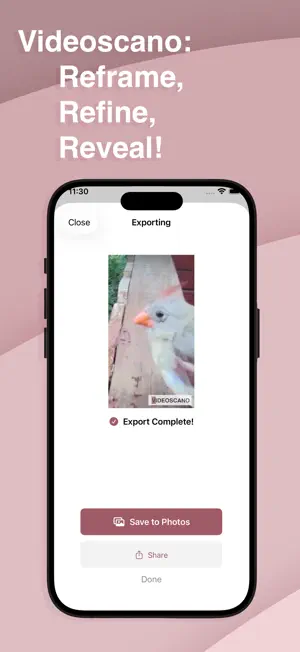
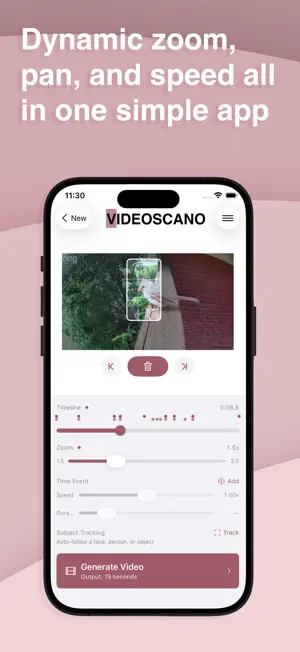
Shot in landscape but posting to TikTok? Videoscano lets you reframe any video with cinematic zoom, pan, and speed effects — so you never have to choose between how you filmed and where you're sharing. We've all been there. You captured something amazing, but now it's stuck in the wrong format. Maybe you filmed your kid's goal in landscape and Instagram wants vertical. Maybe that street performer was on the left side of the frame but you need them centered. Maybe you just want to punch in on the good part without that guy's elbow in the shot. Videoscano fixes all of that. REFRAME ANYTHING Take any video and choose exactly what part of the frame to show. Zoom in to crop out distractions, pan to follow the action, and export in whatever aspect ratio you need. Your original footage stays intact — you're just choosing what to focus on. LANDSCAPE TO PORTRAIT (AND BACK) Convert horizontal videos to vertical for TikTok, Reels, and Shorts without awkward letterboxing or losing the moment. Set pan keyframes to follow subjects across the frame so nothing important gets cut off. SMOOTH CAMERA MOVEMENTS Add the kind of polish that makes content feel professional. Slow push-ins for drama. Pans that track movement. Pull-outs for reveals. Videoscano smoothly animates between your keyframes so everything looks intentional, not edited. SPEED EFFECTS Slow down to 0.25x for impact moments or speed up to 4x to skip the boring parts. Time events ease in and out naturally — no jarring jumps. REAL-TIME PAN RECORDING Here's a pro move: drag the viewport while your video plays to "record" camera movements in real-time. It's like operating a virtual camera in post. Great for tracking unpredictable action. TIMELINE WITH VISUAL FEEDBACK See all your keyframes at a glance. Speed curves show exactly where slow-mo and fast-forward sections are. Scrubbing snaps to keyframes so you can fine-tune precisely. COMPOSITION TOOLS Rule of thirds grid and center crosshairs help you nail the reframe every time. COMPOSITION TOOLS Rule of thirds grid and center crosshairs help you nail the reframe every time. SUBJECT TRACKING Automatically frame and track a subject VIDEOSCANO PRO Go Pro for unlimited exports and watermark-free videos. Stop cropping. Start reframing. Whether you're rescuing landscape footage for social, pulling focus onto what matters, or adding cinematic movement to static shots — Videoscano makes it easy to get the video you wish you'd filmed in the first place.
App privacy
The developer, Christopher Dale Stangland, reported these privacy practices to Apple.
Data Not Collected
The developer does not collect any data from this app.
Alternatives to Videoscano - Reframe Video
Looking for apps like Videoscano - Reframe Video? Here are 6 similar apps on the App Store. The highest rated is ReShoot: Crop Video & Reframe (5.0/5), and all 6 are free to download.
-
 Reframer - Video Reframer
-
 ReShoot: Crop Video & Reframe
5.0
-
 Pantala: Motion Video Editor
5.0
-
 Auto Reframe: Video Crop
-
 NonFace Videos AI Shorts Maker
-
 Shot Bridge
5.0
| App | Rating | Price | Last updated | Compare |
|---|---|---|---|---|
| Videoscano - Reframe Video | 5.0 / 5 (1 rating) | Free | December 11, 2025 | |
| Reframer - Video Reframer | – | Free | Jul 9, 2026 | Compare |
| ReShoot: Crop Video & Reframe | 5.0 / 5 (4) | Free | Oct 13, 2026 | Compare |
| Pantala: Motion Video Editor | 5.0 / 5 (3) | Free | Sep 9, 2026 | Compare |
| Auto Reframe: Video Crop | – | Free | Sep 8, 2026 | Compare |
| NonFace Videos AI Shorts Maker | – | Free | Oct 15, 2025 | Compare |
| Shot Bridge | 5.0 / 5 (1) | Free | Oct 9, 2026 | Compare |