

SimplyRead - EBook Reader
阳 张 Utilities iPhoneiPadiPod touch
SimplyRead - EBook Reader is a free Utilities app for iPhone and iPad by 阳 张. Rated 5.0/5 from 1 ratings. Requires iOS 16.0. Updated October 30, 2026.
- Rating
- 5.0
- 1 ratings
- Price
- Free
- on the App Store
- Size
- 145 MB
- Age 4+
- Updated
- Oct 30
- 2026 · v6.1.0
Screenshots


About SimplyRead - EBook Reader
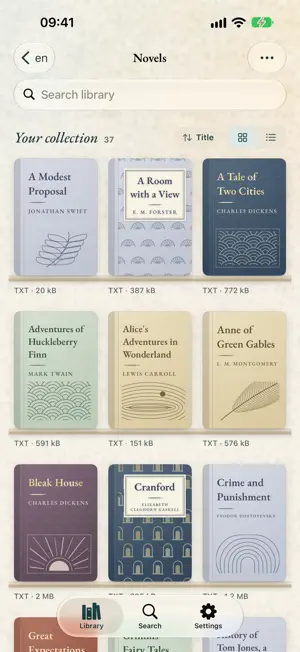
A book you can read — and listen to. SimplyRead opens TXT, EPUB and Markdown files as real books, with clothbound covers, expressive typography and paper textures. Read at your own pace, or listen with natural iOS voices. READ - Comfortable typography with five paper themes and Light or Dark appearance - Page by page, or one continuous scroll — whichever you prefer - Chapters found automatically, including Chinese numeral titles, with a panel to jump anywhere in the book - Bookmarks, find-in-book with highlighted matches, and a Continue Reading card that puts you back where you stopped - Adjust fonts, text size and line spacing, with layouts for iPhone, iPhone Duo and iPad LISTEN - High-quality iOS system voices, at a speed you set - The sentence being spoken is highlighted, and the page follows along - Sleep timer, plus Lock Screen and Control Center controls — keep listening with the screen off BUILD YOUR LIBRARY - Import from the Files app, create a file straight from your clipboard, or download from a URL and watch it arrive - Discover books from public catalogs and open-license sources, with clear labels for downloadable files, online reading and catalog pages - Book covers, clear author labels, folder sorting and destination folders to keep a long shelf tidy EDIT AND KEEP - A built-in editor with Find & Replace, undo for whole-book replacements, recovery after failed saves, and a Fix New Lines tool - iCloud Drive backup and restore for the whole library, reading positions included FREE AND PRO Your own files, the entire reader, themes, chapters, bookmarks and backup are unlimited and free. Pro lifts the daily listening allowance and the download limit. Download availability depends on the source and its access terms. Only import or download content you are entitled to use.
What’s new
Version 6.1.0 · Updated October 30, 2026
Your paper choice now stays with you, even in Dark appearance and after restoring a backup. This update also makes listening controls clearer and improves text and download reliability. Fixed - Choose a light paper while the app is dark and see the paper you selected. - Restore your saved paper and appearance together, including backups from earlier versions. - See when headphones are needed to resume listening in the compact player. - Keep playback paused when skipping sentences from the Lock Screen or Control Center. - Read accented Markdown text with more accurate highlighting and navigation. - Open truncated Big5 text more reliably and avoid saving web pages as book downloads. - Save downloads only to folders that still exist.
App privacy
The developer, 阳 张, reported these privacy practices to Apple.
Data Not Collected
The developer does not collect any data from this app.
Alternatives to SimplyRead - EBook Reader
Looking for apps like SimplyRead - EBook Reader? Here are 6 similar apps on the App Store. The highest rated is Muse Calendar (5.0/5), and all 6 are free to download.
-
 PandaCalc – Notes Calculator
-
 去打卡
-
 PickerFull - Color Extractor
3.6
-
 Muse Calendar
5.0
-
 TidyPic: Clean Photo Library
-
 Compress-san
4.4
| App | Rating | Price | Last updated | Compare |
|---|---|---|---|---|
| SimplyRead - EBook Reader | 5.0 / 5 (1 rating) | Free | October 30, 2026 | |
| PandaCalc – Notes Calculator | – | Free | Apr 27, 2026 | Compare |
| 去打卡 | – | Free | Oct 24, 2026 | Compare |
| PickerFull - Color Extractor | 3.6 / 5 (10) | Free | Jan 19, 2026 | Compare |
| Muse Calendar | 5.0 / 5 (2) | Free | Sep 3, 2026 | Compare |
| TidyPic: Clean Photo Library | – | Free | Jan 5, 2026 | Compare |
| Compress-san | 4.4 / 5 (7) | Free | Sep 25, 2026 | Compare |