

Video Blur: Cloakmark
桥 王 Utilities iPhoneiPadiPod touch
Video Blur: Cloakmark is a free Utilities app for iPhone and iPad by 桥 王. Rated 5.0/5 from 1 ratings. Requires iOS 17.6. Updated October 22, 2026.
- Rating
- 5.0
- 1 ratings
- Price
- Free
- on the App Store
- Size
- 52 MB
- Age 4+
- Updated
- Oct 22
- 2026 · v1.5.5
Screenshots



About Video Blur: Cloakmark
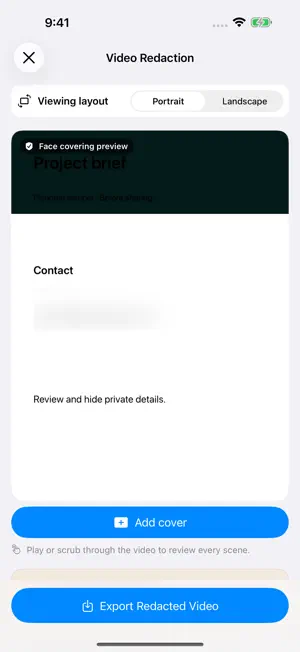
Cloakmark, formerly ZeroNet Redact. Redact photos, videos and PDFs before you share them. Hide sensitive details, review your edits and export a copy on your iPhone or iPad. Content processing stays on your device. FOR SCREENSHOTS, RECEIPTS & PHOTOS Use local text detection to find phone numbers and email addresses, then review the suggested areas. Search repeated text or add covers manually. Choose solid covers, mosaic or blur, and review detected faces before covering them. OCR LANGUAGE OPTIONS Choose automatic recognition or supported OCR languages in Settings. Available languages depend on your iOS version and device. Recognition now includes more international phone-number formats and selected identity-document patterns. A detected number is a suggestion, not document authentication. Scanned PDFs without a text layer can use OCR; mixed text-layer and scanned content is not combined automatically. Review every page and add manual covers for missed details. Video text OCR is not supported. FOR VIDEO PRIVACY Review detected faces or place your own cover over a selected area. Tap to position the box, adjust its size and choose when it appears. Manual boxes stay in a fixed position; preview the full video to check that moving details stay covered. FOR PDF DOCUMENTS Search for sensitive text in a contract, receipt or other document. Review matching areas page by page and add manual covers where needed. Text beneath redacted areas is removed from the exported PDF. Check the entire exported copy before sending it. PICK UP WHERE YOU LEFT OFF Save encrypted drafts for photos, PDFs and videos. For multiple images, apply shared detection rules, review each file, and pause or retry as needed. Organize originals and finished copies into groups, combine images into a long image, and share from the result preview. YOUR FILES, ON YOUR DEVICE Imported originals and editing drafts are stored encrypted on your device. Optional app locking supports a password and Face ID or Touch ID on compatible devices. No account is required to process your files. Purchases and restoring purchases use Apple services. TRY FREE. UPGRADE WITH ONE PURCHASE. The free version includes 3 image/video exports combined and 3 PDF exports per day. Free video exports support source files up to 300 MB. A one-time in-app purchase removes these limits and unlocks premium stickers. No subscription. Automatic detection can miss private information. Review the entire exported result before sharing.
What’s new
Version 1.5.5 · Updated October 22, 2026
Improved editing layouts for larger and folding displays, protected video preview readiness, and access to saved exports after app updates.
App privacy
The developer, 桥 王, reported these privacy practices to Apple.
Data Not Collected
The developer does not collect any data from this app.
Alternatives to Video Blur: Cloakmark
Looking for apps like Video Blur: Cloakmark? Here are 6 similar apps on the App Store. The highest rated is Vishion Ai (5.0/5), and all 6 are free to download.
-
 QubitLink
-
 ScrubIQ: Protect Data for AI
-
 Offline Redactor
-
 Vishion Ai
5.0
Vishion Ai
5.0
-
 RedactKit
-
 PhotoLite – Clean & Save Space
| App | Rating | Price | Last updated | Compare |
|---|---|---|---|---|
| Video Blur: Cloakmark | 5.0 / 5 (1 rating) | Free | October 22, 2026 | |
| QubitLink | – | Free | Aug 18, 2026 | Compare |
| ScrubIQ: Protect Data for AI | – | Free | Mar 9, 2026 | Compare |
| Offline Redactor | – | Free | Jun 22, 2026 | Compare |
| Vishion Ai | 5.0 / 5 (1) | Free | Sep 3, 2026 | Compare |
| RedactKit | – | Free | May 18, 2026 | Compare |
| PhotoLite – Clean & Save Space | – | Free | Feb 13, 2026 | Compare |