

Snapto: Photo Expense Tracker
永鹏 裴 Finance iPhoneiPadiPod touch
Snapto: Photo Expense Tracker is a free Finance app for iPhone and iPad by 永鹏 裴. Rated 5.0/5 from 3 ratings. Requires iOS 16.0. Updated October 2, 2026.
- Rating
- 5.0
- 3 ratings
- Price
- Free
- on the App Store
- Size
- 142 MB
- Age 4+
- Updated
- Oct 2
- 2026 · v2.2.0
Screenshots



About Snapto: Photo Expense Tracker
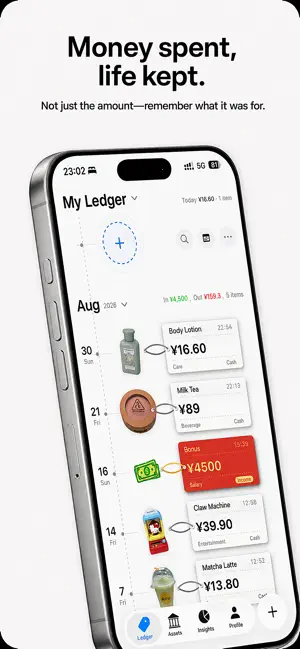
Track more than how much you spent. Remember where you spent it — and what you bought. Take a photo or use a screenshot, and SnapTo turns it into an expense in seconds. With Spending Map, expenses with a location become part of your personal map. Revisit the cafés, stores, restaurants and places behind your spending, instead of seeing only numbers in a list. SnapTo is more than an expense tracker. Receipts, item stickers, timelines and your spending map turn everyday transactions into a visual record of your life. It also helps you remember: What did that money actually buy? With object cutouts, visual expense timelines, and receipt-style details, everyday purchases can become part of your financial record. Months later, instead of seeing only “Food · $6.50,” you may remember the coffee you had that afternoon, the snack you picked up on the way home, or something you bought while traveling. Expense tracking can be more than a list of numbers. Faster expense tracking Use photos, screenshots, and Shortcuts to record everyday expenses with less manual input. Smart Rules can automatically organize transactions based on merchants, amounts, transaction types, and other conditions, helping reduce repetitive categorization over time. See what your money became Snapto can detect and cut out the main object in a photo, turning real purchases into visual stickers inside your expense records. Combined with the visual timeline and receipt-style details, your spending becomes easier to understand and much easier to remember. Make your tracker your own Customize categories and icons to match the way you actually spend. You can also personalize receipt layouts, visual styles, ledgers, and other details, so your expense tracker feels like your own instead of a rigid template. Budget, assets, savings, and more Snapto includes the tools you need for everyday personal finance management: • Budget tracking • Asset and liability management • Income and expense statistics • Spending trends and cash flow • Savings goals • Multiple ledgers • Multi-currency tracking • Refund and reimbursement records • Expense calendar • Home Screen and Lock Screen widgets • Bill imports from supported payment platforms Whether you only want to understand where your money went this month or build better long-term spending habits, you can start with a single expense. No ads. Just your finances. Snapto is designed to stay clean and focused. There are no ads getting in the way when you open the app to check or record an expense. Your financial records should remain yours, which is why Snapto is built around privacy-focused features and iCloud sync. Why “Snapto”? Because expense tracking should be simple enough to fit into everyday life. See something. Snap it. Finish a payment. Save the screenshot. Need to log an expense? Use fewer steps. Tracking spending already requires consistency. The app itself should not make that harder. Snapto is independently designed and developed, with a focus on making personal finance tracking faster, more visual, and more enjoyable to use. The goal is not just to help you count money. It is also to help you look back and remember: Those expenses were part of your life, too. Privacy Policy: https://www.notion.so/2cb4b93732bc8030b0b2e0f4f07037cc?source=copy_link Terms of Use (EULA): https://www.apple.com/legal/internet-services/itunes/dev/stdeula/
What’s new
Version 2.2.0 · Updated October 2, 2026
Wondering where your money went? Now you can actually see it on the map. What's New • Introducing Maps for members: add a location when recording a transaction, then explore where you've been and what you spent. Transactions show their stickers when available, or category icons when they're not • Added the new extra-large “Today’s Receipt” widget for members on iOS 27, showing today’s expenses and total right on the Home Screen • Completely redesigned Statistics with full-page switching between Expenses and Income, plus a clearer view of your map, calendar, trends, categories, and money flow • Added period-over-period comparisons so you can see how trends and categories changed from the previous period • Added balance trends, with monthly income, expenses, and differences available in yearly and all-time views • Charts are now more interactive: tap trends for exact amounts, open category transactions from money flow, and highlight segments in the category chart • Yearly Statistics now includes a 12-month grid with monthly totals, yearly totals, and monthly averages. Tap any month to view its transactions • Added total transaction counts, while category details now show the top five categories with an option to view them all Fixes & Improvements • Fixed an issue where monthly or yearly filters on the scroll could remain on the previous month or year after moving to a new period
App privacy
The developer, 永鹏 裴, reported these privacy practices to Apple.
Data Not Collected
The developer does not collect any data from this app.
Alternatives to Snapto: Photo Expense Tracker
Looking for apps like Snapto: Photo Expense Tracker? Here are 6 similar apps on the App Store. The highest rated is HeyCost: AI Auto-Log (4.9/5), and all 6 are free to download.
-
 HeyCost: AI Auto-Log
4.9
-
 MuMu Accounting
4.9
-
 iAsset: Cost Per Use Tracker
4.4
-
 MoneyTrack: Expense Tracker
4.9
-
 Cookie - Budget & Expense
4.9
-
 iCost记账-快速简洁好用的记账理财助手&记账软件
4.9
| App | Rating | Price | Last updated | Compare |
|---|---|---|---|---|
| Snapto: Photo Expense Tracker | 5.0 / 5 (3 ratings) | Free | October 2, 2026 | |
| HeyCost: AI Auto-Log | 4.9 / 5 (12) | Free | Oct 19, 2026 | Compare |
| MuMu Accounting | 4.9 / 5 (247) | Free | Sep 15, 2026 | Compare |
| iAsset: Cost Per Use Tracker | 4.4 / 5 (72) | Free | Oct 19, 2026 | Compare |
| MoneyTrack: Expense Tracker | 4.9 / 5 (419) | Free | Oct 1, 2026 | Compare |
| Cookie - Budget & Expense | 4.9 / 5 (338) | Free | Oct 19, 2026 | Compare |
| iCost记账-快速简洁好用的记账理财助手&记账软件 | 4.9 / 5 (999) | Free | Oct 3, 2026 | Compare |