

image to file
Geert Stroom Productivity iPhoneiPadiPod touch
image to file is a free Productivity app for iPhone and iPad by Geert Stroom. Requires iOS 16.6. Updated December 12, 2025.
- Price
- Free
- on the App Store
- Size
- 22 MB
- Age 4+
- Updated
- Dec 12
- 2025 · v1.0.1
Screenshots


About image to file
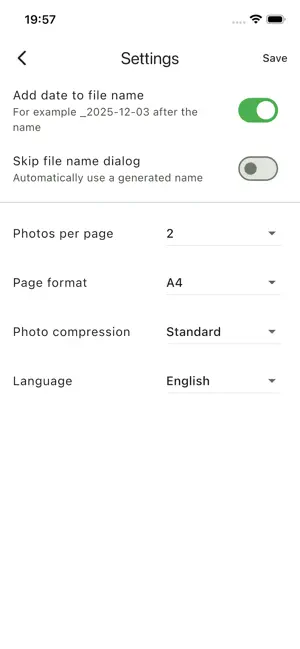
Turn images into clean, share-ready files (eg. PDF) in seconds. Image to File is the fastest way to scan, organize and send documents right from your iPhone or iPad. Whether you’re scanning receipts for expenses, homework for school, contracts for clients or drawings from your kids, Image to File makes everything feel simple and polished. Turn Photos into Perfect PDFs - Import one or multiple photos from your camera roll; - Arrange pages with a simple drag & drop interface; - Choose how many photos per page (1 or 2 on free, up to 4 with Premium); - Add an optional title for each page to keep long documents clear; - Pick your page size: A4 (free) or A4 & US Letter (Premium). Smart Layout & Easy Sharing - See all selected photos at a glance and reorder them in seconds; - Automatically compress images for smaller PDF file sizes; - Create your PDF with a single tap, then share via Mail, Messages, AirDrop, etc.; - Keep everything tidy with automatic file naming and optional date suffix. Built for Everyday Use - History screen: quickly reopen, share or delete previously created PDFs; - Option to skip the file name dialog and use an automatic name – perfect when you’re in a hurry; - Works great on both iPhone and iPad; - No account required; just install and start converting; Free vs. Premium Use Image to File for free with: - Up to 3 PDFs per day - 1 or 2 photos per page - A small “Created with Photo → PDF (free)” watermark Upgrade to Image to File Premium for a one-time purchase and get: - Unlimited PDF creations – no daily limits; - No watermark on your documents; - Up to 4 photos per page for compact multi-page PDFs; - Extra layout options and page formats (A4 & US Letter); Stop emailing yourself photos or fighting with complex scanners. With Image to File, your documents look clean, professional and ready to share – every single time.
What’s new
Version 1.0.1 · Updated December 12, 2025
New: In the layout screen you can now tap a photo to preview it in a larger size, so you can easily double-check you picked the right image. We also improved overall stability (especially on iPad) and fixed a few minor bugs.
App privacy
The developer, Geert Stroom, reported these privacy practices to Apple.
Data Not Collected
The developer does not collect any data from this app.
Alternatives to image to file
Looking for apps like image to file? Here are 6 similar apps on the App Store. The highest rated is Doc Scanner – PDF Scan & OCR (5.0/5), and all 6 are free to download.
-
 Friendly Reminder: Widgets
-
 TimePay: Work Hours & Pay
-
 ShForm – AI Form Builder
-
 Doc Scanner – PDF Scan & OCR
5.0
Doc Scanner – PDF Scan & OCR
5.0
-
 Convert Images To Pdf!
4.4
Convert Images To Pdf!
4.4
-
 FMGS A320
2.1
FMGS A320
2.1
| App | Rating | Price | Last updated | Compare |
|---|---|---|---|---|
| image to file | – | Free | December 12, 2025 | |
| Friendly Reminder: Widgets | – | Free | Oct 1, 2026 | Compare |
| TimePay: Work Hours & Pay | – | Free | Sep 28, 2026 | Compare |
| ShForm – AI Form Builder | – | Free | Oct 12, 2026 | Compare |
| Doc Scanner – PDF Scan & OCR | 5.0 / 5 (2) | Free | Oct 3, 2026 | Compare |
| Convert Images To Pdf! | 4.4 / 5 (9) | Free | Dec 18, 2025 | Compare |
| FMGS A320 | 2.1 / 5 (11) | Free | Oct 9, 2026 | Compare |
Compare image to file with the top alternatives: ratings, updates, ASO score and keyword gaps →