

IELTS Computer
Levon Arakelyan Education iPhoneiPadiPod touchMac
IELTS Computer is a free Education app for iPhone and iPad by Levon Arakelyan. Rated 5.0/5 from 5 ratings. Requires iOS 18.6. Updated September 21, 2026.
- Rating
- 5.0
- 5 ratings
- Price
- Free
- on the App Store
- Size
- 54 MB
- Age 4+
- Updated
- Sep 21
- 2026 · v26.9.1
Screenshots


About IELTS Computer
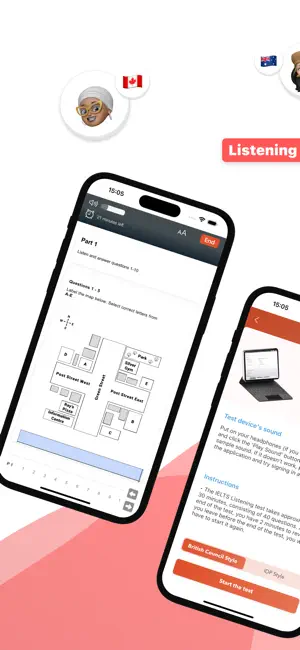
IELTS Computer — Practice Exactly Like the Real Test Here's what actually trips people up on exam day — it's not the English. It's the computer format. The unfamiliar interface, the timer ticking down, typing answers instead of writing them. First time dealing with all that shouldn't be when your score is on the line. This app copies the actual interface, timing, and navigation from IDP and British Council exams. Not some watered-down quiz. Not flashcards pretending to be exam prep. The real layout, the real pressure — minus the consequences. ◆ LISTENING The hard part isn't understanding the audio. It's hearing the answer, typing it, and keeping up with the clock all at once. That multitasking catches everyone off guard. Better to get used to it here than in the test centre. ◆ READING Reading on paper and reading on a screen are two different skills. You need to skim, scan, and highlight using the same tools the real software gives you. If you've only practised on paper, you're training for a different test. ◆ WRITING Write your Task 1 and Task 2, get a band score estimate right away. It breaks down your coherence, vocabulary, grammar — all of it. You see where you stand before an examiner does. Way better than guessing. ◆ VOCABULARY Not a random word dump. These are academic words and collocations that actually show up on the IELTS. The kind of vocabulary that lifts your Lexical Resource score without making you sound like you swallowed a thesaurus. ◆ SPELLING Simple typos cost real marks — especially in Listening and Writing. These drills target the exact spelling mistakes that quietly drag scores down. Probably the easiest points you'll ever get back. ◆ GRAMMAR The gap between Band 6 and Band 7 isn't "learn all of English grammar." It's a handful of specific structures that examiners look for. That's what this focuses on. Whatever your target band is — for uni, immigration, work — getting comfortable with the format before exam day takes a huge chunk of stress off your shoulders. Start your free trial. Practice in the real environment. Walk in knowing exactly what's coming.
Ratings & reviews
5.0
5 ratings
What’s new
Version 26.9.1 · Updated September 21, 2026
This is one of the biggest updates to IELTS Computer yet. Here's everything that's changed — and why it matters for your score. ◆ TRACK YOUR PROGRESS WITH CHARTS Listening, Reading, and Writing now each have a dedicated progress tracker with visual charts. You can finally see your band score trend over time — not just your last result. Knowing where you're improving (and where you're stuck) is the fastest way to stop wasting study time on areas you've already mastered. ◆ PROFESSIONAL WRITING ASSESSMENT Your Writing module now delivers detailed, criteria-by-criteria feedback on every essay — with specific tips on how to improve each area. But here's what makes this different: every assessment includes a Band 8 model answer for the same topic, so you can see exactly what a top score looks like and measure the gap between your writing and theirs. ◆ HIGHLIGHT TEXT IN READING You can now highlight passages directly in the Reading exam — just like in the real IDP/British Council interface. No more scrolling back and forth trying to remember where you saw the answer. This was one of the most requested features, and it changes how efficiently you can work through the Reading module. ◆ REDESIGNED INTERFACE The entire app has been modernized with a cleaner, faster interface. Navigation is sharper, layouts are more intuitive, and the exam environment feels closer to the real test than ever. If IELTS Computer already felt familiar, it now feels like the real thing. ◆ PUSH NOTIFICATIONS Stay on track with study reminders. Notifications are fully customizable — turn them on, off, or set your own schedule. No spam, just a nudge when you need it. ◆ EXAM ENVIRONMENT FIXES Multiple bugs in the exam environment have been squashed — smoother timer behavior, more reliable answer saving, and a more stable experience across all modules. The exam should feel seamless now, so you can focus on your answers instead of the app. Your feedback drives these updates. If something isn't working or you have an idea for what's next, reach out — every message gets read.
App privacy
The developer, Levon Arakelyan, reported these privacy practices to Apple.
Data Not Linked to You
The following data, which may be collected but is not linked to your identity, may be used for the following purposes:
- Purchases: Purchase History
- Contact Info: Email Address, Name
- User Content: Customer Support
- Identifiers: User ID
Used for: App Functionality
Alternatives to IELTS Computer
Looking for apps like IELTS Computer? Here are 6 similar apps on the App Store. The highest rated is IELTS Practice | Test (5.0/5), and all 6 are free to download.
-
 IELTS Speaking Topics
4.8
IELTS Speaking Topics
4.8
-
 IELTS Prep App – Practice
4.7
IELTS Prep App – Practice
4.7
-
 IELTS Reading Test
-
 IELTS Practice | Test
5.0
IELTS Practice | Test
5.0
-
 IELTS Flex
5.0
IELTS Flex
5.0
-
 IELTS: Speaking & Listening
4.7
IELTS: Speaking & Listening
4.7
| App | Rating | Price | Last updated | Compare |
|---|---|---|---|---|
| IELTS Computer | 5.0 / 5 (5 ratings) | Free | September 21, 2026 | |
| IELTS Speaking Topics | 4.8 / 5 (4) | Free | Feb 20, 2026 | Compare |
| IELTS Prep App – Practice | 4.7 / 5 (74) | Free | Oct 10, 2026 | Compare |
| IELTS Reading Test | – | Free | Oct 23, 2023 | Compare |
| IELTS Practice | Test | 5.0 / 5 (3) | Free | Feb 17, 2026 | Compare |
| IELTS Flex | 5.0 / 5 (1) | Free | Sep 29, 2026 | Compare |
| IELTS: Speaking & Listening | 4.7 / 5 (542) | Free | Oct 22, 2026 | Compare |
Compare IELTS Computer with the top alternatives: ratings, updates, ASO score and keyword gaps →