

SlideFarm: Auto Post Slideshow
Borys Kusmirek Productivity iPhoneiPadiPod touch
SlideFarm: Auto Post Slideshow is a free Productivity app for iPhone and iPad by Borys Kusmirek. Rated 5.0/5 from 1 ratings. Requires iOS 15.0.
- Rating
- 5.0
- 1 ratings
- Price
- Free
- on the App Store
- Size
- 93 MB
- Age 4+
- Updated
- Oct 5
- 2026 · v1.0.75
Screenshots



About SlideFarm: Auto Post Slideshow
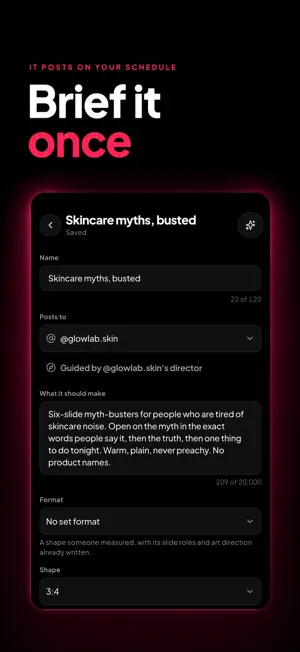
SlideFarm is a faceless content machine for TikTok. Describe a topic once. AI writes the hook and every slide. SlideFarm builds the carousel, schedules it, and posts it to your TikTok account on the days and times you pick. It is a TikTok scheduler, an AI carousel maker and a faceless-content autopilot in one. Run one account or six. Set up a month of posts in an afternoon. HOW IT WORKS 1. Connect your TikTok account. 2. Describe what you post about, in one sentence. 3. AI writes the slide text, the title and the caption. 4. Pick your images, or let AI generate them. 5. Choose your schedule. SlideFarm does the rest. WHAT YOU GET Automatic posting to TikTok Set your posting days and times once. SlideFarm publishes on schedule, even when the app is closed. Prefer to stay hands-on? Save posts as drafts and publish them yourself. AI-written slide text Skip the blank page. Generate hooks and slide-by-slide copy from a simple prompt, in the tone you choose, and edit anything before it goes out. AI-generated slide images Let AI create the pictures for each slide, or use your own photo collections. Posts made with AI-generated images are labelled as AI-generated on TikTok. Pinterest import Build image collections fast by importing straight from Pinterest. Reusable image collections Build a collection per theme and reuse it across posts, pairing saved visuals with fresh AI text. Run several series at once Keep multiple automations running in parallel to test themes, rotate niches, or scale output. Multiple TikTok accounts Manage several accounts from one dashboard. Post analytics Track views, likes, comments and engagement per post and per account, so you can repeat what works. WHO IT IS FOR Faceless creators. Affiliate marketers. Social media managers running several pages. Founders who need a daily TikTok presence. Anyone posting photo slideshows by hand who is tired of it. PLANS SlideFarm runs on a monthly subscription. Every plan includes a monthly allowance of posting credits. Each published post uses credits from that allowance; posts that generate AI images use more than posts using your own photos, and the app shows the cost before you create one. Starter, Growth, Scale and Unlimited plans are available. Prices are shown in the app in your local currency. Payment is charged to your Apple ID at confirmation of purchase. Subscriptions renew automatically unless auto-renew is turned off at least 24 hours before the end of the current period. Manage or cancel in your Apple ID account settings. Privacy policy and terms of use are linked in the app under Settings.
What’s new
Version 1.0.75 · Updated October 5, 2026
This release is a big reliability pass. Analytics syncs more consistently and reports clearly when it can't complete, instead of quietly going stale. Briefs and automations: dozens of fixes to saving, scheduling, and deleting. Edits made on two devices no longer overwrite each other, and a failed save tells you why. Offline: collection uploads, imports, and deletes no longer get stuck if your connection drops mid-action. Accessibility: larger text support, bigger touch targets, and better screen reader behavior throughout. Sheets no longer hide their main button behind the keyboard. An account TikTok has refused now shows a clear Reconnect state instead of failing silently, and invite-only briefs can now request access.
App privacy
The developer, Borys Kusmirek, reported these privacy practices to Apple.
Data Used to Track You
The following data may be used to track you across apps and websites owned by other companies:
- Purchases: Purchase History
- Location: Coarse Location
- Contact Info: Email Address
- Identifiers: User ID, Device ID
- Usage Data: Product Interaction, Advertising Data
Data Linked to You
The following data, which may be collected and linked to your identity, may be used for the following purposes:
- Purchases: Purchase History
- Location: Coarse Location
- Contact Info: Email Address, Name
- Identifiers: User ID, Device ID
- Usage Data: Product Interaction, Advertising Data
- User Content: Photos or Videos, Other User Content
- Diagnostics: Crash Data, Performance Data
Used for: Third-Party Advertising, Developer’s Advertising or Marketing, Analytics, App Functionality