

Duoler
翠涓 徐 Education iPhoneiPadiPod touch
Duoler is a free Education app for iPhone and iPad by 翠涓 徐. Requires iOS 18.1. Updated October 10, 2026.
- Price
- Free
- on the App Store
- Size
- 642 MB
- Age 4+
- Updated
- Oct 10
- 2026 · v1.3
Screenshots


About Duoler
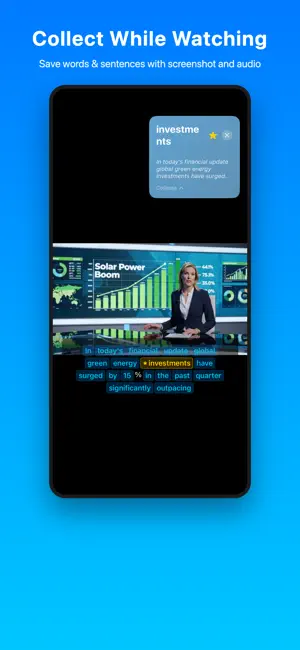
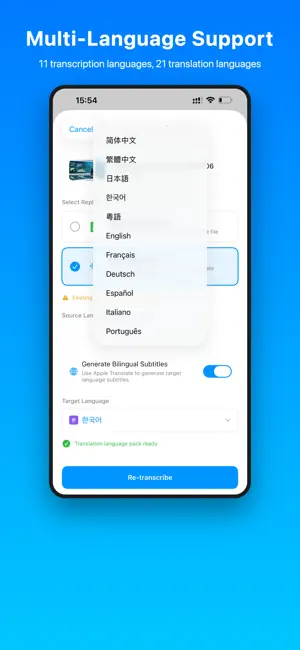
Learn a language from the videos you actually want to watch. Import a movie, show, lecture or any other video from the Files app. No subtitles? Duoler creates them with AI right on your iPhone, and can add a translation line to make bilingual subtitles. Tap any word or sentence to translate it, then save it to your notebook together with the video frame and audio clip. AI SUBTITLES ON YOUR IPHONE • Speech recognition in 11 languages: English, Chinese (Simplified and Traditional), Cantonese, Japanese, Korean, French, German, Spanish, Italian and Portuguese • Bilingual subtitles with translation into 20 languages • Everything runs on your device. Your videos are never uploaded TAP TO TRANSLATE • Tap a word or a whole sentence while you watch • Uses Apple's on-device translation (iOS downloads each language once) A NOTEBOOK WITH CONTEXT • Double-tap a word to save it, or save the whole sentence • Every item keeps the video frame and audio clip it came from, so you can hear it again MADE FOR LISTENING PRACTICE • Split a video into 3- or 5-minute practice sections • Move through Listen, Study and Review phases, with subtitles hidden when needed • Loop one sentence, mark difficult moments, and resume where you stopped • Review saved words and sentences with their original audio • Jump by sentence or 10 seconds, change speed, and adjust subtitle timing MORE LOCAL VIDEO FORMATS • Reference the original file to save space, or keep an independent copy in Duoler • Local playback for common formats including MKV and WebM with VP9 or AV1, when the file's tracks are supported YOUR OWN SUBTITLES WORK TOO • Import SRT, VTT or ASS/SSA files • Edit subtitle text and timing, and export SRT files PRIVATE BY DESIGN No account, no ads, no tracking. Your videos, subtitles and notebook stay on your device. FREE AND PREMIUM Free: play videos with your own subtitles, tap to translate, save unlimited words and sentences, create AI subtitles for 5 minutes a day (up to 5 minutes per video), and export the subtitles you imported. Premium: unlimited AI subtitles and export of AI-generated subtitles, billed monthly or yearly. Eligible new subscribers can try the yearly plan free. Payment is charged to your Apple Account at confirmation of purchase. Subscriptions renew automatically unless cancelled at least 24 hours before the end of the current period. Manage or cancel in Settings > [your name] > Subscriptions. Terms of Use (EULA): https://www.apple.com/legal/internet-services/itunes/dev/stdeula/ Privacy Policy: https://duoler.vercel.app/privacy
What’s new
Version 1.3 · Updated October 10, 2026
• Practice videos in 3- or 5-minute sections with Listen, Study and Review phases • Loop individual sentences, hide or reveal subtitles, mark difficult moments and resume your progress • Review saved words and sentences with their original audio • Import by reference to save space, or keep an independent copy in Duoler • Local playback support for more formats, including MKV and WebM with VP9 or AV1 • Improved bilingual ASS subtitle handling, media relinking and update backups • Everything stays on your device
App privacy
The developer, 翠涓 徐, reported these privacy practices to Apple.
Data Not Collected
The developer does not collect any data from this app.
Alternatives to Duoler
Looking for apps like Duoler? Here are 6 similar apps on the App Store. The highest rated is Myatlastic (5.0/5), and all 6 are free to download.
-
 Immersea: Learn Languages
-
 ForYou Mandarin
-
 Liàng: Chinese Measure Words
-
 Speak Uzbek - NowFluency
-
 Myatlastic
5.0
Myatlastic
5.0
-
 Learn Uzbek - AuraLingo
| App | Rating | Price | Last updated | Compare |
|---|---|---|---|---|
| Duoler | – | Free | October 10, 2026 | |
| Immersea: Learn Languages | – | Free | Jun 27, 2026 | Compare |
| ForYou Mandarin | – | Free | Apr 20, 2026 | Compare |
| Liàng: Chinese Measure Words | – | Free | Jun 16, 2026 | Compare |
| Speak Uzbek - NowFluency | – | Free | May 25, 2026 | Compare |
| Myatlastic | 5.0 / 5 (4) | Free | Sep 30, 2026 | Compare |
| Learn Uzbek - AuraLingo | – | Free | Aug 12, 2026 | Compare |
Compare Duoler with the top alternatives: ratings, updates, ASO score and keyword gaps →