

TimeLog – Simple Notes
Tomohiko Yasui Productivity iPhoneiPadiPod touch
TimeLog – Simple Notes is a free Productivity app for iPhone and iPad by Tomohiko Yasui. Requires iOS 26.1. Updated May 3, 2026.
- Price
- Free
- on the App Store
- Size
- 5 MB
- Age 4+
- Updated
- May 3
- 2026 · v1.4
Screenshots
About TimeLog – Simple Notes
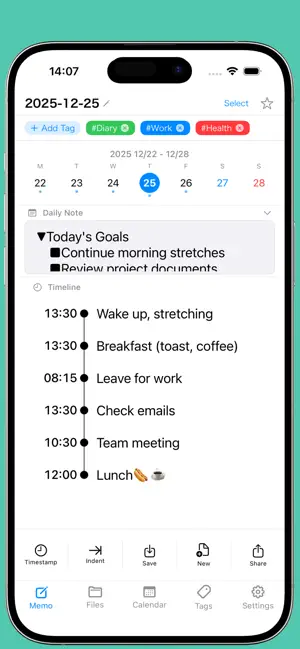
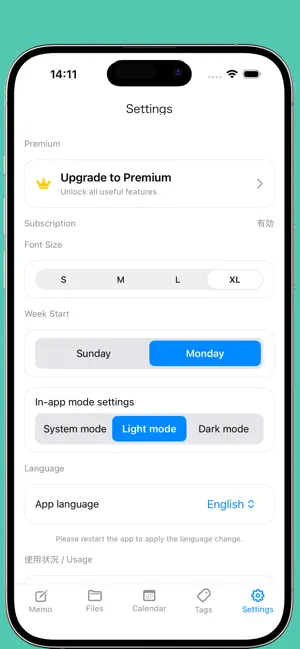
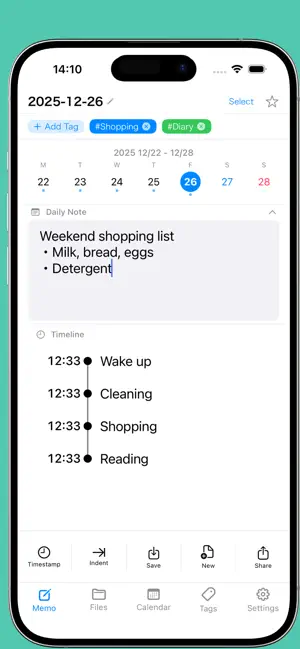
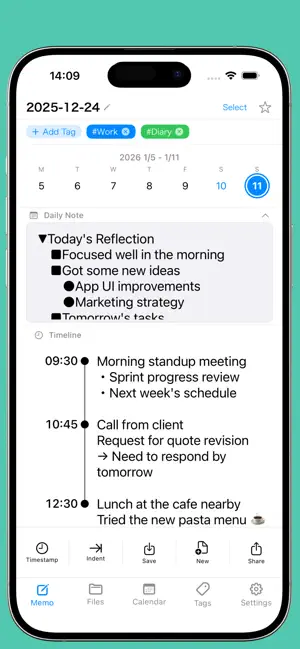
Do you keep a diary? I've tried using various diary apps and paper diaries to see if I could stick with it. But... I couldn't keep it up. Even though I thought, “I should keep a diary! I have to keep one...” I just couldn't make it a habit. That's because... I had to think about what to write. Even if I tried to write at the end of the day, I'd end up thinking, “Huh... what did I even do today?” and using up mental energy just trying to remember. Then, actually writing the diary entry felt like too much trouble. But I still want to keep a record of my days! Well... I have good news for you. This app shows the exact time the moment you press the timestamp button, letting you instantly jot down whatever you want to record. It makes keeping track super easy. It's great for daily journaling, work notes, organizing your thoughts—anything really. You don't even have to press the timestamp button; you can just use it as a memo. And later, when you need to find something, adding tags makes searching a breeze. Plus! It posts to Google Calendar too. So when you wonder, “What did I do that day...?” Or “What was that meeting about last time...?” Just sync everything to Google Calendar, and finding it later is a breeze. ▼ Now supports various communication tools. ■ If you use LINE, Slack, Teams, Messenger, WhatsApp, etc., you can share necessary notes. ▼ Recommended for: ■ Those who want to reflect on their daily activities ■ Those looking to reassess how they use their time ■ Those seeking a simple note-taking app ■ Those wanting to start keeping a life log ▼ Main Features 【Timestamp】 Automatically inserts the current time with a single tap. No need for tedious time input. 【Daily Notes】 Freely record your daily goals and reflections. Separate from the timeline, you can capture your thoughts for the day. 【Tag Management】 Organize notes by adding tags. Easily search and sort later. 【Folder Organization】 Create folders to categorize notes. Freely classify them for work, personal use, etc. 【Calendar Integration】 Sync with Google Calendar. 【Sharing】 Easily share via LINE, email, PDF, etc. Simple sharing with teams or family! ▼ Basic Features Available in Free Version ・Create timestamped notes ・Save up to 10 files ・Create up to 3 tags ・Share as PDF/text ▼ Premium ・Unlimited files ・Unlimited tags ・Google Calendar integration ・Ad-free. ■ Privacy All memo data is stored locally on your device. No account registration required. Data is never sent externally unless you use Google Calendar integration. Simple design makes it easy to stick with. Record your everyday moments.
What’s new
Version 1.4 · Updated May 3, 2026
[App Launch Improvement] The app now opens to today's date by default when launched. You can also navigate to other dates easily. [Title Input Now Required] The date is displayed by default, and titles make it easier to organize your file folders. Therefore, entering a title is now required. [Workout and Step Count Recording] Your health matters. Once your workout is complete and you open the app, your data is automatically recorded. [Time Input Improvement] No need to type ":". Just type 1230 and it will automatically be formatted as 12:30. [Security Feature Added] Security is important, especially for personal and private use. Lock feature using Face ID or passcode Use the app more safely and securely [File Attachment Feature Added] Want to keep a photo from that special day? We get it. Attach files to Daily Memos and Timeline entries Files can also be attached to Google Calendar events Attached files are also saved to Google Drive. Files cannot be attached when sharing via Teams or Slack. Please attach files separately within each app. Long press the clip button to place it wherever you like [Expanded Toolbar] We added features we think you will find surprisingly useful. Added checkmark (v) Added checkbox ([ ]) Type after [ ], then tap to check it off. Great for ToDo management. Added arrows (right / left / up / down) Added ">" for describing hierarchical structures more intuitively Added full-width brackets ( ), colon, and space input buttons Displayed as "SP" in the toolbar [Reset Feature Added] Want to delete everything and start fresh? You can now reset all memos in the app Export your data first, and you can restore it after resetting by importing [Daily Note Improvement] When entering Timeline entries, the Daily Note area automatically collapses to make input easier. [Insert Memos at Past Times] Ever suddenly remember something you wanted to log earlier? We have you covered. Manually adjust the timestamp to insert a memo at a past time in the Timeline For more precise time entry, feel free to input the exact time manually!
App privacy
The developer, Tomohiko Yasui, reported these privacy practices to Apple.
Data Linked to You
The following data, which may be collected and linked to your identity, may be used for the following purposes:
- Contact Info: Email Address
- Identifiers: User ID
Used for: App Functionality
Data Not Linked to You
The following data, which may be collected but is not linked to your identity, may be used for the following purposes:
- Health & Fitness: Health, Fitness
Used for: App Functionality
Alternatives to TimeLog – Simple Notes
Looking for apps like TimeLog – Simple Notes? Here are 6 similar apps on the App Store.
-
 レコログ|タイムスケジュールと行動記録のライフログアプリ
-
 Already Done - Task Log
-
 WRITE LOG - 執筆ログ
-
 Feats: Calm To-Do List
-
 独り言感覚でメモを取ろう:MEMOLOGU
-
 SandyNote
| App | Rating | Price | Last updated | Compare |
|---|---|---|---|---|
| TimeLog – Simple Notes | – | Free | May 3, 2026 | |
| レコログ|タイムスケジュールと行動記録のライフログアプリ | – | Free | May 12, 2026 | Compare |
| Already Done - Task Log | – | Free | Jul 16, 2026 | Compare |
| WRITE LOG - 執筆ログ | – | Free | Oct 1, 2026 | Compare |
| Feats: Calm To-Do List | – | Free | Sep 1, 2026 | Compare |
| 独り言感覚でメモを取ろう:MEMOLOGU | – | Free | Feb 13, 2018 | Compare |
| SandyNote | – | Free | Mar 24, 2026 | Compare |