

UltraBudget: Budget Planner
Axiosware LLC Finance iPhoneiPadiPod touch
UltraBudget: Budget Planner is a free Finance app for iPhone and iPad by Axiosware LLC. Rated 4.4/5 from 7 ratings. Requires iOS 18.6.
- Rating
- 4.4
- 7 ratings
- Price
- Free
- on the App Store
- Size
- 26 MB
- Age 12+
- Updated
- Sep 26
- 2026 · v1.2.0
Screenshots


About UltraBudget: Budget Planner
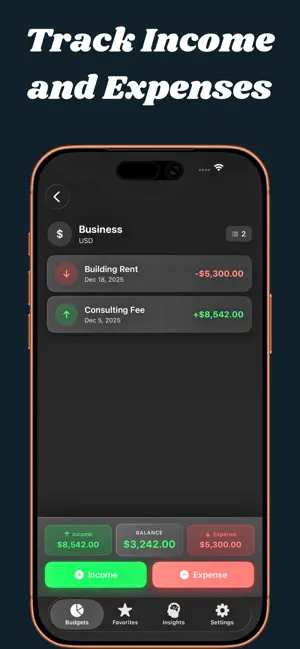
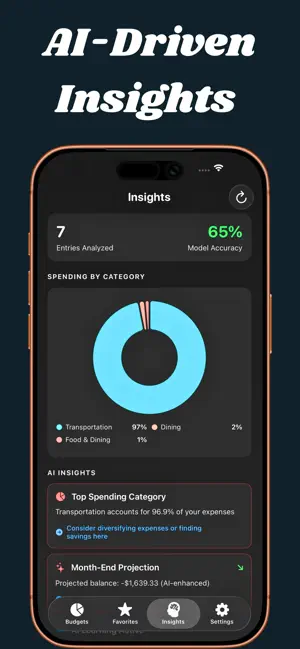
UltraBudget makes budgeting feel effortless. Give each budget a target, and the app tracks every dollar against it, sorts your spending into the right category for you, and shows you exactly where your money goes. All of it happens privately on your device. BUDGETS THAT WORK THE WAY YOU THINK Group your spending into budgets and folders, then set a weekly, monthly, or yearly target. A clean progress bar fills as you spend, so you always know where you stand. Turn on rollover and unused money carries into the next period. SPENDING SORTED FOR YOU Type "Trader Joe's" and UltraBudget suggests Groceries on the spot. Tap to accept it or pick your own. The more consistent you are, the sharper it gets, and every suggestion is figured out on your device. ENTRIES THAT POST THEMSELVES Rent, subscriptions, paychecks: set a recurring transaction once and it appears automatically on schedule. No more forgetting the bills that hit every month. KNOW BEFORE YOU OVERSPEND Get a friendly heads up at 80 percent and 100 percent of any budget, plus a month-end projection of where you are headed if you keep going at this pace. SEE YOUR MONEY CLEARLY . Spending by category, at a glance . Trends across the last several months . A what-if simulator to test spending cuts before you commit . A plain-language summary of your week STAY ON TOP OF EVERYTHING . Search, filter, and sort transactions in seconds . Import a CSV from your bank, or export your data anytime . Home screen widgets, including quick add buttons . Log an expense just by asking Siri . Lock the app behind Face ID . Undo a delete if you tap too fast . 40 plus currencies and nine languages PRIVATE BY DESIGN Your financial data is yours. Categorization and insights are computed on your device, not on a server. There are no ads and no data brokers. Optional cloud backup keeps your budgets safe and in sync whenever you want it, and you stay in control of it. START FREE, UPGRADE WHEN YOU ARE READY Begin free with one budget and up to 50 transactions. UltraBudget Pro unlocks: . Unlimited budgets, folders, and transactions . Full insights, trends, and the what-if simulator . Home screen widgets Pro is available as a monthly or yearly subscription. Download UltraBudget and give every dollar a job. Privacy Policy: https://ultrabudgetapp.com/privacy End User License Agreement (EULA): https://www.apple.com/legal/internet-services/itunes/dev/stdeula/
Ratings & reviews
4.4
7 ratings
What’s new
Version 1.2.0 · Updated September 26, 2026
UltraBudget 1.2 makes logging faster, widgets more useful, and your data safer. NEW • Start without an account. Sign in later if you want Cloud Backup. • Swipe a budget, folder or favorite to edit, copy, favorite or delete it. • Tap any transaction to edit it. • Home Screen widgets: tap + or − to jump straight to a new entry. Quick-add presets now use your budget's currency. • Siri: "Add an expense in UltraBudget" now opens the entry screen, in all 9 languages. • Appearance can follow your device's Light or Dark setting. • Importing a card statement? Swap income and expenses in one tap. IMPROVED • Faster entry: amount first with the keypad ready, in your region's number format. • New budgets start in your local currency. • Tapping a reminder opens its budget, and month-end reminders now arrive every month. • Cloud Backup handles much larger histories, and a new or reset iPhone can no longer overwrite your backup. • The Face ID lock now covers every screen and keeps amounts out of the app switcher and notifications. • Clearer widget labels (Left this period, Over budget), in your language. • A roomier layout on iPad, better VoiceOver support, and complete translations in all 9 languages. FIXED • The Sign in with Apple button now shows its proper label. • Very long histories now save reliably. • Changes to budgets in subfolders now save correctly, and recurring entries no longer post twice. • Fixes for two-digit years in CSV imports, date filters and currency formatting. Questions or ideas? Tap Settings > Send Feedback.
App privacy
The developer, Axiosware LLC, reported these privacy practices to Apple.
Data Not Collected
The developer does not collect any data from this app.
Alternatives to UltraBudget: Budget Planner
Looking for apps like UltraBudget: Budget Planner? Here are 6 similar apps on the App Store. The highest rated is Almie: Budget by Paycheck (5.0/5), and 5 of the 6 are free to download.
-
 BudgetBrains
-
 UltiSaver
-
 Figz: Control Your Money
-
 SethuThangaNagaiMaaligai
-
 FinPilot: Expense Tracker
-
 Almie: Budget by Paycheck
5.0
Almie: Budget by Paycheck
5.0
| App | Rating | Price | Last updated | Compare |
|---|---|---|---|---|
| UltraBudget: Budget Planner | 4.4 / 5 (7 ratings) | Free | September 26, 2026 | |
| BudgetBrains | – | Free | Dec 16, 2025 | Compare |
| UltiSaver | – | 2.99 USD | Aug 16, 2025 | Compare |
| Figz: Control Your Money | – | Free | Jan 19, 2026 | Compare |
| SethuThangaNagaiMaaligai | – | Free | Nov 18, 2025 | Compare |
| FinPilot: Expense Tracker | – | Free | Oct 7, 2026 | Compare |
| Almie: Budget by Paycheck | 5.0 / 5 (3) | Free | Sep 29, 2026 | Compare |