

My Device Settings – Tools
Kanubhai Vaddoriya Utilities iPhoneiPadiPod touch
My Device Settings – Tools is a free Utilities app for iPhone and iPad by Kanubhai Vaddoriya. Requires iOS 15.6. Updated April 16, 2026.
- Price
- Free
- on the App Store
- Size
- 57 MB
- Age 4+
- Updated
- Apr 16
- 2026 · v2.0
Screenshots


About My Device Settings – Tools
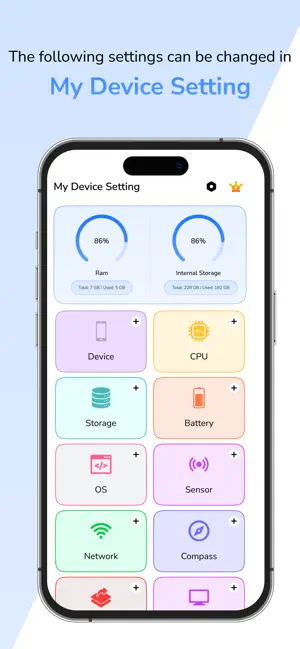
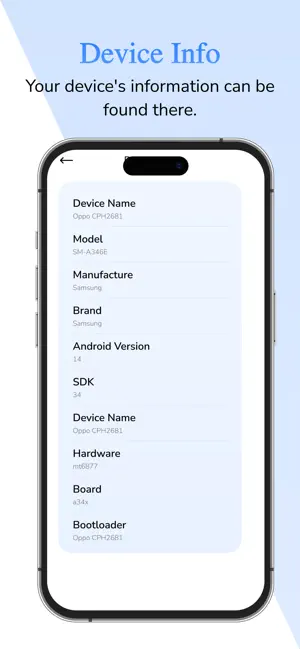
My Device Settings – Tools provides complete visibility into your iPhone’s system information along with essential tools for device management. Instantly access real-time hardware and software details, check battery and performance status, monitor storage usage, explore network and SIM data, and view all active sensors. This app also offers convenient quick settings and smart utilities to help you control key system features faster and more efficiently. My Device Settings – Tools is designed for users who want a simple, powerful, and reliable way to understand and optimize their device. Whether you want better performance awareness, easier access to system shortcuts, or complete details about your phone’s specifications, everything is available in one place. Detailed Device Information Get accurate and up-to-date information about key hardware and software components, including device model, iOS version, processor type, screen resolution, memory status, and system identifiers. Battery Health and Usage Monitoring Track current battery level, charging state, temperature, and usage behavior. Understand how your battery performs over time to improve longevity and avoid unexpected shutdowns. CPU and Performance Stats Analyze real-time CPU load, operational state, architecture data, and thermal behavior. Useful for users who want to ensure stable performance during daily usage or gaming. Storage Insights Monitor total storage, used space, available space, and filesystem details. Identify when you need to clear space and keep your device performing smoothly. Network and SIM Information View important connectivity details such as network type, carrier name, IP address, Wi-Fi status, and signal information. Stay informed about your active network state at all times. Sensor Availability and Status Check which sensors your device supports and whether they are functioning correctly. Includes accelerometer, gyroscope, magnetometer, proximity sensor, and others depending on your device model. Quick Settings and Smart Tools Save time and simplify your workflow with fast access shortcuts to commonly used system features including Wi-Fi, Bluetooth, Mobile Data, Flashlight, Volume, Brightness, Airplane Mode, Privacy, and more. Avoid navigating deep menus and get things done quickly with a single tap. Compass and Direction Utility A built-in compass helps you stay oriented in any environment using sensor-based direction tracking. Designed for Easy and Efficient Usage • Fast and smooth performance • Clear, well-organized interface • Accurate and real-time data • Useful for beginners and advanced users • Brings together tools that normally require multiple apps Ideal for Many Usage Scenarios • Users who want complete system awareness • People checking phone performance or troubleshooting • Anyone who needs quick access to important settings • Travelers who rely on compass functionality • Tech enthusiasts wanting detailed phone data Privacy Commitment This application does not collect, store, or transmit any personal device information. All processing happens securely on your device. Compatible for Today and Future Devices Supports a wide range of iPhone models and continues to evolve with updates. New features and improvements will be added regularly to enhance functionality and performance. Start using My Device Settings – Tools today to take control of essential system features and gain real insights into your device. Important Feature availability may vary based on device hardware and iOS version. Privacy Policy: https://kanubhaiv.blogspot.com/2025/12/privacy-policy.html Terms Of Use: : https://kanubhaiv.blogspot.com/2025/12/terms-of-use.html Premium Plans: Week: $3.99 Month: $8.99 Yearly: $19.99 Premium Features: - Ads Free Experience - Unlimited Access to all features
What’s new
Version 2.0 · Updated April 16, 2026
- Complete UI redesign for a cleaner, faster, and more intuitive experience - Improved access to device settings and tools - Enhanced system information with more accurate and detailed insights - Upgraded network and connectivity tools - Performance improvements for smoother and faster usage - Bug fixes and overall stability improvements
App privacy
The developer, Kanubhai Vaddoriya, reported these privacy practices to Apple.
Data Used to Track You
The following data may be used to track you across apps and websites owned by other companies:
- Identifiers: Device ID
- Usage Data: Advertising Data
Data Not Linked to You
The following data, which may be collected but is not linked to your identity, may be used for the following purposes:
- Identifiers: Device ID
- Usage Data: Advertising Data
Used for: Developer’s Advertising or Marketing, Analytics
Alternatives to My Device Settings – Tools
Looking for apps like My Device Settings – Tools? Here are 6 similar apps on the App Store. The highest rated is Quick Settings Launcher (5.0/5), and all 6 are free to download.
-
 Quick Settings Launcher
5.0
Quick Settings Launcher
5.0
-
 Easy Settings Manager
4.3
Easy Settings Manager
4.3
-
 My Device Info & Manage
-
 Settings Guide & Tips
5.0
Settings Guide & Tips
5.0
-
 APN Settings - 2G 3G 4G LTE 5G
-
 Settings App for My Phone
3.9
Settings App for My Phone
3.9
| App | Rating | Price | Last updated | Compare |
|---|---|---|---|---|
| My Device Settings – Tools | – | Free | April 16, 2026 | |
| Quick Settings Launcher | 5.0 / 5 (1) | Free | Aug 14, 2026 | Compare |
| Easy Settings Manager | 4.3 / 5 (19) | Free | Aug 19, 2026 | Compare |
| My Device Info & Manage | – | Free | Oct 18, 2024 | Compare |
| Settings Guide & Tips | 5.0 / 5 (1) | Free | Jul 17, 2026 | Compare |
| APN Settings - 2G 3G 4G LTE 5G | – | Free | Nov 12, 2025 | Compare |
| Settings App for My Phone | 3.9 / 5 (142) | Free | Dec 26, 2025 | Compare |