

Flip-Talk
JARED EVANS Utilities iPhoneiPadiPod touch
Flip-Talk is a free Utilities app for iPhone and iPad by JARED EVANS. Rated 5.0/5 from 8 ratings. Requires iOS 18.6. Updated September 5, 2026.
- Rating
- 5.0
- 8 ratings
- Price
- Free
- on the App Store
- Size
- 6 MB
- Age 4+
- Updated
- Sep 5
- 2026 · v2.5
Screenshots
About Flip-Talk
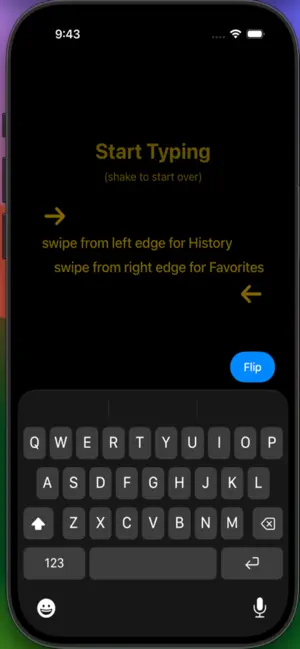
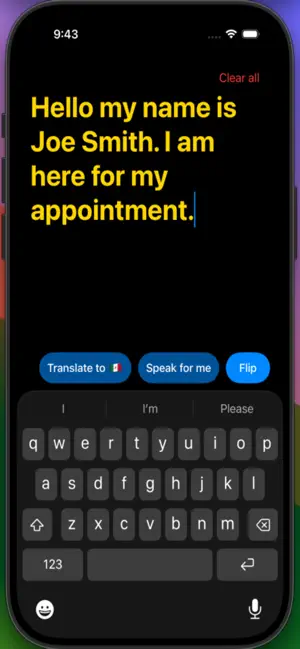
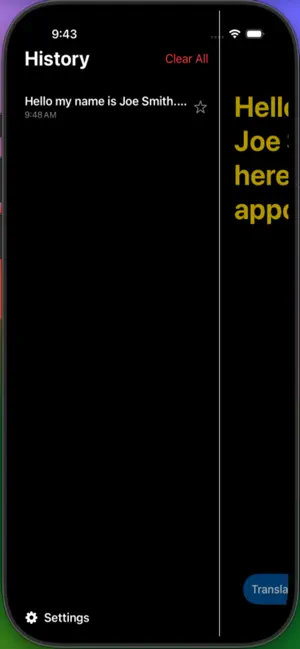
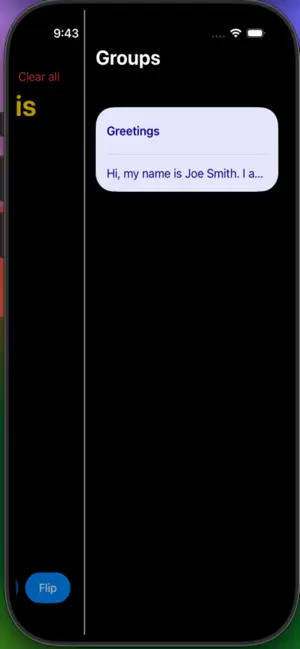
Flip-Talk: The Two-Way Bridge for Deaf & Hearing Communication Break down barriers instantly. Flip-Talk is the digital equivalent of a tap on the shoulder—fast, private, and designed for seamless face-to-face connection. WHY FLIP-TALK? Forget fumbling with notes apps or waiting for microphones to initialize. Flip-Talk creates a natural rhythm where everyone communicates in their preferred way: • For Deaf Users: Type on a large, high-contrast display. • For Hearing Users: Speak naturally—the app uses Always-On listening to catch every word. HOW IT WORKS 1. Type: Deaf person types a message. 2. Flip: Swipe right or tap to "flip" the screen to the other person. 3. Read: Hearing person speaks, and their words transcribe instantly. KEY FEATURES • Always-On Transcription: No "start" button needed. Transcription is ready the moment you open the app or flip the screen. • Multilingual Support: Supports 20+ languages including English, Spanish, French, German, Chinese, and more. Switch seamlessly for global conversations. • Intelligent Voice Quality: Automatically detects and uses the highest quality on-device voices for crystal-clear offline speech. • Privacy First: All processing happens on-device. Your conversations stay private and are never stored on a server. • Smart History & Favorites: Swipe left to see past chats or right to access saved quick-phrases like "Coffee please" or "Emergency." • Continuous Speaking Mode: Tap "Speak for me" and the app automatically speaks your sentences as you finish them (triggered by '.', '?', or '!'), keeping the conversation flowing naturally without constant tapping. • Custom Themes: Beautiful high-contrast optics, including Dark Mode and large auto-sizing text for maximum readability. PERFECT FOR • One-on-one conversations • Ordering coffee, asking directions, or travel • Appointments & professional meetings ACCESSIBILITY FIRST Designed with high-contrast visuals, large auto-adjusting fonts, and simple gesture-based controls. Optimized for both Deaf and Hard of Hearing users to work in any lighting condition. Communication should be effortless. Flip-Talk makes it possible.
Ratings & reviews
5.0
8 ratings
What’s new
Version 2.5 · Updated September 5, 2026
Four new languages: Danish, Hindi, Norwegian, and Swedish.
App privacy
The developer, JARED EVANS, reported these privacy practices to Apple.
Data Not Collected
The developer does not collect any data from this app.
Alternatives to Flip-Talk
Looking for apps like Flip-Talk? Here are 6 similar apps on the App Store. The highest rated is SplitChatter (5.0/5), and all 6 are free to download.
-
 SplitChatter
5.0
-
 Undy: Read and Write Easily
5.0
-
 SquareGlow
4.8
-
 Taptic d/Deaf Support
4.4
-
 Big Note.
4.8
-
 Live Transcribe Deaf - Relay
4.8
| App | Rating | Price | Last updated | Compare |
|---|---|---|---|---|
| Flip-Talk | 5.0 / 5 (8 ratings) | Free | September 5, 2026 | |
| SplitChatter | 5.0 / 5 (3) | Free | Oct 21, 2026 | Compare |
| Undy: Read and Write Easily | 5.0 / 5 (1) | Free | Aug 6, 2026 | Compare |
| SquareGlow | 4.8 / 5 (108) | Free | Nov 24, 2023 | Compare |
| Taptic d/Deaf Support | 4.4 / 5 (11) | Free | Mar 20, 2026 | Compare |
| Big Note. | 4.8 / 5 (243) | Free | Sep 20, 2026 | Compare |
| Live Transcribe Deaf - Relay | 4.8 / 5 (212) | Free | Oct 7, 2026 | Compare |
Compare Flip-Talk with the top alternatives: ratings, updates, ASO score and keyword gaps →