

Document Scanner & PDF Scanner
Identiq Infotech Productivity iPhoneiPadiPod touch
Document Scanner & PDF Scanner is a free Productivity app for iPhone and iPad by Identiq Infotech. Requires iOS 16.0. Updated May 31, 2026.
- Price
- Free
- on the App Store
- Size
- 96 MB
- Age 4+
- Updated
- May 31
- 2026 · v1.7
Screenshots

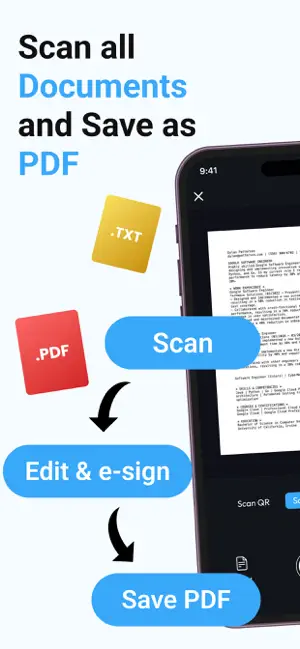

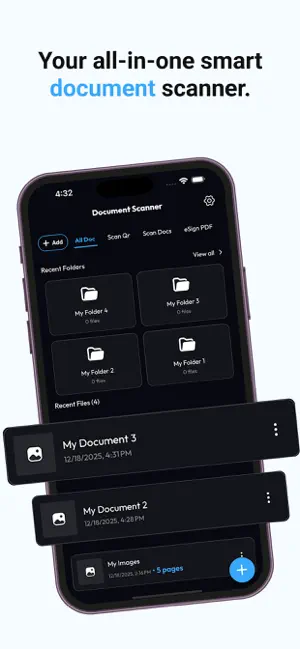
About Document Scanner & PDF Scanner
Document Scanner & PDF Scanner turns your iPhone into a fast, simple scanner for everyday documents. Scan receipts, notes, contracts, ID cards, invoices, and more into clear PDF files in seconds. Organize everything in folders, sign documents, and share files anytime from one easy app. Scan documents in seconds • Scan receipts, contracts, notes, invoices, ID cards, and other documents with your camera • Save scans as PDF or image files with clear, readable quality • Quickly capture paperwork for work, school, travel, and personal use Organize files your way • Create folders to keep important documents neatly sorted • Rename, move, and manage files with a simple interface • Find recent scans faster and keep everything in one place Edit, sign, and share • Add your handwritten signature to documents for quick eSign use • Share scans by email, messaging apps, or cloud storage • Print documents in just a few taps when needed More than a basic scanner • Scan documents, photos, and QR codes from one app • Convert scans into optimized PDF files that are easy to store and share • Use a clean, smooth experience designed for daily document tasks Whether you are a student, professional, freelancer, or business user, Document Scanner & PDF Scanner helps you stay organized and go paperless wherever you are. Subscriptions Monthly – $0.99 per month Upgrade to Premium to remove ads and enjoy an uninterrupted scanning experience. Auto-renews monthly. Yearly – $9.99 per year Upgrade to Premium to remove ads and enjoy an uninterrupted scanning experience. Auto-renews yearly. Payment & Renewal Payment will be charged to your Apple ID account at confirmation of purchase. Subscriptions automatically renew unless cancelled at least 24 hours before the end of the current billing period. You can manage or cancel your subscription anytime in your Apple ID account settings. For more details on managing subscriptions, visit: https://support.apple.com/en-us/118428 Terms of Use: https://sites.google.com/view/document-scanner-pdf-editor-to/home Privacy Policy: https://sites.google.com/view/document-scanner-privacy/home Thank you for choosing us. For feedback or support, contact us at [email protected]
What’s new
Version 1.7 · Updated May 31, 2026
Various bug fixes and performance improvements.
App privacy
The developer, Identiq Infotech, reported these privacy practices to Apple.
Data Used to Track You
The following data may be used to track you across apps and websites owned by other companies:
- Usage Data: Advertising Data
Data Not Linked to You
The following data, which may be collected but is not linked to your identity, may be used for the following purposes:
- Usage Data: Advertising Data
- Other Data: Other Data Types
Used for: Developer’s Advertising or Marketing, Analytics, App Functionality
Alternatives to Document Scanner & PDF Scanner
Looking for apps like Document Scanner & PDF Scanner? Here are 6 similar apps on the App Store. The highest rated is RPN-35 SD (4.4/5), and 5 of the 6 are free to download.
-
 WhattaRAG
-
 Cleaner AI: Storage CleanerKit
-
 Habit Tracker - Craft Routine
-
 Expiry Tracker: ZeroExpiry
-
 ShareX - wifi file transfer
1.0
ShareX - wifi file transfer
1.0
-
 RPN-35 SD
4.4
RPN-35 SD
4.4
| App | Rating | Price | Last updated | Compare |
|---|---|---|---|---|
| Document Scanner & PDF Scanner | – | Free | May 31, 2026 | |
| WhattaRAG | – | Free | Sep 15, 2026 | Compare |
| Cleaner AI: Storage CleanerKit | – | Free | Apr 22, 2026 | Compare |
| Habit Tracker - Craft Routine | – | Free | Oct 17, 2026 | Compare |
| Expiry Tracker: ZeroExpiry | – | Free | Oct 22, 2026 | Compare |
| ShareX - wifi file transfer | 1.0 / 5 (1) | Free | May 14, 2026 | Compare |
| RPN-35 SD | 4.4 / 5 (14) | 1.99 USD | Oct 16, 2025 | Compare |