

Labide - Remote Dev Studio
Maxim Merkurev Developer Tools iPhoneiPadiPod touch
Labide - Remote Dev Studio is a free Developer Tools app for iPhone and iPad by Maxim Merkurev. Rated 3.0/5 from 2 ratings. Requires iOS 17.0.
- Rating
- 3.0
- 2 ratings
- Price
- Free
- on the App Store
- Size
- 12 MB
- Age 17+
- Updated
- Apr 5
- 2026 · v1.3
Screenshots


About Labide - Remote Dev Studio
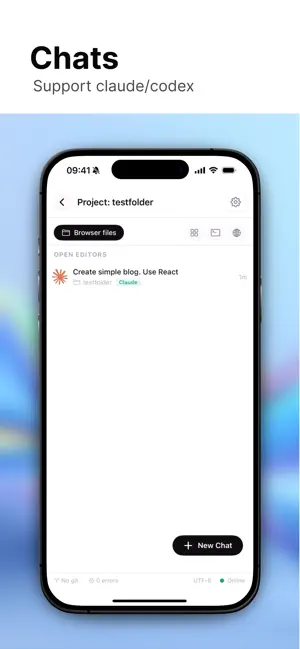
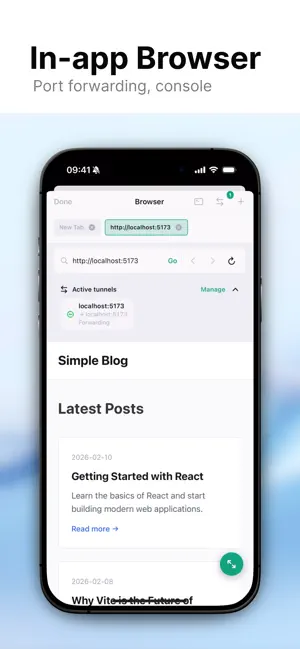
Labide transforms your iPhone and iPad into a powerful remote development workstation. Connect to any server via SSH and leverage AI assistance to write, debug, and deploy code directly from your mobile device. Works with Codex and Claude Core Features SSH Connections Securely connect to remote servers with password or key-based authentication. Manage multiple connections with custom titles and working directories. Your credentials are stored safely in the iOS Keychain. AI-Powered Coding Assistant Integrated AI assistant helps you write, review, and debug code in real-time. Ask questions about your codebase, generate code snippets, fix bugs, and get intelligent suggestions — all within the context of your project files. Full-Featured Terminal Access a complete terminal emulator with support for interactive sessions. Execute commands, run scripts, and manage your server directly from your device with a responsive and intuitive interface. Built-in Browser with Port Tunneling Preview your web applications instantly with the integrated browser. Create SSH port tunnels to access services running on remote ports. Manage multiple browser tabs and enjoy full-screen mode for immersive testing. Git Integration Complete source control at your fingertips: • View repository status, branches, and commit history • Stage, unstage, and discard changes • Create commits with custom messages • Pull and push to remote repositories • Create and switch between branches • Resolve merge conflicts • Configure GitHub access with personal access tokens Project File Browser Navigate your project structure with an intuitive file browser. View and edit files, create new directories, and save frequently accessed folders for quick access. Quick Commands Create shortcuts for your most-used terminal commands. Save time by executing common operations with a single tap. Use Cases • Debug production issues from anywhere • Review and merge pull requests on the go • Deploy updates without your laptop • Monitor server logs in real-time • Write code with AI assistance • Test web applications via port tunneling • Manage multiple development environments Security First • Credentials stored securely in iOS Keychain • SSH key authentication support • No data stored on external servers • Local session management Labide brings the power of a full development environment to your mobile device. Whether you’re fixing a critical bug from the airport or reviewing code during your commute, Labide keeps you connected to your projects.
What’s new
Version 1.3 · Updated April 5, 2026
- Improved connection stability - Fixed Codex errors
App privacy
The developer, Maxim Merkurev, reported these privacy practices to Apple.
Data Not Collected
The developer does not collect any data from this app.
Alternatives to Labide - Remote Dev Studio
Looking for apps like Labide - Remote Dev Studio? Here are 6 similar apps on the App Store. The highest rated is CCC(C3): AI Agents' Mobile IDE (5.0/5), and all 6 are free to download.


| App | Rating | Price | Last updated | Compare |
|---|---|---|---|---|
| Labide - Remote Dev Studio | 3.0 / 5 (2 ratings) | Free | April 5, 2026 | |
| CCC(C3): AI Agents' Mobile IDE | 5.0 / 5 (2) | Free | Apr 18, 2026 | Compare |
| AFK Remote | – | Free | Mar 10, 2026 | Compare |
| Chell | 4.4 / 5 (5) | Free | Feb 25, 2026 | Compare |
| VibeTerm | – | Free | Mar 28, 2026 | Compare |
| Punk Code | – | Free | Mar 26, 2026 | Compare |
| Agmente | 5.0 / 5 (2) | Free | Jan 3, 2026 | Compare |