

Tracearr
Connor Gallopo Utilities iPhoneiPadiPod touch
Tracearr is a paid Utilities app for iPhone and iPad by Connor Gallopo. Rated 3.9/5 from 18 ratings. Requires iOS 17.0. Updated October 5, 2026.
- Rating
- 3.9
- 18 ratings
- Price
- 4.99 USD
- on the App Store
- Size
- 87 MB
- Age 4+
- Updated
- Oct 5
- 2026 · v2026.10.1
Screenshots



About Tracearr
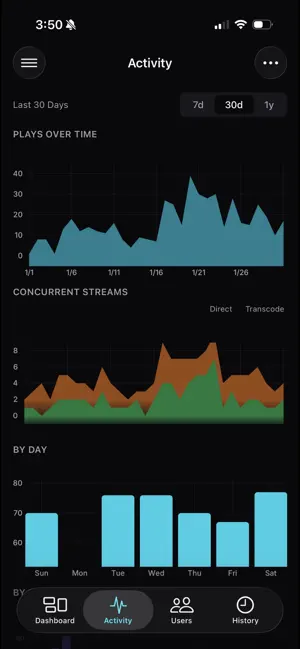
Tracearr is a real-time monitoring platform for Plex, Jellyfin, and Emby. One dashboard for all your media servers, on mobile and web. REAL-TIME STREAMING DASHBOARD See who's watching, what they're playing, and where they're streaming from - the moment it happens. Active sessions show device, quality, location, and transcoding status, and you can end a stream right from the dashboard. Live CPU and memory for Plex, Jellyfin, and Emby, and a banner when a media server goes down. Plex streams update over Server-Sent Events; Jellyfin and Emby are polled, or push updates through the optional Tracearr plugin. A live stream map shows where your viewers are watching from. AUTOMATIONS Build automations in the Tracearr web dashboard from 30+ condition fields: • Session behavior - concurrent streams, travel speed, unique IPs/devices in a time window, account inactivity • Stream quality - resolution, transcoding, bitrate thresholds • User attributes - specific users, trust score, account age • Device & client - device type, platform, player app • Network & location - country, IP ranges, local vs remote • Scope - target specific servers or media types Match all or any conditions in a group, and stack groups for finer control. A policy automation records a violation with a severity level when it matches. Then it can run any of these actions: • Send notifications (push, Discord, email, webhooks, ntfy, Gotify, Pushover, and more) • Adjust, set, or reset trust scores • Terminate streams • Message the client directly (Jellyfin/Emby) Chain multiple actions, branch with if/otherwise, and set cooldowns to prevent spam. Ready-made templates for common patterns - impossible travel, simultaneous locations, device velocity, concurrent streams, geo restrictions - get you started in seconds. In the app, pause or resume any automation, see what ran and why, and acknowledge alerts one at a time or all at once. TRUST SCORES Users earn (or lose) trust based on their behavior. Automations can adjust scores when they trigger. See at a glance which accounts might need attention. SESSION HISTORY & ANALYTICS Browse complete session history with filters: date range, user, platform, country, media type, and transcode decision. Search across your entire watch history. See aggregated stats - total plays, watch time, unique viewers. The web dashboard adds library analytics: storage, quality, duplicates, and engagement. Link Seerr, Overseerr, or Jellyseerr to see who requested each title and whether they watched it. USER PROFILES Search and sort your users, then open anyone to see recent sessions, known devices, locations, trust score, and violations across every server they use. Adjust a trust score on the spot. PUSH NOTIFICATIONS Configure notifications for: • Violations (filter by severity) • Stream starts and stops • New device detection • Trust score changes • Server up/down status Set quiet hours to pause notifications overnight. High-severity violations and server-down alerts can break through quiet hours if you allow it. WIDGETS A Now Playing widget for the iPhone and iPad home screen and lock screen shows active streams and transcodes at a glance. It's new, and we'd like your feedback on GitHub or Discord. MULTI-SERVER SUPPORT Connect multiple Plex, Jellyfin, and Emby servers to a single Tracearr instance. Switch between servers or view combined stats. SELF-HOSTED & PRIVATE Tracearr runs on your hardware. Your watch history, user data, and analytics are stored on your server, and the mobile apps connect to it directly. Push notifications are delivered through Expo's push service. Import existing data from Tautulli or Jellystat so you don't start from zero. REQUIREMENTS You need a running Tracearr server to use this app. It's free, open source, and runs in Docker. Visit github.com/connorgallopo/tracearr for setup instructions. Questions or issues? Open an issue on GitHub or join the Discord community.
Ratings & reviews
3.9
18 ratings
What’s new
Version 2026.10.1 · Updated October 5, 2026
The sign-in screen now says why a device was signed out, such as being removed in the Tracearr web app or 30 days without use. The app stays signed in while your server restarts or is unreachable. Now Playing shows buffering and marks trailers, and stream details show Dolby Atmos. History filters by trailers, audio-only transcodes and subtitle burn-in. Historical servers are marked in the server list. Fixed a crash when a list got shorter while scrolling.
App privacy
The developer, Connor Gallopo, reported these privacy practices to Apple.
Data Not Linked to You
The following data, which may be collected but is not linked to your identity, may be used for the following purposes:
- Identifiers: Device ID
- Usage Data: Product Interaction
- Diagnostics: Crash Data, Performance Data, Other Diagnostic Data
Used for: Analytics, App Functionality
Alternatives to Tracearr
Looking for apps like Tracearr? Here are 6 similar apps on the App Store. The highest rated is YaArr (5.0/5), and all 6 are free to download.
-
 Unraid Deck - Server Manager
4.8
Unraid Deck - Server Manager
4.8
-
 Dashboarr
4.9
Dashboarr
4.9
-
 ShelfPulse
4.9
ShelfPulse
4.9
-
 Sable.
4.7
Sable.
4.7
-
 Icarus - Media Manager
4.0
Icarus - Media Manager
4.0
-
 YaArr
5.0
YaArr
5.0
| App | Rating | Price | Last updated | Compare |
|---|---|---|---|---|
| Tracearr | 3.9 / 5 (18 ratings) | 4.99 USD | October 5, 2026 | |
| Unraid Deck - Server Manager | 4.8 / 5 (26) | Free | Sep 24, 2026 | Compare |
| Dashboarr | 4.9 / 5 (20) | Free | Sep 24, 2026 | Compare |
| ShelfPulse | 4.9 / 5 (9) | Free | Sep 30, 2026 | Compare |
| Sable. | 4.7 / 5 (30) | Free | Apr 30, 2026 | Compare |
| Icarus - Media Manager | 4.0 / 5 (6) | Free | Oct 16, 2026 | Compare |
| YaArr | 5.0 / 5 (4) | Free | Aug 21, 2026 | Compare |
Compare Tracearr with the top alternatives: ratings, updates, ASO score and keyword gaps →