

Pixli - AI Image Generator
Yassine bouassria Photo & Video iPhoneiPadiPod touch
Pixli - AI Image Generator is a free Photo & Video app for iPhone and iPad by Yassine bouassria. Requires iOS 16.0. Updated February 23, 2026.
- Price
- Free
- on the App Store
- Size
- 26 MB
- Age 9+
- Updated
- Feb 23
- 2026 · v1.0.1
Screenshots

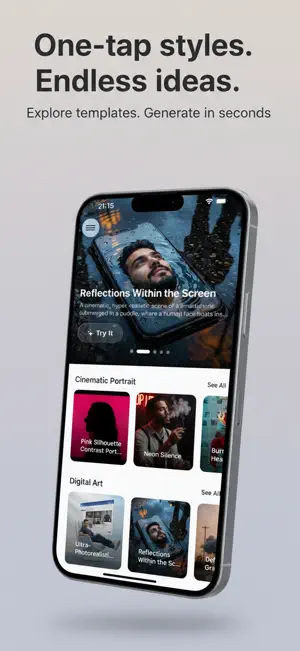
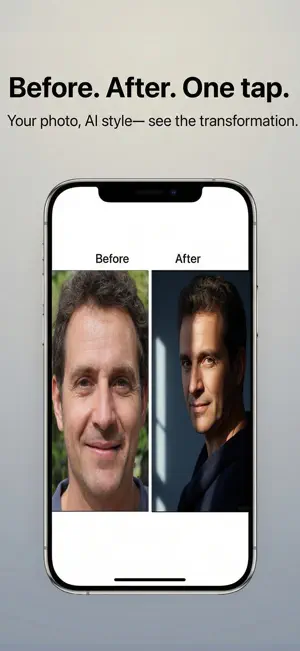
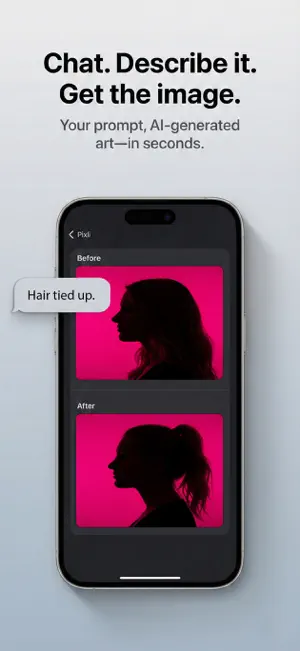
About Pixli - AI Image Generator
Create stunning images from your photos and ideas with Pixli, the AI photo editor that makes professional-looking visuals effortless. Whether you're transforming everyday photos into art or generating unique images from text, Pixli puts creative power in your hands-no design skills needed. EXPRESS YOURSELF WITH AI Turn your thoughts into images instantly. Describe what you want, attach a photo, and watch the AI bring your vision to life. From creative concepts to personalized edits, Pixli makes image creation as simple as chatting. TRANSFORM PHOTOS WITH TEMPLATES Choose from a variety of AI-powered photo templates and add your own image from your camera or library. In seconds, Pixli reimagines your photo in stunning new styles-perfect for social media, profile pictures, or just for fun. KEY FEATURES AI Image Generator Generate unique images from text prompts. Describe your idea and let the AI create it for you. Photo Templates Pick a template, add your photo, and get instant AI transformations in themed styles. Photo-to-Image Creation Attach your photos in chat and have the AI reimagine them based on your description. High-Quality Saves Save all your creations in HD or 4K quality directly to your photo library. Personal Gallery Keep all your generated images organized in one place within the app. WHY PIXLI? - No design experience required-templates and AI do the work - Create in seconds, not hours-skip the learning curve - Get personalized, one-of-a-kind images every time - Turn ordinary photos into something special - Save and share high-quality images instantly Perfect for social media enthusiasts, content creators, students, or anyone who wants to create standout visuals without complex editing tools. HOW IT WORKS 1. Sign in with Apple or Google 2. Choose a template or start a text prompt 3. Add your photo (optional) or describe your idea 4. Let the AI generate your image 5. Save to your gallery or photo library in high quality Get started with free credits, then subscribe or purchase credit packs for unlimited creativity. Terms of Use: https://www.pixli.online/2025/12/terms-conditions.html Privacy Policy: https://www.pixli.online/2025/12/privacy-policy.html End User license Agreement: https://www.apple.com/legal/internet-services/itunes/dev/stdeula/ Download Pixli today and turn your photos and ideas into unique images-effortlessly.
What’s new
Version 1.0.1 · Updated February 23, 2026
Performance improvements and bug fixes. Images load faster thanks to smart caching. General stability and reliability improvements.
App privacy
The developer, Yassine bouassria, reported these privacy practices to Apple.
Data Linked to You
The following data, which may be collected and linked to your identity, may be used for the following purposes:
- Purchases: Purchase History
- Identifiers: User ID, Device ID
- Usage Data: Product Interaction
- Contact Info: Email Address, Name
- User Content: Photos or Videos
Used for: Analytics, App Functionality
Alternatives to Pixli - AI Image Generator
Looking for apps like Pixli - AI Image Generator? Here are 6 similar apps on the App Store. The highest rated is Glossy: AI Photoshoot & Avatar (5.0/5), and all 6 are free to download.
-
 AI Photo Generator - Pixazo
-
 Neronia AI - Image Generation
-
 PromptRaja AI Photo
-
 Stdyo - AI Photo & Video
-
 Emovia: AI Image & Video
-
 Glossy: AI Photoshoot & Avatar
5.0
| App | Rating | Price | Last updated | Compare |
|---|---|---|---|---|
| Pixli - AI Image Generator | – | Free | February 23, 2026 | |
| AI Photo Generator - Pixazo | – | Free | Apr 23, 2026 | Compare |
| Neronia AI - Image Generation | – | Free | Nov 26, 2025 | Compare |
| PromptRaja AI Photo | – | Free | Jan 16, 2026 | Compare |
| Stdyo - AI Photo & Video | – | Free | May 23, 2026 | Compare |
| Emovia: AI Image & Video | – | Free | Oct 20, 2026 | Compare |
| Glossy: AI Photoshoot & Avatar | 5.0 / 5 (1) | Free | Oct 21, 2026 | Compare |