

Nōma: Film Camera & Recipes
Noma Software LLC Photo & Video iPhoneiPadiPod touch
Nōma: Film Camera & Recipes is a free Photo & Video app for iPhone and iPad by Noma Software LLC. Rated 5.0/5 from 1 ratings. Requires iOS 18.0.
- Rating
- 5.0
- 1 ratings
- Price
- Free
- on the App Store
- Size
- 41 MB
- Age 4+
- Updated
- Oct 19
- 2026 · v2.2
Screenshots

About Nōma: Film Camera & Recipes
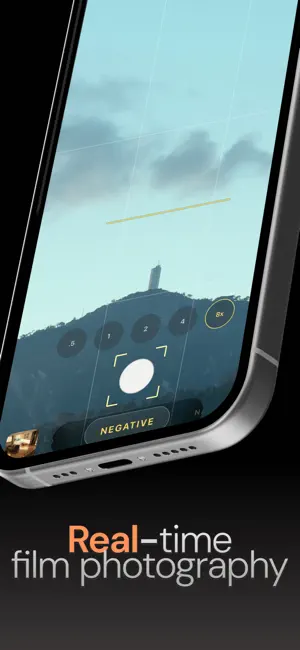
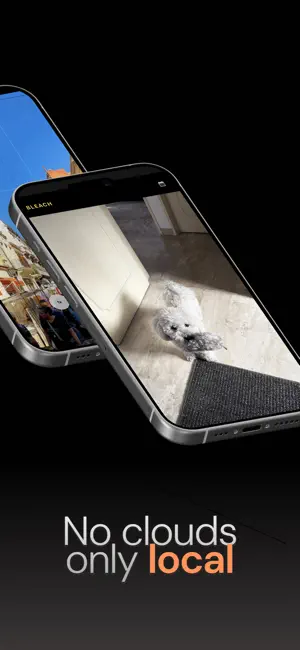
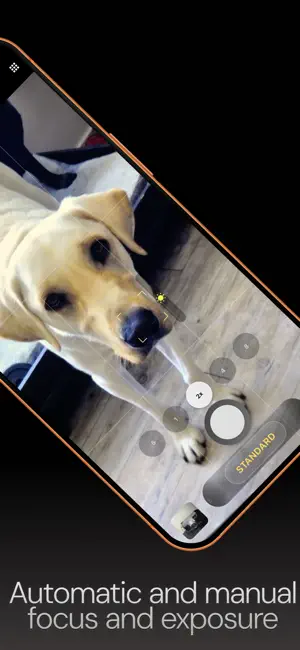
Nōma is a film camera for iPhone. Pick a recipe, see the finished look live in the viewfinder, and shoot. No filters afterward, no editing — what you see is exactly what you get. Inspired by classic 35mm film stocks and cinema, Nōma turns your iPhone into a pocket film camera with real film grain, rich color and a minimal interface built for shooting, not scrolling through menus. 13 FILM RECIPES Each recipe has its own color science, tuned to feel like a real film stock: - Khrome — rich slide-film color: deep skies, olive greens, golden warmth - Vivid — bold, saturated and high contrast - Standard — clean and neutral, for everyday shooting - Natural — faithful color with flattering skin tones - Soft — gentle contrast, made for portraits - Negative — hard tones, cyan skies and amber highlights - Cinema — flat, muted and cinematic - Retro — faded, warm and nostalgic, like an old print - Bleach — silvery, desaturated and contrasty - Mono — timeless, neutral black and white - Noir — dramatic black and white with a red-filter look - Sepia — a warm toned print with chocolate shadows - Normal — your iPhone's color, untouched Swipe through recipes and watch the viewfinder change instantly. REAL FILM GRAIN Fine, organic grain that lives in the midtones, just like film. Choose Off, Weak or Strong — the grain in your photo matches what you saw in the viewfinder. MANUAL CONTROL Tap to focus and slide to adjust exposure. Set ISO and shutter speed manually, or leave them on auto. Switch between ultra wide, wide and telephoto lenses, and choose your resolution. COMPOSE WITH CONFIDENCE - A level to keep your horizon straight - Rule-of-thirds grid - 16:9, 4:3 and 3:2 aspect ratios - Flash control - Classic date stamp - Shoot in portrait or landscape — icons rotate with your iPhone and photos are saved the way you hold it MAKE IT YOURS Long-press the top bar to add up to six quick controls — grid, level, aspect ratio, grain, ISO, shutter speed and more — so your favorite settings are always one tap away. REVIEW, THEN KEEP After each shot, pinch or double-tap to zoom in and check focus, then save or retake. Photos are saved in wide P3 color. BUILT-IN GALLERY Browse your shots in a clean, dark gallery. Double-tap or pinch to zoom, long-press to select several photos, and share or delete them at once. INSTANT SHARING Share to Instagram, Messages, AirDrop and any other app, right from Nōma. PRIVACY FIRST No account. No cloud. No tracking. Your photos never leave your device unless you share them. WHY NŌMA Most camera apps make you edit after the shot. Nōma flips the workflow: you choose the look first and see the final image before you press the shutter. That means more intentional photos, faster results and nothing left to edit. Designed for people who care about how their photos feel from the moment they press the shutter. Point, choose your recipe, and shoot. Terms of Use: https://nomasoftware.com/noma-camera/terms Privacy Policy: https://nomasoftware.com/noma-camera/privacy
What’s new
Version 2.2 · Updated October 19, 2026
Nōma 2.2 is our biggest update yet. REBUILT FILM RECIPES Every recipe has been re-graded from the ground up, with richer and more distinct color: - Khrome — Kodachrome-inspired: dense skies, olive greens, golden warmth - Noir — red-filter black and white with darker skies and luminous skin - Sepia — a true toned print with chocolate shadows and cream whites - Negative, Cinema, Retro, Natural, Soft, Vivid, Standard, Mono and Bleach — each with its own unmistakable character Deeper blacks, smoother highlights and wide P3 color in every shot. REAL FILM GRAIN Fine, organic grain that lives in the midtones and matches exactly what you see in the viewfinder. SHOOT ANY WAY YOU HOLD IT Photos are saved in the orientation you shoot: portrait, landscape or upside down. Icons rotate with your iPhone, just like the built-in Camera. LEVEL A new level helps you keep the horizon straight. Turn it on or off from the menu. CUSTOMIZABLE TOP BAR Long-press the top bar to add up to six quick controls: grid, level, aspect ratio, grain, ISO, shutter speed and more. REVIEW BEFORE YOU SAVE Pinch or double-tap to zoom into your shot before saving. Double-tap zoom now works in the gallery too. FRESH NEW LOOK A redesigned shutter, lens selector and photo review screen. ALSO IN THIS UPDATE - More accurate tap-to-focus - The shutter no longer triggers exposure adjustments by accident - What's New, Restore Purchases and Rate the App in the info menu
App privacy
The developer, Noma Software LLC, reported these privacy practices to Apple.
Data Not Collected
The developer does not collect any data from this app.
Alternatives to Nōma: Film Camera & Recipes
Looking for apps like Nōma: Film Camera & Recipes? Here are 6 similar apps on the App Store. The highest rated is Frame Pair: Dual Video Camera (5.0/5), and 5 of the 6 are free to download.
-
 Frame Pair: Dual Video Camera
5.0
Frame Pair: Dual Video Camera
5.0
-
 PrivaLens
-
 BabyTime - Baby Photo Album
-
 FlowColor-Save Photos to Art
-
 Video Tinify Secured
-
 DualCam: Dual Video Recorder
4.5
DualCam: Dual Video Recorder
4.5
| App | Rating | Price | Last updated | Compare |
|---|---|---|---|---|
| Nōma: Film Camera & Recipes | 5.0 / 5 (1 rating) | Free | October 19, 2026 | |
| Frame Pair: Dual Video Camera | 5.0 / 5 (2) | Free | Jul 11, 2026 | Compare |
| PrivaLens | – | Free | Oct 10, 2026 | Compare |
| BabyTime - Baby Photo Album | – | Free | Sep 30, 2026 | Compare |
| FlowColor-Save Photos to Art | – | 0.99 USD | May 2, 2026 | Compare |
| Video Tinify Secured | – | Free | Feb 16, 2026 | Compare |
| DualCam: Dual Video Recorder | 4.5 / 5 (6) | Free | Oct 26, 2026 | Compare |