

Habit Check: Daily Tracker
RYOTA AZUMA Health & Fitness iPhoneiPadiPod touch
Habit Check: Daily Tracker is a free Health & Fitness app for iPhone and iPad by RYOTA AZUMA. Rated 5.0/5 from 1 ratings. Requires iOS 15.0.
- Rating
- 5.0
- 1 ratings
- Price
- Free
- on the App Store
- Size
- 27 MB
- Age 4+
- Updated
- Aug 7
- 2026 · v2.1.0
Screenshots
About Habit Check: Daily Tracker
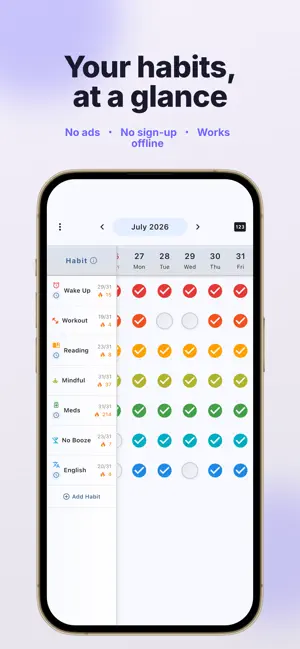
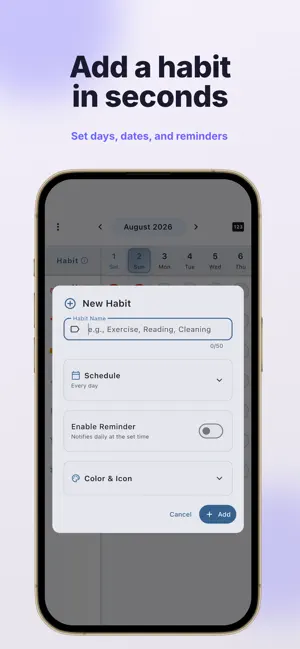
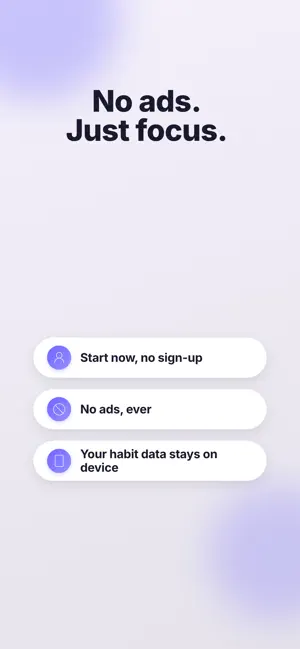
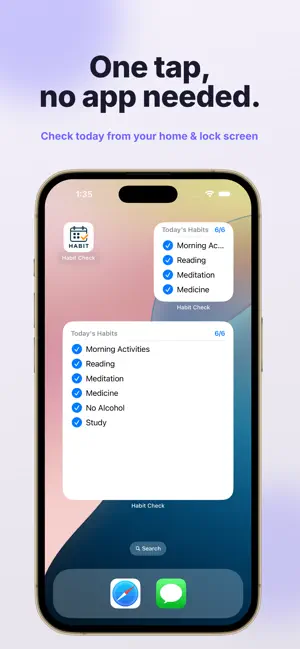
[Beat Procrastination] Visualize your habits on a calendar - No account, no ads, completely free - Habit data stored only on your device — privacy-focused Record and manage your daily habits in a calendar view. Check off each day to see your progress at a glance and stay motivated to keep your streak alive. KEY FEATURES Calendar View - See your habit progress month by month - Track completion visually with check marks - Scroll horizontally to view past and future records - Toggle the check count display on or off Habit Customization (NEW) - Pick from 80+ icons to match each habit - Browse by category: Fitness, Study, Food, Health, Hobby, Life, and Other - Assign a color to each habit to tell them apart at a glance Statistics & Annual Heatmap (NEW) - Visualize a full year of progress in a heatmap - Switch between yearly and monthly views - See checked days, completion rate, longest streak, and more - Filter the stats by habit Widgets - Check today's progress without opening the app - Check off habits directly from the widget - Easily undo an accidental tap - Home Screen widgets in small, medium, and large sizes - Lock Screen widgets also supported (NEW) Flexible Scheduling - Set habits by day of week (e.g. Mon/Wed/Fri) - Set habits by date (e.g. 1st and 15th of each month) - Combine both for advanced schedules - Defaults to a daily habit when no schedule is set Share & Milestones - Turn your monthly record into an image to share on social media - Celebration animations at 7, 15, and 30 day streaks - Tell friends you kept it going and stay motivated Reminders - Set a reminder time for each habit - Recurring reminders notify you at a fixed time - Already-checked habits automatically skip the notification Data Backup - Automatic iCloud backup — restore your data after switching devices or reinstalling (NEW) - Export and import your habit data as a file Privacy First - All habit data is stored on your device (never sent to external servers) - No personal data or account required - Only anonymous usage and crash data is collected to improve the app PERFECT FOR - Anyone who wants to beat procrastination - Building habits like morning routines, exercise, or reading - Checking your streak progress on a calendar - People looking for a simple, easy-to-use app - Privacy-conscious users who don't want ads in the way HOW TO USE (3 STEPS) 1. Add a habit — tap the "+" button at the bottom right 2. Check in daily — just tap the calendar 3. Review your progress — see your streak at a glance HIGHLIGHTS - Dark mode support - No internet connection needed (fully offline) - Lightweight and fast - English and Japanese support Visualize the small steps you take every day with Habit Check.
What’s new
Version 2.1.0 · Updated August 7, 2026
v2.1.0 Update - Added a Statistics screen. See a full year of progress at a glance with the annual heatmap, plus monthly views, completion rate, and longest streak. - Added Lock Screen widgets so you can see today's progress right from your Lock Screen. - Added automatic iCloud backup. Turn it on and your habit data is saved automatically — restore it with one tap after switching devices or reinstalling. - Expanded the habit icon set to 80+ icons, organized into seven categories: Fitness, Study, Food, Health, Hobby, Life, and Other. - Improved the habit editor. The save button now stays fixed at the bottom, and you can find icons quickly by category. - Condensed the statistics period selector into a single row, and pinned the weekday labels of the annual heatmap to the left edge. - Fixed an issue where checks made from the widget right after midnight were recorded for the next day. - Made restoring from a backup safer — your existing data is no longer lost if a restore fails. - Minor bug fixes and improvements.
App privacy
The developer, RYOTA AZUMA, reported these privacy practices to Apple.
Data Not Linked to You
The following data, which may be collected but is not linked to your identity, may be used for the following purposes:
- Identifiers: User ID, Device ID
- Usage Data: Product Interaction
- Diagnostics: Crash Data, Performance Data
Used for: Analytics
Alternatives to Habit Check: Daily Tracker
Looking for apps like Habit Check: Daily Tracker? Here are 6 similar apps on the App Store. The highest rated is Habit Tracker & Streaks: Goal4 (5.0/5), and all 6 are free to download.
-
 Track Easy - Habit Tracker
-
 MyRhythm Habit Tracker & Diary
-
 Habit Tracker & Streaks: Goal4
5.0
Habit Tracker & Streaks: Goal4
5.0
-
 タップde継続- 習慣化・継続・記録
-
 Monthly Habit Tracker
-
 習慣トラッカー - シンプル記録
| App | Rating | Price | Last updated | Compare |
|---|---|---|---|---|
| Habit Check: Daily Tracker | 5.0 / 5 (1 rating) | Free | August 7, 2026 | |
| Track Easy - Habit Tracker | – | Free | Feb 22, 2026 | Compare |
| MyRhythm Habit Tracker & Diary | – | Free | Sep 18, 2026 | Compare |
| Habit Tracker & Streaks: Goal4 | 5.0 / 5 (1) | Free | Oct 3, 2026 | Compare |
| タップde継続- 習慣化・継続・記録 | – | Free | Feb 26, 2026 | Compare |
| Monthly Habit Tracker | – | Free | May 21, 2026 | Compare |
| 習慣トラッカー - シンプル記録 | – | Free | Aug 14, 2026 | Compare |