

MissionCtrl - Habit Tracker
Kaustav Halder Productivity iPhoneiPadiPod touch
MissionCtrl - Habit Tracker is a free Productivity app for iPhone and iPad by Kaustav Halder. Requires iOS 15.0. Updated September 27, 2026.
- Price
- Free
- on the App Store
- Size
- 43 MB
- Age 4+
- Updated
- Sep 27
- 2026 · v2.0
Screenshots

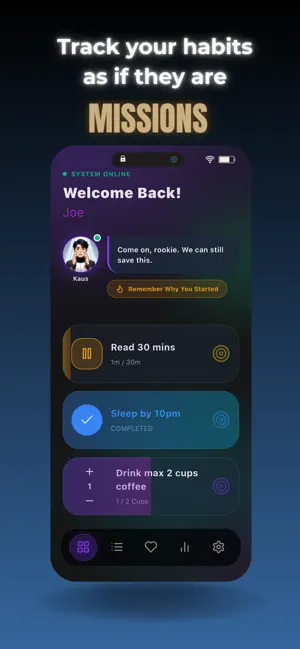


About MissionCtrl - Habit Tracker
MissionCtrl is a habit tracker designed to help you build consistent routines, track daily goals, and stay on top of the habits that matter to you. Instead of traditional task lists, habits are treated as missions that you complete throughout the day. Create missions that match the way you work and track your progress over time. Whether you are building new habits, improving productivity, exercising regularly, or maintaining a daily routine, MissionCtrl gives you a simple and flexible way to stay consistent. ### Mission Types MissionCtrl supports three types of missions: **Boolean Missions** Simple yes-or-no habits such as sleeping on time, avoiding junk food, taking your vitamins, or completing a daily task. **Time-Based Missions** Track activities based on time. Read for 30 minutes, meditate for 10 minutes, exercise, or practice a skill. **Count-Based Missions** Perfect for repetition-based goals such as push-ups, drinking water, walking, or completing a certain number of tasks. ### Guided Experience Choose between two in-app guides, Kaus or Prats. These characters respond to your activity and provide prompts and feedback throughout your journey, adding a sense of progress and motivation as you complete your missions. ### Your Progress, Your Data MissionCtrl is designed to keep your habit tracking personal. Your missions, activity, and progress are focused on you. There are no global leaderboards, competitive leagues, or public profiles. You can focus on building better habits without comparing your progress with anyone else. ### Privacy Focused MissionCtrl is designed with privacy in mind. Your personal missions and progress are stored locally on your device and do not require an account. Your habit tracking stays personal, so you can build routines and review your progress without sharing your activity with others. ### Build Better Routines MissionCtrl helps you stay consistent, track your progress, and build habits that last. Create missions. Complete them daily. Track your progress. Build better routines, one mission at a time. Privacy Policy: https://kauscoder.com/missionctrl-privacy-policy/ Terms of Use: https://www.apple.com/legal/internet-services/itunes/dev/stdeula/
What’s new
Version 2.0 · Updated September 27, 2026
More focused. More personal. MissionCtrl is now centered entirely around your habits and progress, with a cleaner, simpler experience and plenty of polish.
App privacy
The developer, Kaustav Halder, reported these privacy practices to Apple.
Data Used to Track You
The following data may be used to track you across apps and websites owned by other companies:
- Identifiers: Device ID
Data Linked to You
The following data, which may be collected and linked to your identity, may be used for the following purposes:
- Contact Info: Email Address, Name
Used for: App Functionality
Data Not Linked to You
The following data, which may be collected but is not linked to your identity, may be used for the following purposes:
- Identifiers: Device ID
- Diagnostics: Crash Data, Performance Data, Other Diagnostic Data
Used for: Third-Party Advertising, Analytics
Alternatives to MissionCtrl - Habit Tracker
Looking for apps like MissionCtrl - Habit Tracker? Here are 5 similar apps on the App Store. The highest rated is NotePlan - To-Do List & Notes (4.8/5), and all 5 are free to download.
-
 Re:List
4.7
Re:List
4.7
-
 Days Since Habıt Tracker
-
 Humanize AI Text Detector
4.4
Humanize AI Text Detector
4.4
-
 NotePlan - To-Do List & Notes
4.8
NotePlan - To-Do List & Notes
4.8
-
 WordPress – Website Builder
4.6
WordPress – Website Builder
4.6
| App | Rating | Price | Last updated | Compare |
|---|---|---|---|---|
| MissionCtrl - Habit Tracker | – | Free | September 27, 2026 | |
| Re:List | 4.7 / 5 (6) | Free | Aug 1, 2026 | Compare |
| Days Since Habıt Tracker | – | Free | Sep 17, 2026 | Compare |
| Humanize AI Text Detector | 4.4 / 5 (219) | Free | Aug 26, 2026 | Compare |
| NotePlan - To-Do List & Notes | 4.8 / 5 (1,517) | Free | Oct 23, 2026 | Compare |
| WordPress – Website Builder | 4.6 / 5 (22,282) | Free | Sep 28, 2026 | Compare |