

Where's My Car??
GANA Holdings Co., Ltd. Navigation iPhoneiPadiPod touch
Where's My Car?? is a free Navigation app for iPhone and iPad by GANA Holdings Co., Ltd. Requires iOS 18.2. Updated August 29, 2026.
- Price
- Free
- on the App Store
- Size
- 8 MB
- Age 4+
- Updated
- Aug 29
- 2026 · v1.2.0
Screenshots


About Where's My Car??
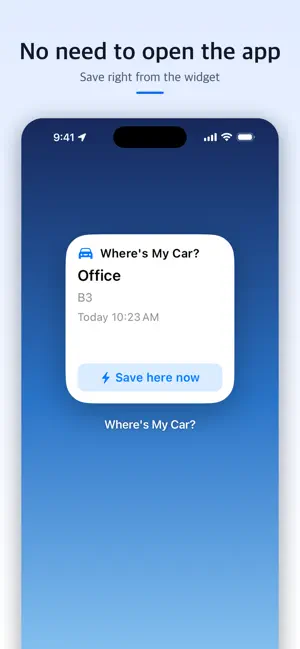
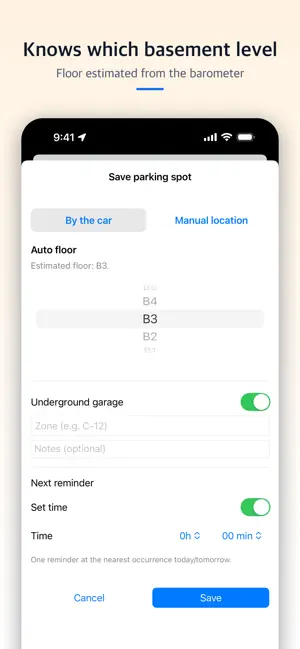
Where's My Car? remembers where you parked in busy garages and lots—automatically. Everything stays on your device; no account needed. Saved when you turn the engine off Register your car once in Settings (car audio/CarPlay or a BLE device). The moment the engine stops and the connection drops, the app saves your spot and floor and sends a notification. No button to press. Underground garages included The app remembers where GPS was lost at the garage entrance and saves that spot. The floor is estimated from your device's barometer and the places you visit often, and gets better with every correction. Shortcuts automation & Siri The "Save Parking Location" action lets you build a personal automation ("When my car's Bluetooth / CarPlay disconnects") that works even when the app is closed. "Hey Siri, save parking in Where's My Car?" works too. A prompt right after you get out When the car stops and you start walking, a "Did you just park?" notification arrives about 15 seconds later. One tap saves; if you drive off again it cancels itself. Home Screen widget See your last spot, floor and time at a glance, and use "Save here now" to save in one tap. Save in about 3 seconds Tap + → confirm the suggested floor → save. Floor wheel, zone note and manual map pin are all supported. Places you visit often Register home, work and favorite garages for smarter detection and remembered floors. Directions and reminders Open a route in Apple Maps to your saved spot, and get an optional reminder 24 hours later (weekday exclusions available). Privacy Your location and parking history stay on the device. Nothing is sent to a server. PRO UPGRADE (ONE-TIME PURCHASE) Remove ads, unlock the full home and history lists, and see floor & zone in notifications. Restore purchases anytime. Notes • Automatic saving requires your phone to be connected to the car via Bluetooth or CarPlay, plus the "Always" location permission with Precise Location on. • Floor estimation requires a device with a barometer.
What’s new
Version 1.2.0 · Updated August 29, 2026
Your parking spot is saved automatically when you turn the engine off. • Car audio & CarPlay auto-save: pick your car once in Settings → Register my car. When the engine stops and the connection drops, the app saves your location and floor and notifies you. Works with most hands-free/audio systems (Classic Bluetooth) and CarPlay. • Underground garages: the app remembers where GPS was lost at the garage entrance and saves that spot; the floor is estimated from the barometer and learned places. • Shortcuts automation & Siri: new “Save Parking Location” action. Create a “When my car’s Bluetooth / CarPlay disconnects” automation in the Shortcuts app and it works even if the app was closed. A one-minute setup guide is in Settings. • Much faster “Did you just park?” prompt: it now arrives about 15 seconds after you leave the car, and is cancelled automatically if you drive off again. • Widget “Save here now” improved: always waits for a fresh GPS fix and shows “Locating…” while saving. Fixed the previous place name lingering in the widget. • The widget date turns into “Yesterday” after midnight, and shows “Car left” once you clear the spot. • The home screen now updates instantly after automatic saves and edits, and the map jumps to the new spot. • Fixed: reminder still firing after “Done (left)”, deleted spots remaining in the widget. • Settings shows your location permission state (Always / While Using / Precise) with a one-tap fix. • Stability: fixed an occasional crash while saving.
App privacy
The developer, GANA Holdings Co., Ltd., reported these privacy practices to Apple.
Data Linked to You
The following data, which may be collected and linked to your identity, may be used for the following purposes:
- Location: Coarse Location
- Identifiers: Device ID
- Usage Data: Product Interaction, Advertising Data
Used for: Third-Party Advertising, Developer’s Advertising or Marketing, Analytics, App Functionality
Data Not Linked to You
The following data, which may be collected but is not linked to your identity, may be used for the following purposes:
- Usage Data: Other Usage Data
- Diagnostics: Other Diagnostic Data, Crash Data
Used for: Third-Party Advertising, Developer’s Advertising or Marketing, Analytics, App Functionality
Alternatives to Where's My Car??
Looking for apps like Where's My Car??? Here are 6 similar apps on the App Store.
-
 Find My Car: Parking GPS
-
 BackPark: Find My Car & Spot
-
 Parky: Where Did I Park
-
 Parking Floor Tracker
-
 ParkHere - Parking Spot Photo
-
 Indoor ParKing Reminder
| App | Rating | Price | Last updated | Compare |
|---|---|---|---|---|
| Where's My Car?? | – | Free | August 29, 2026 | |
| Find My Car: Parking GPS | – | Free | Oct 13, 2026 | Compare |
| BackPark: Find My Car & Spot | – | Free | Sep 10, 2026 | Compare |
| Parky: Where Did I Park | – | Free | Sep 30, 2026 | Compare |
| Parking Floor Tracker | – | Free | Oct 12, 2026 | Compare |
| ParkHere - Parking Spot Photo | – | Free | Oct 12, 2026 | Compare |
| Indoor ParKing Reminder | – | Free | Sep 13, 2026 | Compare |
Compare Where's My Car?? with the top alternatives: ratings, updates, ASO score and keyword gaps →