

Panel Flow
Tap4Mobile do Brasil Entertainment iPhoneiPadiPod touchMac
Panel Flow is a free Entertainment app for iPhone and iPad by Tap4Mobile do Brasil. Requires iOS 27.0. Updated October 21, 2026.
- Price
- Free
- on the App Store
- Size
- 136 MB
- Age 9+
- Updated
- Oct 21
- 2026 · v3.0.0
Screenshots



About Panel Flow
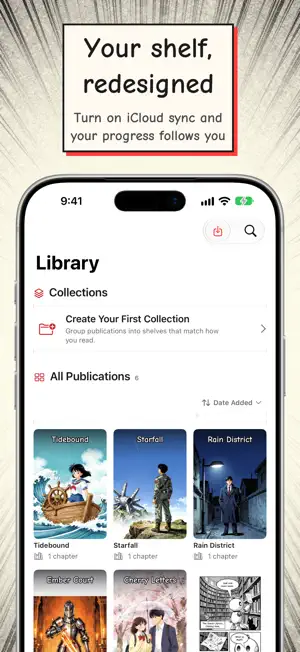
Panel Flow is a comic and manga reader that follows the story panel by panel. Version 3.0 brings it to iPhone, iPad and Mac, with your library synced through iCloud. Bring your own collection: import CBZ, CBR, CB7, CBT and PDF files, or browse your own comic servers (OPDS-compatible). Panel Flow organizes it all and keeps your place. GUIDED READING - Panel and speech bubble detection: Panel Flow finds the panels on each page and moves through them in reading order, zooming in on one panel at a time. - Steady focus that reframes when you rotate the device and respects Reduce Motion. - Left-to-right, right-to-left for manga, and vertical scroll for long-strip comics. LISTEN AND TRANSLATE - Text-to-speech reads the speech bubbles aloud, and guided reading can move along with the voice, bubble by bubble. - Speech bubble translation shows the translated text right on the page. - On supported devices with Apple Intelligence, ask for an on-device description of the current page. YOUR LIBRARY, ON EVERY DEVICE - iCloud sync, once you turn it on: collections, reading progress and metadata follow you across iPhone, iPad and Mac. Downloaded pages and imported files stay on each device. - A personal reading shelf, collections, search, sorting and a metadata editor. - New chapter alerts: turn them on and Panel Flow checks your series from online sources in the background and lets you know about new chapters (your own comic servers are not included). - One Activity Queue for downloads and image enhancement, with several chapters downloading at once. - A Storage screen shows what each publication uses and frees space by type, chapter or publication. - Optional progress tracking with anime and manga tracking services. MADE TO FIT YOU - Themes from manga to noir, with accessible contrast in every one. - Shortcuts and Siri: Open Library and Continue Reading. - VoiceOver, Dynamic Type and Reduce Motion support. - Available in English, Spanish and Portuguese, with an original sample comic to try first. PRIVACY Anonymous usage analytics are off by default; you choose whether to turn them on in Settings > Privacy.
What’s new
Version 3.0.0 · Updated October 21, 2026
What's new in 3.0 Panel Flow is now on Mac - A native Mac app joins iPhone and iPad, with a resizable window and the full reader. - Turn on iCloud sync in Settings and your collections, reading progress and metadata follow you across devices. Downloaded pages and imported files stay on each device. A redesigned app - New library with a personal reading shelf, reworked collections and clearer progress. - Redesigned Discovery, publication details, import flow, metadata editor and Settings. - New Dark Shoujo theme, and improved contrast in every theme. Better guided reading - Panel focus is steadier, follows the right reading order and reframes correctly when you rotate the device. - In vertical-scroll reading, guided reading now scrolls along with read-aloud, bubble by bubble. - Clearer reading assistance panels, with Reduce Motion respected throughout the reader. New chapter alerts - Turn on new chapter alerts in Settings > Notifications, and Panel Flow checks your series from online sources in the background and lets you know about new chapters. Your own comic servers are not checked. - Library covers show a "+N" badge for new chapters, and you can check for updates manually from the details screen. Downloads and storage - One activity queue for downloads and image enhancement, with several chapters downloading at once. - Chapters can be enhanced right after they download. - New Storage screen in Settings shows what each publication uses and lets you free space by type, chapter or publication. Apple Intelligence and Shortcuts - On supported devices, ask for an on-device description of the current page. - New Shortcuts and Siri actions: Open Library and Continue Reading. Polish - A new original sample comic, available in English, Spanish and Portuguese. - Translation pickers now tell language variants apart. - Internet Archive now shows curated public domain collections by default. The full catalog, which includes community uploads, can be turned on in Settings > Content Sources. - Complete localization and many accessibility improvements. - Links to the privacy policy, terms and support in Settings. Anonymous usage statistics are opt-in: off by default, you can turn them on in Settings > Privacy. - Many stability and performance fixes across the reader and the library.
App privacy
The developer, Tap4Mobile do Brasil, reported these privacy practices to Apple.
Data Not Collected
The developer does not collect any data from this app.
Alternatives to Panel Flow
Looking for apps like Panel Flow? Here are 6 similar apps on the App Store. The highest rated is Comic Geeks (4.9/5), and all 6 are free to download.
-
 Paperback - Comic/Manga Reader
4.3
-
 Outplayer
4.6
-
 Comic Geeks
4.9
-
 MangaPin
4.9
-
 Swiftfin
3.8
-
 Tachimanga
4.8
| App | Rating | Price | Last updated | Compare |
|---|---|---|---|---|
| Panel Flow | – | Free | October 21, 2026 | |
| Paperback - Comic/Manga Reader | 4.3 / 5 (643) | Free | Feb 28, 2025 | Compare |
| Outplayer | 4.6 / 5 (513) | Free | Oct 21, 2026 | Compare |
| Comic Geeks | 4.9 / 5 (4,923) | Free | Jul 1, 2026 | Compare |
| MangaPin | 4.9 / 5 (5,970) | Free | Oct 21, 2026 | Compare |
| Swiftfin | 3.8 / 5 (276) | Free | Aug 24, 2026 | Compare |
| Tachimanga | 4.8 / 5 (5,508) | Free | Oct 19, 2026 | Compare |
Compare Panel Flow with the top alternatives: ratings, updates, ASO score and keyword gaps →