

Shift to Calendar: AI Planner
LOUD S.r.l. Productivity iPhoneiPadiPod touch
Shift to Calendar: AI Planner is a free Productivity app for iPhone and iPad by LOUD S.r.l. Rated 5.0/5 from 2 ratings. Requires iOS 15.6.
- Rating
- 5.0
- 2 ratings
- Price
- Free
- on the App Store
- Size
- 101 MB
- Age 4+
- Updated
- Oct 27
- 2026 · v2.1
Screenshots


About Shift to Calendar: AI Planner
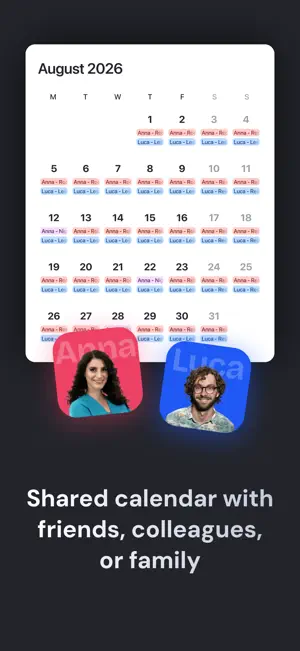
Snap a photo of your work schedule and find your shifts ready in your calendar instantly. Shift2Cal is the ultimate shift planner designed for people with variable hours who still receive their schedule on paper, as a PDF, or in a chat. If you currently manage your shifts using WhatsApp screenshots, photos of the breakroom board, or endless manual typing, this app will change your workflow. Just open the app, frame the schedule image, and let our technology take care of the rest. POWERED BY ARTIFICIAL INTELLIGENCE At its core, Shift2Cal uses advanced AI to read your schedule image. It automatically recognizes days, times, and shift names, turning them into clean, consistent calendar events. Simply verify the details, and in seconds, your work calendar is ready to use. SYNC WITH YOUR FAVORITE CALENDAR Your shifts are saved directly to your preferred calendar app. Shift2Cal integrates seamlessly with Apple Calendar, Google Calendar, Outlook, TimeTree, and other compatible services. Keep using the calendar you already know, now automatically updated with your work schedule across all your devices. IMPORT FROM EXCEL OR CSV Does your company send schedules in an Excel sheet or through a management system? Export the file to a CSV, upload it to the app, and instantly populate a full year of shifts. No more endless copy-pasting. TRACK YOUR WORK HOURS Beyond planning, Shift2Cal acts as your personal hours log. Track your workload over time: see total hours worked, count your night shifts, calculate Sunday shifts, and monitor accumulated overtime. It is the easiest way to ensure your paycheck matches your effort. TEAM PLANNING AND SHIFT SWAPS If you work in a team, you can see when your colleagues are on shift. This helps you know who you will be working with and makes organizing shift swaps incredibly simple. Perfect for hospital wards, busy stores, or complex departments. FULLY CUSTOMIZABLE PLANNER Manual Editing: Add or edit shifts manually at any time. Recurring Patterns: Set up repeating shift rotations to build your monthly plan. Color Coding: Assign unique colors to morning, afternoon, night, on-call, or overtime shifts for a quick visual overview. Smart Reminders: Customize alerts based on shift type so you are always prepared. WHO IS SHIFT2CAL FOR? This app is ideal for nurses, healthcare staff, hospitality workers, retail employees, factory staff, police, security, and anyone working rotating shifts, nights, or weekends. Turn shift chaos into a simple, reliable calendar that is always in your pocket. Once set up, the app does the heavy lifting, letting you focus on the rest of your day. EULA: https://www.apple.com/legal/internet-services/itunes/dev/stdeula/
What’s new
Version 2.1 · Updated October 27, 2026
What's new in Shift2Cal Hello, iPhone Duo! Shift2Cal now fully supports iPhone Duo, so your schedule looks great on any screen. Statistics that finally make sense • Your pay now appears right below compensation, so you can see what you've earned at a glance • Settings have been reorganized so you can find what you need faster • Unpaid shifts are now excluded by default, so your totals stay accurate • If a shift has no pay set, a friendly notice will let you know Smarter AI Our AI got some extra training: it now reads your shifts from photos and PDFs more accurately, even when that photo of the break-room schedule isn't exactly perfect. A calmer keyboard Typing is now smoother and more stable. No more surprise jumps. Always up to date Shifts and chats refresh automatically every time you reopen the app. A fresh look New icons and clearer error messages: if something goes wrong, you'll know why and what to do next. Bug hunting We tracked down and squashed a bunch of bugs to make everything run smoother. Enjoying Shift2Cal? A quick review on the App Store helps us more than you think
App privacy
The developer, LOUD S.r.l., reported these privacy practices to Apple.
Data Used to Track You
The following data may be used to track you across apps and websites owned by other companies:
- Identifiers: User ID
Data Linked to You
The following data, which may be collected and linked to your identity, may be used for the following purposes:
- User Content: Photos or Videos, Audio Data
Used for: Analytics, App Functionality
Data Not Linked to You
The following data, which may be collected but is not linked to your identity, may be used for the following purposes:
- Identifiers: Device ID
- Usage Data: Product Interaction, Other Usage Data
- Diagnostics: Crash Data, Performance Data, Other Diagnostic Data
Used for: Analytics, App Functionality, Other Purposes
Alternatives to Shift to Calendar: AI Planner
Looking for apps like Shift to Calendar: AI Planner? Here are 6 similar apps on the App Store. The highest rated is Shift Calendar: Work Planner (5.0/5), and all 6 are free to download.
-
 Turnista: Shift Calendar
2.5
-
 Shift Calendar: Work Schedules
-
 Shift Calendar: Work Planner
5.0
-
 ZenShift: Shift Calendar
4.3
-
 WorkShift: Work Shift Schedule
5.0
-
 SnapShift: Schedule Scanner
4.9
| App | Rating | Price | Last updated | Compare |
|---|---|---|---|---|
| Shift to Calendar: AI Planner | 5.0 / 5 (2 ratings) | Free | October 27, 2026 | |
| Turnista: Shift Calendar | 2.5 / 5 (2) | Free | Oct 31, 2026 | Compare |
| Shift Calendar: Work Schedules | – | Free | Oct 21, 2026 | Compare |
| Shift Calendar: Work Planner | 5.0 / 5 (5) | Free | Jun 3, 2026 | Compare |
| ZenShift: Shift Calendar | 4.3 / 5 (6) | Free | Oct 30, 2026 | Compare |
| WorkShift: Work Shift Schedule | 5.0 / 5 (1) | Free | Jul 25, 2026 | Compare |
| SnapShift: Schedule Scanner | 4.9 / 5 (17) | Free | Jul 26, 2026 | Compare |