

Gallery Optimizer
Giuseppe Caccavale Utilities iPhoneiPadiPod touch
Gallery Optimizer is a free Utilities app for iPhone and iPad by Giuseppe Caccavale. Requires iOS 18.0. Updated January 3, 2026.
- Price
- Free
- on the App Store
- Size
- 7 MB
- Age 4+
- Updated
- Jan 3
- 2026 · v1.6
Screenshots



About Gallery Optimizer
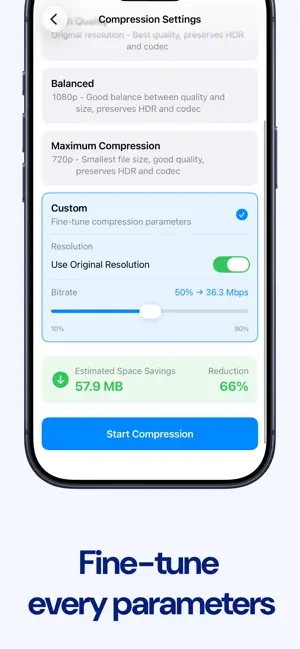
RECLAIM YOUR STORAGE SPACE Gallery Optimizer helps you free up valuable storage on your iPhone by intelligently compressing videos and optimizing photos—all while preserving quality and your precious memories. SMART VIDEO COMPRESSION • Multiple quality presets: High Quality (4K), Balanced (1080p), or Maximum Compression (720p) • Advanced custom controls for resolution, bitrate, and frame rate • Automatically preserves HDR (HDR10/HLG) and original codec (HEVC/H.264) • Maintains creation date, location, favorites, and all metadata • Real-time compression progress with time estimates • Typical space savings: 40-70% depending on settings INTELLIGENT PHOTO OPTIMIZATION • Convert photos to space-efficient HEIC format • Quality presets: High (90%), Balanced (70%), or Maximum Compression (50%) • Custom quality control from 10-100% • Preserves original resolution, HDR, and wide color gamut • Maintains GPS, camera settings, and lens information • Typical space savings: 20-60% depending on format and quality PRIVACY-FIRST DESIGN • All processing happens locally on your device • No cloud uploads or external servers • Your photos and videos never leave your iPhone • Full control over your media library • Completely offline after initial setup POWERFUL FEATURES • Choose specific media or process your entire library • See detailed statistics and track space saved over time • Filter and sort by size, date, duration, or resolution • Batch processing with pause/resume capability • Automatic detection of already-optimized media • Screen lock prevention during processing • Clean, modern interface following Apple design guidelines HOW IT WORKS 1. Grant photo library access 2. Choose between videos or photos 3. Select specific items or scan your entire library 4. Pick a quality preset or customize settings 5. Let Gallery Optimizer do the work 6. Optionally delete originals to reclaim space PERFECT FOR • Anyone running low on iPhone storage • Users with large video and photo libraries • Content creators managing 4K videos • Travelers wanting to free up space for new memories • Anyone wanting to optimize their photo library without quality loss TECHNICAL EXCELLENCE • Built with native Apple frameworks for optimal performance • Supports all modern iPhone formats and codecs • Concurrent processing for faster optimization • Intelligent metadata preservation • No subscriptions or hidden fees NOTES • iOS 18.0 or later required • App must remain open during processing • Original media can be optionally deleted after optimization • Compression is permanent—keep backups of irreplaceable content Download Gallery Optimizer today and take back control of your storage!
What’s new
Version 1.6 · Updated January 3, 2026
- Compressed photos and videos are now organized into albums within the Photos app. - Improved statistics graph. - Fixed a bug in the "Find Duplicates" tool.
App privacy
The developer, Giuseppe Caccavale, reported these privacy practices to Apple.
Data Not Collected
The developer does not collect any data from this app.
Alternatives to Gallery Optimizer
Looking for apps like Gallery Optimizer? Here are 6 similar apps on the App Store.
-
 TidyShot
-
 BaerClear: Photo Cleaner
-
 AI Cleaner: Clean Up Storageㅤ
-
 PhotoTri: Duplicate Cleaner
-
 Zone: Relax and Sleep Sounds
-
 Momento: Clean Up Storage
| App | Rating | Price | Last updated | Compare |
|---|---|---|---|---|
| Gallery Optimizer | – | Free | January 3, 2026 | |
| TidyShot | – | Free | Jan 2, 2026 | Compare |
| BaerClear: Photo Cleaner | – | Free | Oct 22, 2026 | Compare |
| AI Cleaner: Clean Up Storageㅤ | – | Free | Oct 1, 2026 | Compare |
| PhotoTri: Duplicate Cleaner | – | Free | Oct 22, 2026 | Compare |
| Zone: Relax and Sleep Sounds | – | Free | Jun 30, 2026 | Compare |
| Momento: Clean Up Storage | – | Free | Sep 30, 2026 | Compare |
Compare Gallery Optimizer with the top alternatives: ratings, updates, ASO score and keyword gaps →