

Locker Browser: Private Web
Chi Leung Chow Utilities iPhoneiPadiPod touch
Locker Browser: Private Web is a free Utilities app for iPhone and iPad by Chi Leung Chow. Requires iOS 18.6. Updated April 17, 2026.
- Price
- Free
- on the App Store
- Size
- 22 MB
- Age 17+
- Updated
- Apr 17
- 2026 · v1.2
Screenshots


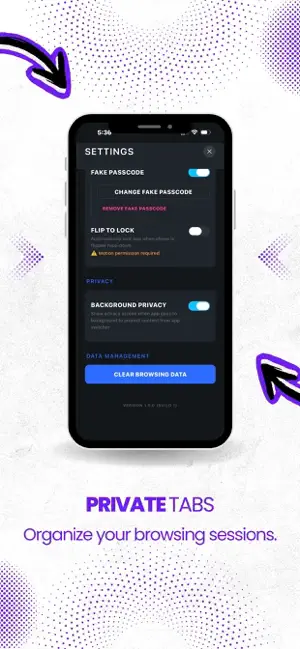
About Locker Browser: Private Web
Experience true privacy with Locker Browser, the secure web browser designed to keep your personal data safe and your browsing habits private. Locker Browser combines a powerful web engine with military-grade security features to ensure your browsing history, bookmarks, and tabs remain completely inaccessible to prying eyes. **ADVANCED SECURITY** • **Passcode Lock**: Secure the entire app with a custom PIN code. • **Flip to Lock**: Instantly lock the browser by simply flipping your phone face-down. • **Background Privacy**: Automatically blurs your screen in the app switcher so no one can see your last viewed page. **PRIVACY FEATURES** • **Fake Passcode Mode**: Set a secondary "decoy" passcode. If forced to unlock your phone, enter this code to open a clean, empty browser session instead of your private one. • **Incognito Always**: Browse without leaving a trace. No cookies, history, or cache are stored by default. • **Secure Storage**: All bookmarks and history are encrypted locally on your device. **FULL-FEATURED BROWSER** • Multi-tab management • Fast and responsive web engine • Dark mode support • Bookmark management
What’s new
Version 1.2 · Updated April 17, 2026
We briefly let everyone into the VIP lounge for free. That was a mistake. Lifetime Premium is back — unlock Fake Passcode, Flip to Lock, and Background Privacy with a one-time purchase. Worth every penny for your secrets. Also: tap Skip on the intro screen if you're in a hurry. We won't take it personally.
App privacy
The developer, Chi Leung Chow, reported these privacy practices to Apple.
Data Not Collected
The developer does not collect any data from this app.