

Cutout - AI Background Remover
Loi Doan Utilities iPhoneiPadiPod touch
Cutout - AI Background Remover is a free Utilities app for iPhone and iPad by Loi Doan. Requires iOS 13.0. Updated January 7, 2026.
- Price
- Free
- on the App Store
- Size
- 76 MB
- Age 12+
- Updated
- Jan 7
- 2026 · v1.0.3
Screenshots


About Cutout - AI Background Remover
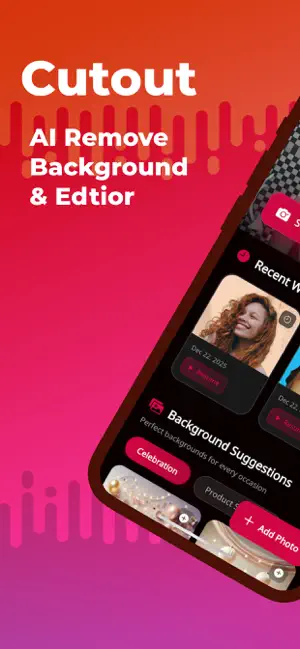
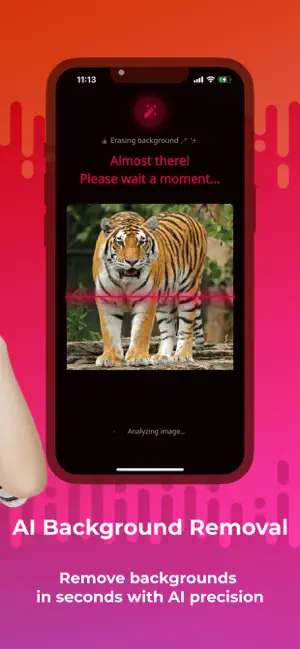
Remove backgrounds fast. Create clean photos with AI. Cutout Studio is an AI-powered background remover designed to help you cut out photos, remove backgrounds, and create clean images in seconds. Whether you’re editing a portrait, a product photo, or content for social media, Cutout Studio makes background editing simple, fast, and accessible for everyone. ** KEY FEATURES 1. AI Background Removal Remove backgrounds automatically with AI. Cutout Studio detects the main subject and separates it cleanly—no manual selection required. • One-tap background removal • Clean edges and natural results • Works with people, products, pets, and objects 2. AI Background Creation Create new backgrounds instantly using AI. Choose from creative styles, colors, or scenes that fit naturally with your photo. • AI-generated background options • Quick preview before applying • Designed to match your subject 3. HD Photo Enhancement Improve image clarity and resolution with AI upscaling. • Enhance low-resolution photos • Sharper details and better quality • Ideal for sharing or professional use 4. PREMIUM EXPERIENCE • High-resolution exports • Clean results without overlays • Fast AI processing • Earn free credits daily • Optional upgrades for advanced features ** WHY CUTOUT STUDIO Cutout Studio focuses on speed and simplicity. No design skills are needed—just upload a photo and let AI do the work. It’s a practical tool for anyone who needs clean, professional-looking images without complex editing. ** PERFECT FOR • Social media posts and profile photos • Online shops and product listings • Presentations and marketing visuals • Creative projects and designs ** HOW IT WORKS 1. Choose a photo from your gallery 2. Remove the background automatically 3. Add a new AI background or keep it transparent 4. Enhance quality if needed 5. Save and share your image ** PRIVACY & SECURITY Images are processed securely and are not stored after editing. No biometric or face data is collected. Privacy Policy: https://ai-photo-3be9e.web.app/privacy.html Terms of Service: https://ai-photo-3be9e.web.app/terms.html Support: [email protected]
What’s new
Version 1.0.3 · Updated January 7, 2026
• Improved background removal accuracy • Enhanced AI processing performance • Minor UI refinements for better usability • Bug fixes and stability improvements
App privacy
The developer, Loi Doan, reported these privacy practices to Apple.
Data Used to Track You
The following data may be used to track you across apps and websites owned by other companies:
- Identifiers: Device ID
- Diagnostics: Crash Data
Data Linked to You
The following data, which may be collected and linked to your identity, may be used for the following purposes:
- Identifiers: Device ID
Used for: Third-Party Advertising
Data Not Linked to You
The following data, which may be collected but is not linked to your identity, may be used for the following purposes:
- Diagnostics: Crash Data, Performance Data
- User Content: Photos or Videos
Used for: Analytics, App Functionality
Alternatives to Cutout - AI Background Remover
Looking for apps like Cutout - AI Background Remover? Here are 6 similar apps on the App Store. The highest rated is Quick Cut - photo cut out (5.0/5), and all 6 are free to download.
-
 Remove Background with AI
-
 VYBEX: Build Apps
-
 StickerCut Editor
-
 Quick Cut - photo cut out
5.0
-
 Stickat - Sticker Maker
-
 Shaders Texture for MCPE
| App | Rating | Price | Last updated | Compare |
|---|---|---|---|---|
| Cutout - AI Background Remover | – | Free | January 7, 2026 | |
| Remove Background with AI | – | Free | Jan 6, 2026 | Compare |
| VYBEX: Build Apps | – | Free | Jul 14, 2026 | Compare |
| StickerCut Editor | – | Free | Jan 2, 2026 | Compare |
| Quick Cut - photo cut out | 5.0 / 5 (2) | Free | Jan 28, 2026 | Compare |
| Stickat - Sticker Maker | – | Free | Mar 21, 2025 | Compare |
| Shaders Texture for MCPE | – | Free | Jul 1, 2026 | Compare |